7
English
EN
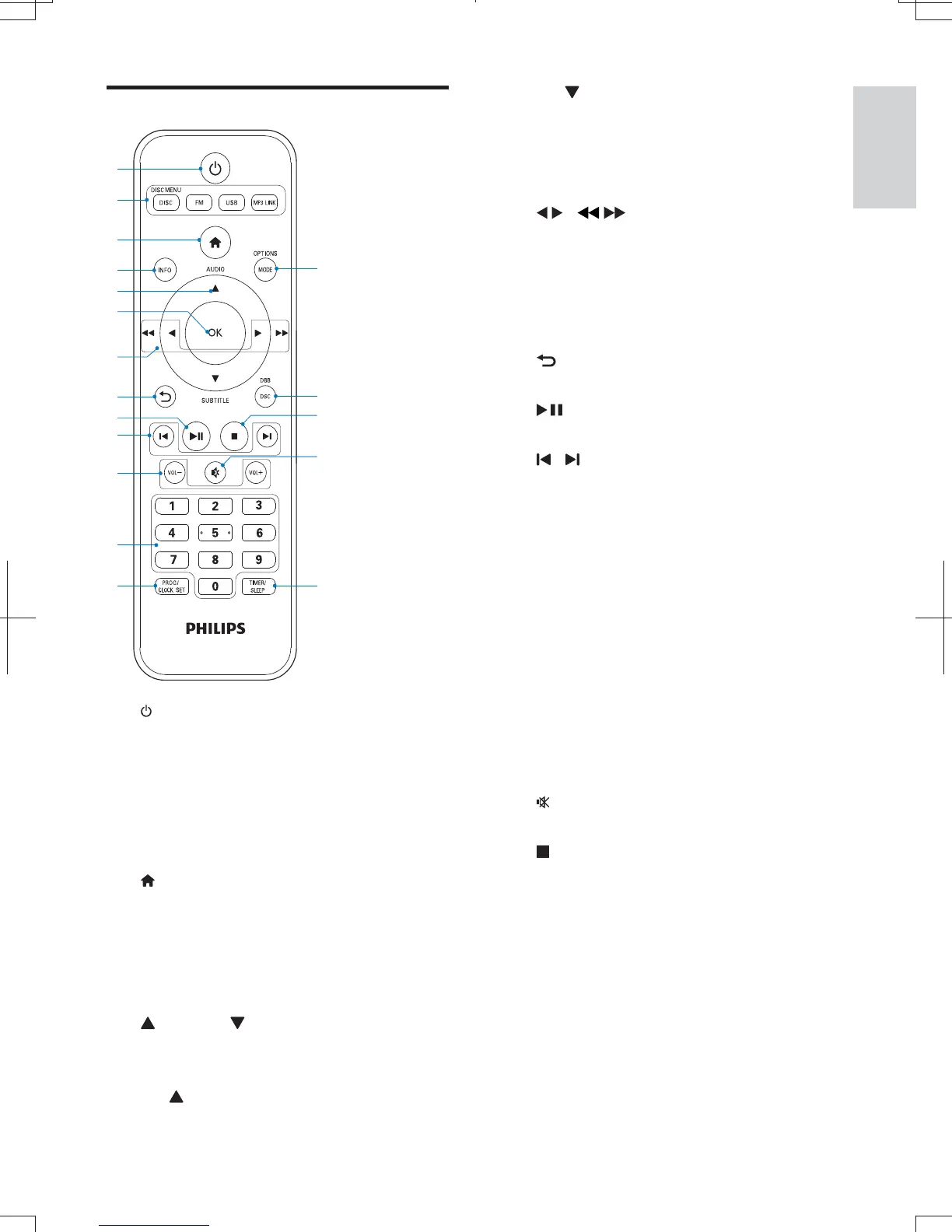
Overview of remote control
a
Switch the micro system on/off.
standby.
b DISC/DISC MENU/FM/USB/MP3 LINK
Select the source.
Access the main menu of the system.
c
Access the home menu.
d INFO
Show the disk information such as title,
chapter, subtitle, time elapsed, total
time etc.
e
AUDIO / SUBTITLE
For menus: navigate up/down.
Invert a picture.
AUDIO: Toggle between stereo and
mono.
a
b
d
e
f
g
h
j
i
k
m
l
c
r
q
n
p
o
SUBTITLE
: Select a subtitle language
for a video.
Select a programmed radio station.
f OK
g
/
Search in a track or disc.
Fast backward or forward.
For menus, navigate left/right.
Rotate a picture.
Select a preset radio station.
h
Return to a previous display menu.
i
Start, pause or resume play.
j
/
Skip to the previous/next track, title,
Select a programmed radio station.
k VOL +/-
Adjust the volume.
l Numeric buttons
Select a title/chapter/track to play.
m PROG/CLOCK SET
Program radio stations.
Set clock.
n TIMER/SLEEP
Set sleep timer.
Set alarm timer.
o
Mute.
p
Stop play.
Activate/deactivate the demonstration
mode.
q DSC/DBB
Select a preset sound setting.
Turn on or off dynamic bass enhancement.
r MODE/OPTIONS
Select repeat play or random play.
Accesses options relating to the
current activity or selection.
MCD1060_93_UM_V1.0.indb 7 2012-3-22 16:54:47



 To Next Page