8 EN
3 Before use
Place the unit
Note
Risk of overheating! Never install this apparatus in a
other objects never cover the ventilation slots on this
apparatus.
Never place this unit in an enclosed cabinet, nor on any
Do not insert any object other than indicated into
ventilation openings nor other openings.
Install this unit near the AC outlet where the AC power
plug can be easily reached.
To avoid magnetic interference or unwanted noise,
never place the main unit and speakers too close to
any radiation devices.
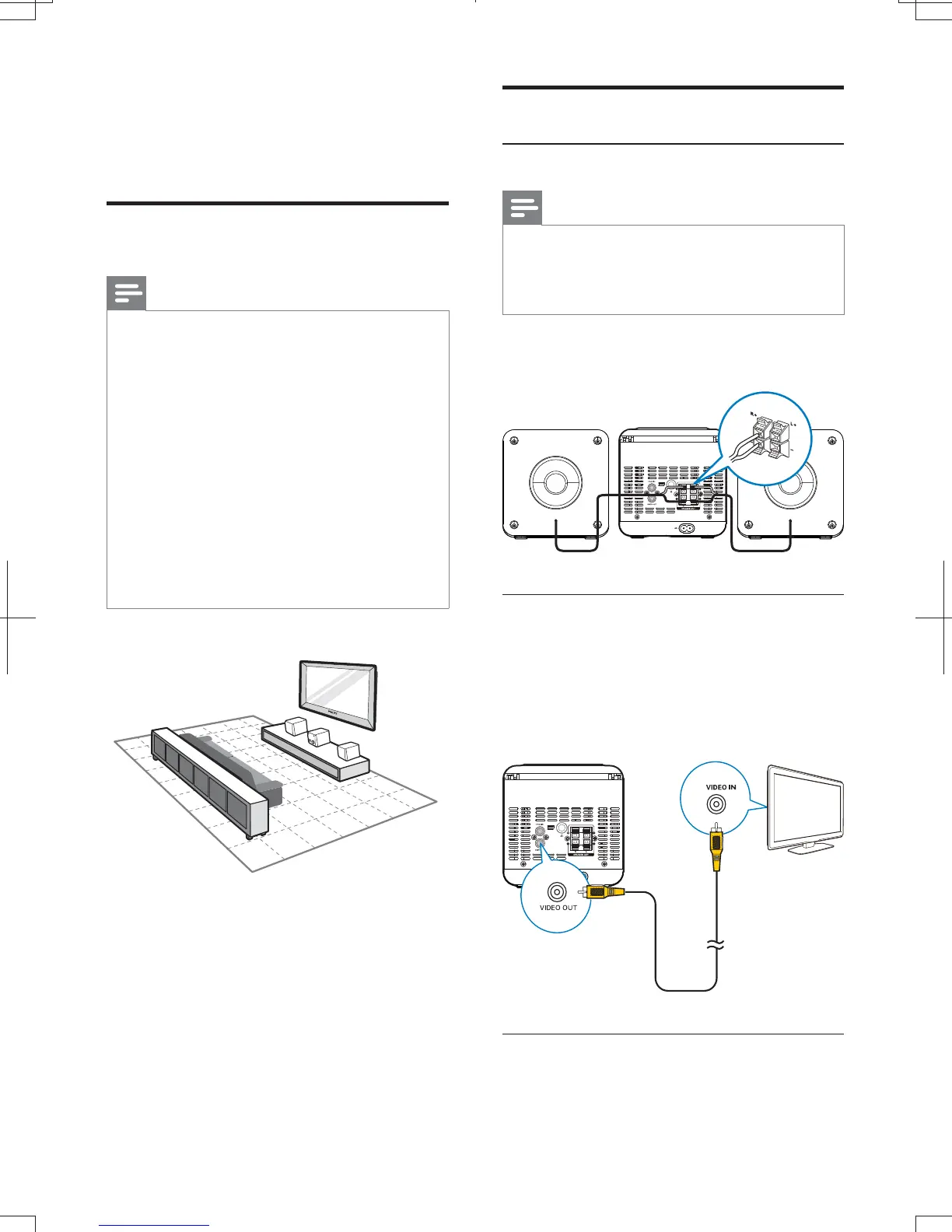
1 Place the unit near to the TV.
2 Place the speakers at a suitable
distance from the TV and at an angle
of approximately 45 degrees from the
listening position.
Connect
Connect speakers
Note
For optimal sound, use the supplied speakers only.
Connect only speakers with impedance that is the
same or higher than the supplied speakers. Refer to the
Insert the speaker wires completely into the
speaker input sockets on the back of the unit.
Connect TV
Connect through composite video
Connect the supplied composite video cable to:
the VIDEO OUT socket on this unit.
the video input socket on the TV.
Connect audio from TV or other devices
Connect audio through a digital coaxial
cable
MCD1060_93_UM_V1.0.indb 8 2012-3-22 16:54:49



 To Next Page