11
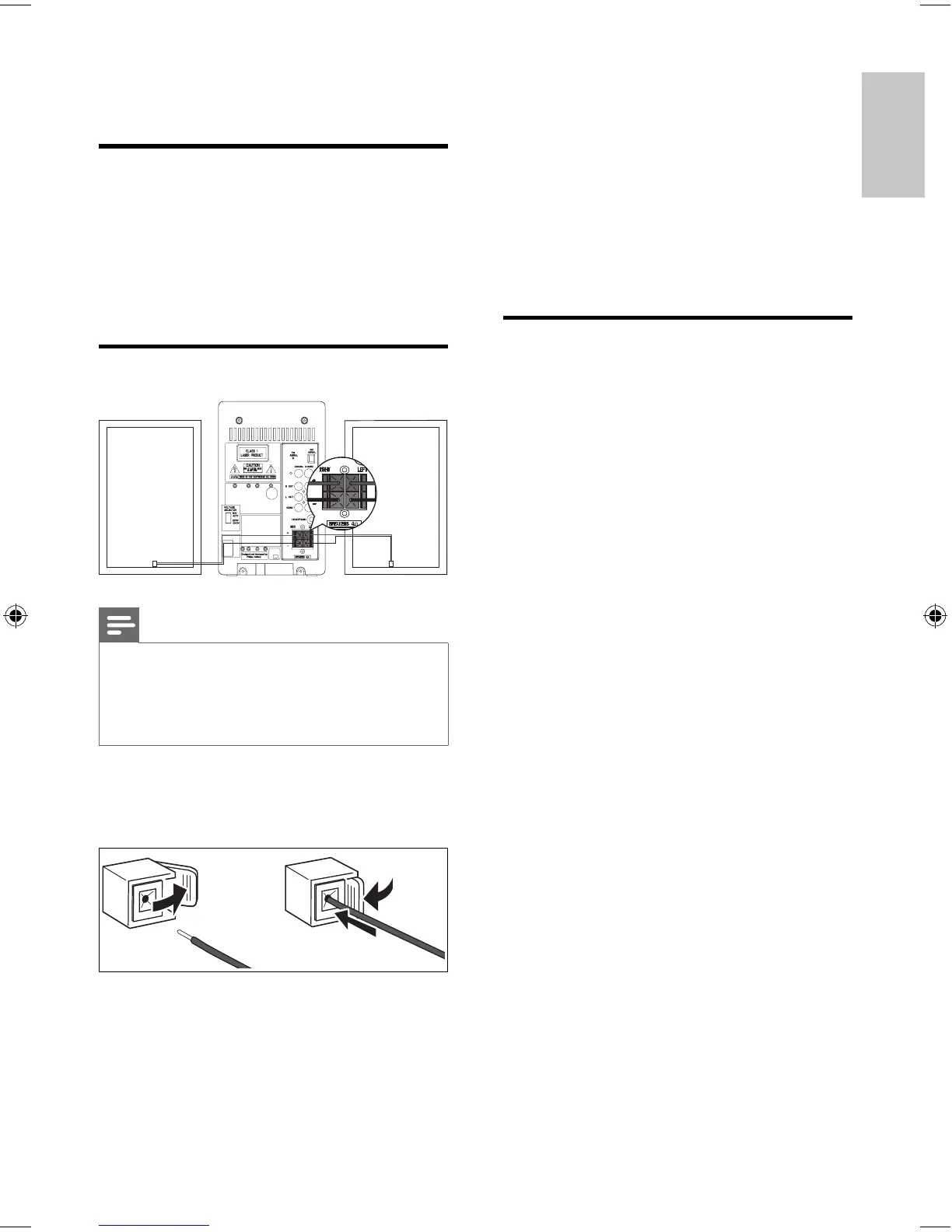
1 For the right speaker, fi nd the sockets on
the main unit marked ‘RIGHT’.
2 Insert the red wire to the red (+) socket.
3 Insert the black wire into the black (-)
socket.
4 For the left speaker, fi nd the sockets on
the main unit marked ‘LEFT’.
5 Repeat steps 2-3.
Connect audio cables
To hear audio from other audio devices as well
as the DVD Micro Theater speakers, select a
preferred audio connection:
Option 1: connect a coaxial cable•
Option 2: connect analog audio •
cables
Option 3: connect a headphone•
3 Connect
Preparations
1 Place a soft cloth on a hard, fl at, stable
surface.
2 Place the unit onto the cloth.
3 Remove the socket cover.
Connect speakers
Note
Insert the stripped portion of each speaker wire into •
the socket completely.
Connect only speakers with impedance that is the •
same or higher than the supplied speakers. Refer to
the Specifi cations section of this manual.
To insert each speaker wire: Hold down
the socket fl ap. Insert the speaker wire fully.
Release the socket fl ap.
English
EN
MCD170_98_Eng.indd Sec1:11MCD170_98_Eng.indd Sec1:11 12/18/2008 2:27:36 PM12/18/2008 2:27:36 PM



 To Next Page