12
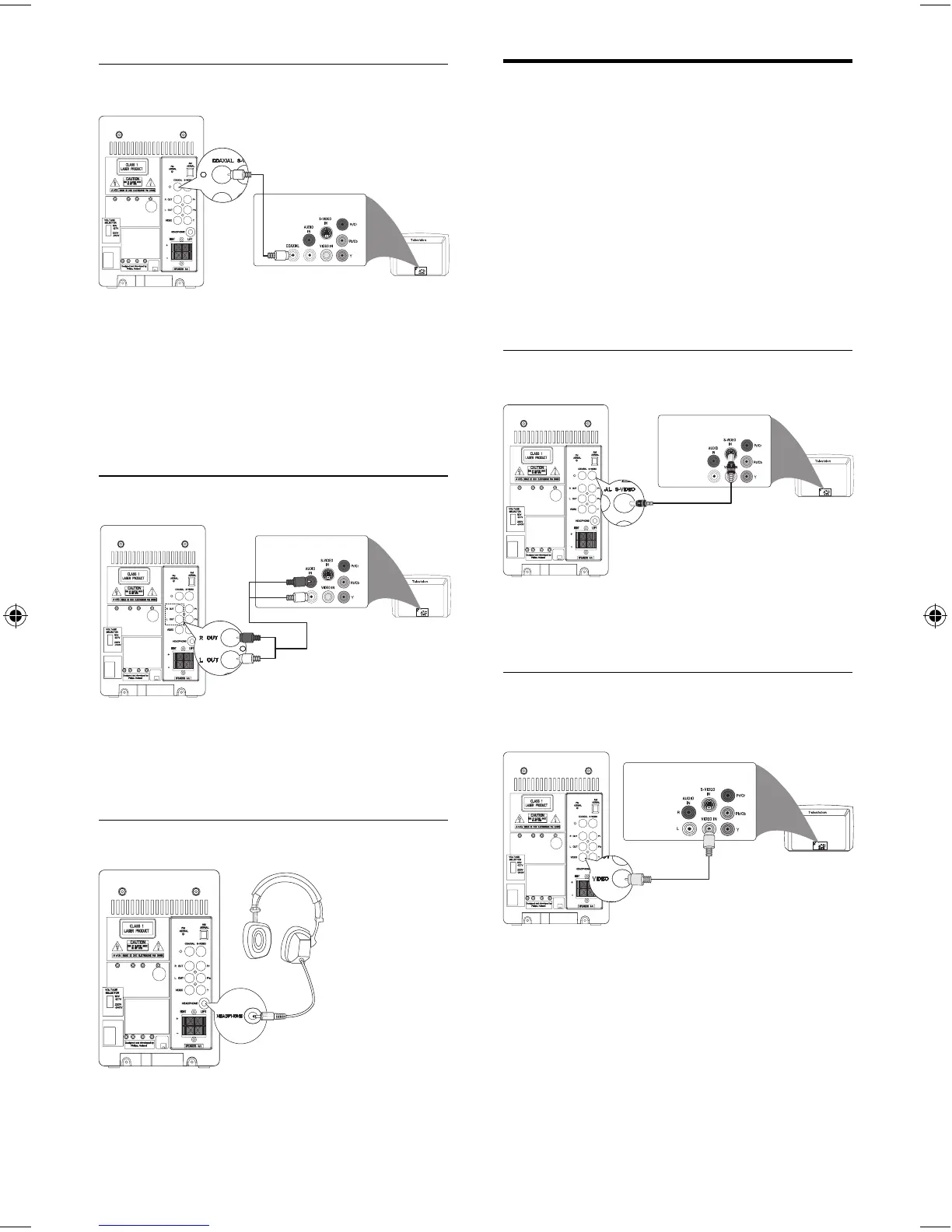
Connect video cables
You can select the best video connection that
your TV supports.
Option 1: connect to the S-Video socket •
(for a standard TV).
Option 2: connect to the composite •
video (CVBS) socket (for a standard TV).
Option 3: connect to the component •
video sockets (for a standard TV or
Progressive Scan TV).
Option 1: connect S-Video cable
1 Connect an S-video cable (not supplied)
to the S-Video input socket on the TV.
Option 2: connect composite video
cable
1 Connect a composite vide cable (yellow)
to the composite video input socket on
the TV.
Option 1: connect coaxial cable
You can enjoy multi-channel surround sound
from this unit when it is connected to a digital
audio device.
1 Connect a coaxial cable (not supplied)
to the digital input socket on the audio
device.
Option 2: connect analog audio cables
1 Connect an audio cable (red/white ends)
to the audio input sockets on an audio
device.
Option 3: connect headphone
1 Connect the headphone to
HEADPHONE socket.
EN
MCD170_98_Eng.indd Sec1:12MCD170_98_Eng.indd Sec1:12 12/18/2008 2:27:37 PM12/18/2008 2:27:37 PM



 To Next Page