English
13
Functional Overview
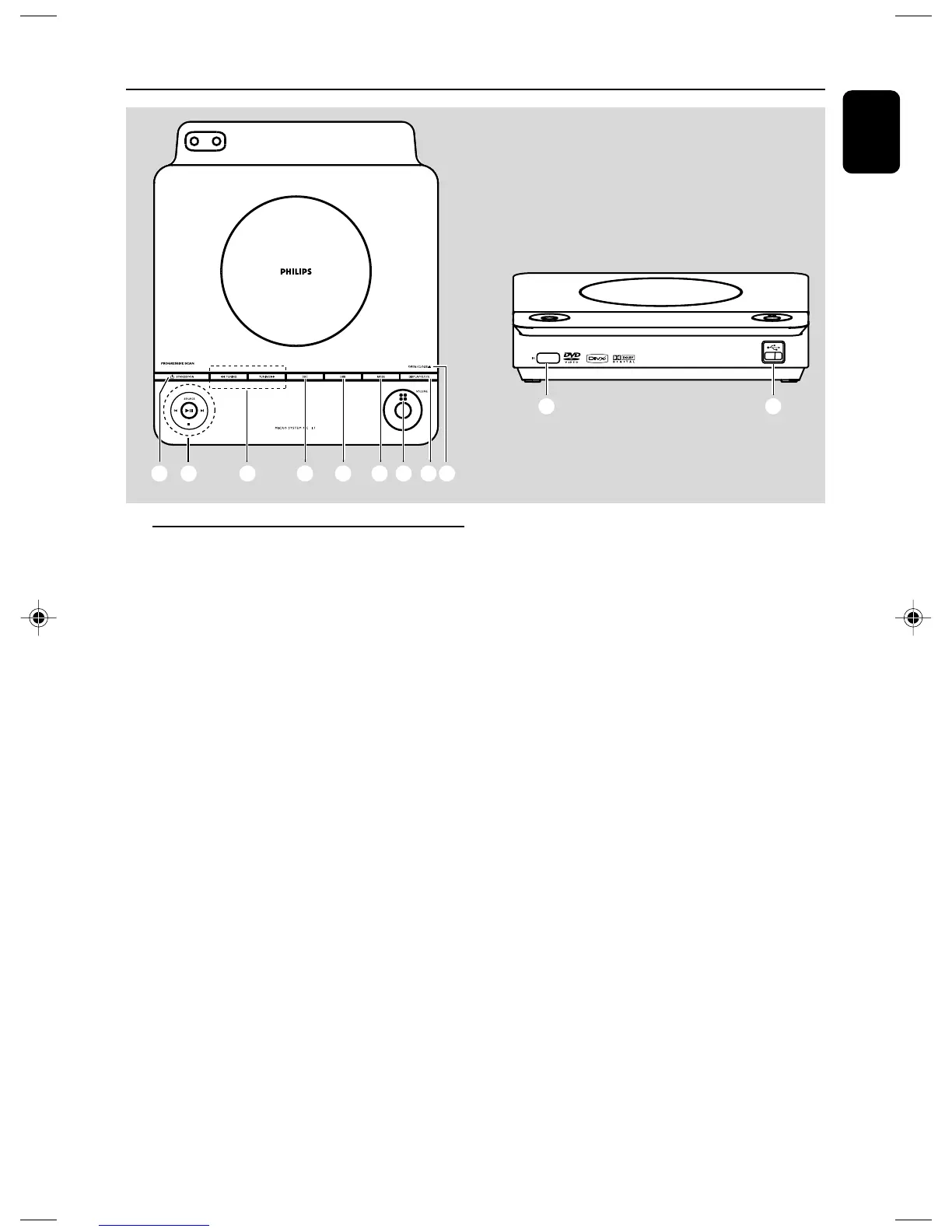
Controls on the system
1 STANDBY ON (2)
– switches the system on or to Eco-power standby
/standby mode.
2 SOURCE
–selects the respective sound source: DISC/USB/
FM/AUX.
– switches on the system.
2; ........................... starts or interrupts disc playback.
9 ............................. stops disc playback or erases a
programme.
í/
ë
Disc ....................... press to skip to the previous/
next chapter/title/track.
Tuner .................... selects a preset radio station
clock/timer ........ adjusts the minutes for the clock/
timer function.
3 TUNING à / á
Tuner .................... tunes to a radio station
Disc ....................... fast searches backward/forward
in a disc at different speeds.
clock/timer ........ adjusts the hours for the clock/
timer function.
4 DSC (Digital Sound Control)
– selects different types of preset sound equalizer
settings.
5 DBB (Dynamic Bass Boost)
– enables or disables bass enhancement.
6 MODE
– selects various repeat modes or the shuffle play
mode for a disc (For VCD with PBC feature,
PBC must be turned off).
7 VOLUME
– adjusts the volume upward/downward.
8 DISPLAY/CLOCK
Disc ....................... displays the current status and/or
disc information.
clock...................... sets and views the clock.
9 OPEN/CLOSE0
– opens/closes the disc door.
0 USB port
– connects to external USB mass storage device.
! iR SENSOR
– point the remote control towards this sensor.
21 3 456
0
!
789
7
D
pg001-019_MCD177_98_Eng 3/3/08, 10:5813














 To Next Page