English
9
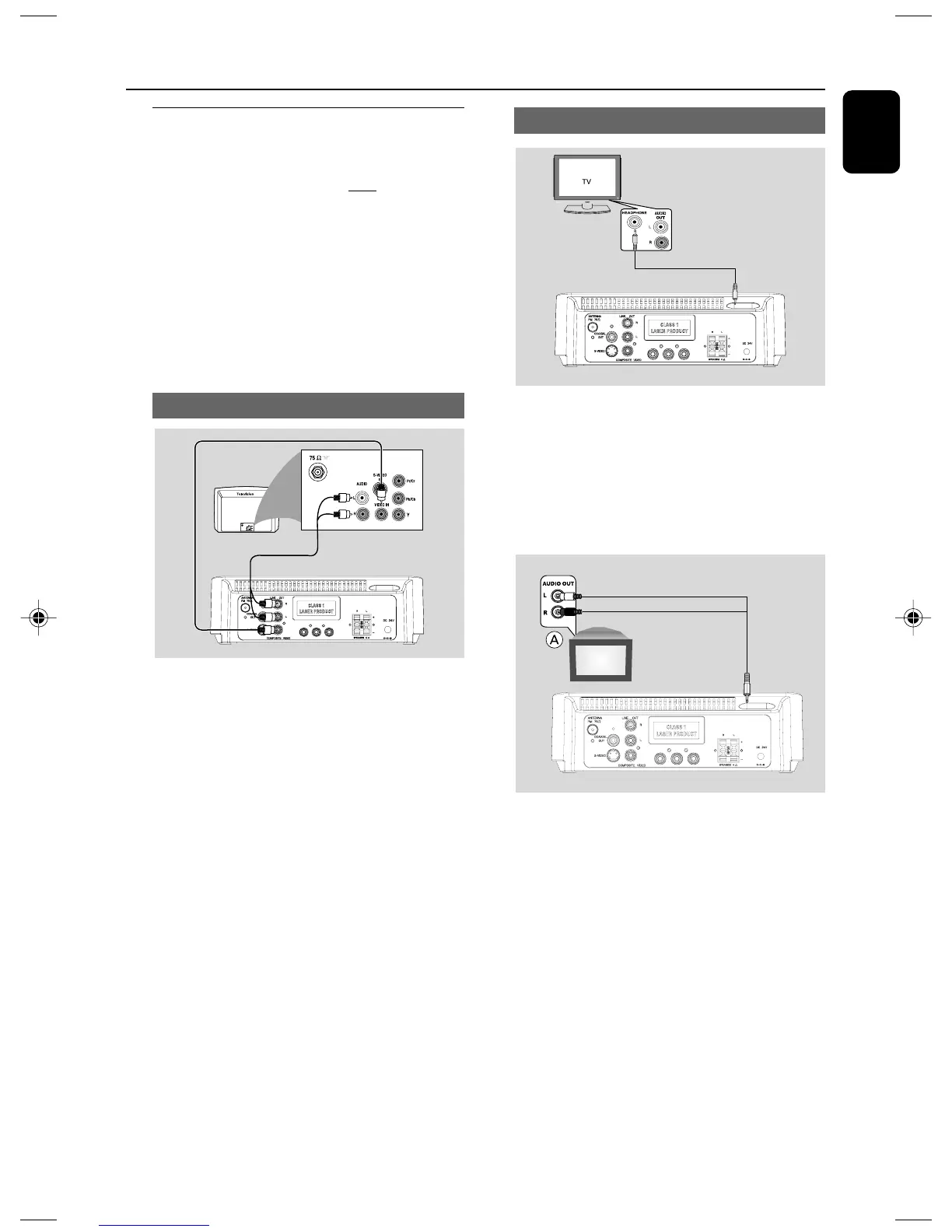
Using Headphone jack
● To listen to TV through this system, use a cinch
cable (not supplied) to connect AUX IN jack
(3.5mm) to the HEADPHONE jack on the TV
set (with a 3.5mm-diameter stereo jack).
Or, you may use a cinch calbe (not supplied) to
connect AUX IN jack (3.5mm) to audio out
jacks on the TV set.
Before starting operation, press AUX on the
remote control to select “AUX ” in order to
activate the input source.
Step 3: Connecting TV set
IMPORTANT!
–You only need to make one video
connection from the following options,
according to the capabilities of your TV
system.
– S-Video or Component Video
connection provides higher picture
quality. These options must be available
on your TV set.
– Connect the system directly to the TV
set.
Using Video In jack (CVBS)
IN
Y PB PR
● Use the supplied composite video cable (yellow)
to connect the system’s COMPOSITE
VIDEO jack to the video input jack (or labeled
as A/V In, Video In, Composite or Baseband) on
the TV set.
● To hear the sound of this DVD Player through
your TV, use the audio cables (white/red,
supplied) to connect LINE OUT (L/R) jacks of
the DVD Player to the corresponding AUDIO
IN jacks on the TV.
Connections
pg001-019_MCD177_98_Eng 3/3/08, 10:589














 To Next Page