9EN
4 Get started
Caution
•
Use of controls or adjustments or performance of
procedures other than herein may result in hazardous
radiation exposure or other unsafe operation.
Always follow the instructions in this chapter in
sequence.
If you contact Philips, you will be asked for the
model and serial number of this apparatus. The
model number and serial number are on the
back of the apparatus. Write the numbers here:
Model No. __________________________
Serial No. ___________________________
Prepare the remote control
Caution
•
Risk of explosion! Keep batteries away from heat,
sunshineorre.Neverdiscardbatteriesinre.
• Risk of decreased battery life! Never mix different
brands or types of batteries.
• Risk of product damage! When the remote control is
not used for long periods, remove the batteries.
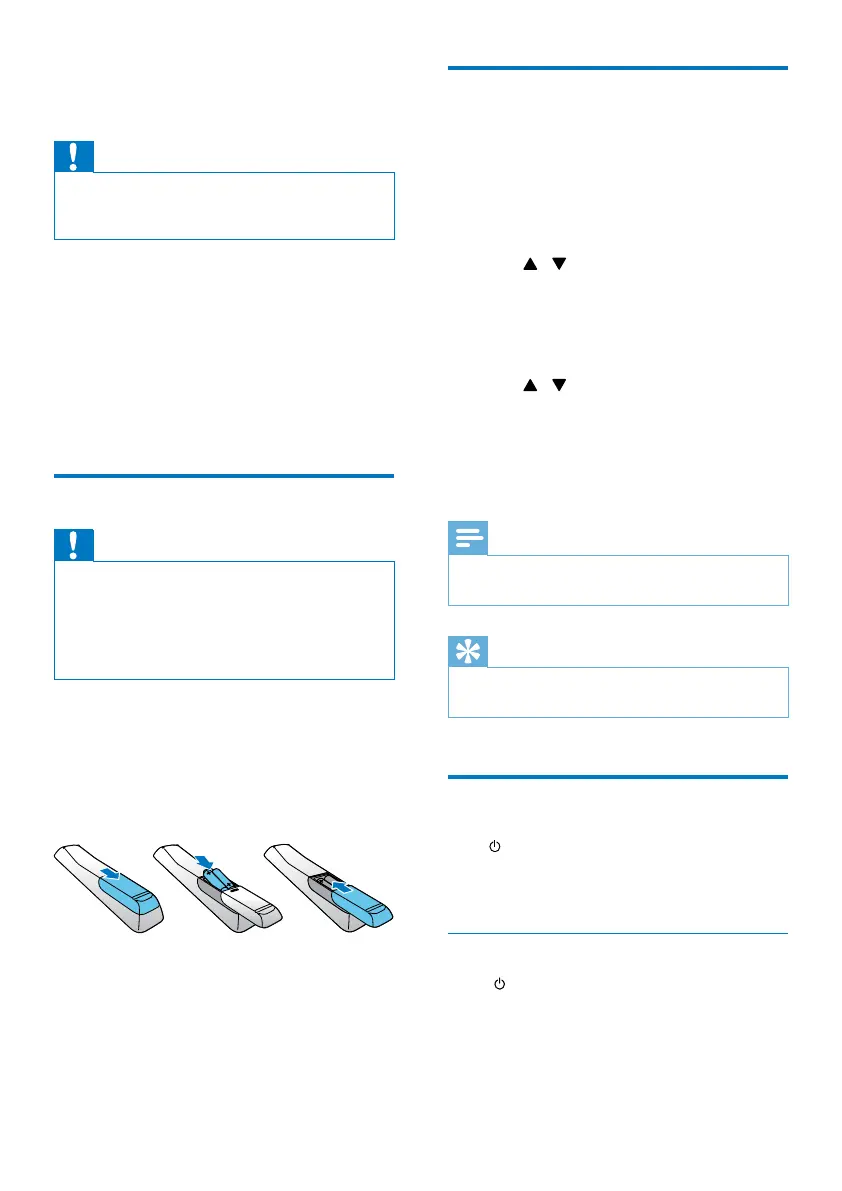
To insert the remote control battery:
1 Open the battery compartment.
2 Insert two AAA batteries (supplied) with
correct polarity (+/-) as indicated.
3 Close the battery compartment.
a
b
c
Set clock
1
In standby mode, press and hold CLOCK
SET on the remote control for more than
two seconds.
» [24H] or [12H] hour format is
displayed.
2 Press / (or +/-) to select [24H]
or [12H] hour format, and then press
CLOCK SET.
» The hour digits are displayed and begin
to blink.
3 Press / (or +/-) to set hour, and then
press CLOCK SET.
» The minute digits are displayed and
begin to blink.
4 Repeat step 3 to set minute.
Note
•
If no button is pressed in 90 seconds, the system exits
clock setting mode automatically.
Tip
•
You can view clock information in Eco power mode by
pressing CLOCK SET.
Turn on
Press .
» The unit switches to the last selected
source.
Switch to standby mode
Press again to switch the unit to standby
mode.
» The clock (if set) is displayed on the
panel.


 To Next Page