15
English
1 Use the S-Video cable (not supplied) to connect
the system's S-VIDEO jack to the S-Video
input jack (or labelled as Y/C or S-VHS) on the
TV set.
2 To hear the sound of this DVD Player through
your TV, use the audio cables (white/red-not
supplied) to connect LINE OUT (L/R) jacks of
the DVD Player to the corresponding AUDIO
IN jacks on the TV.
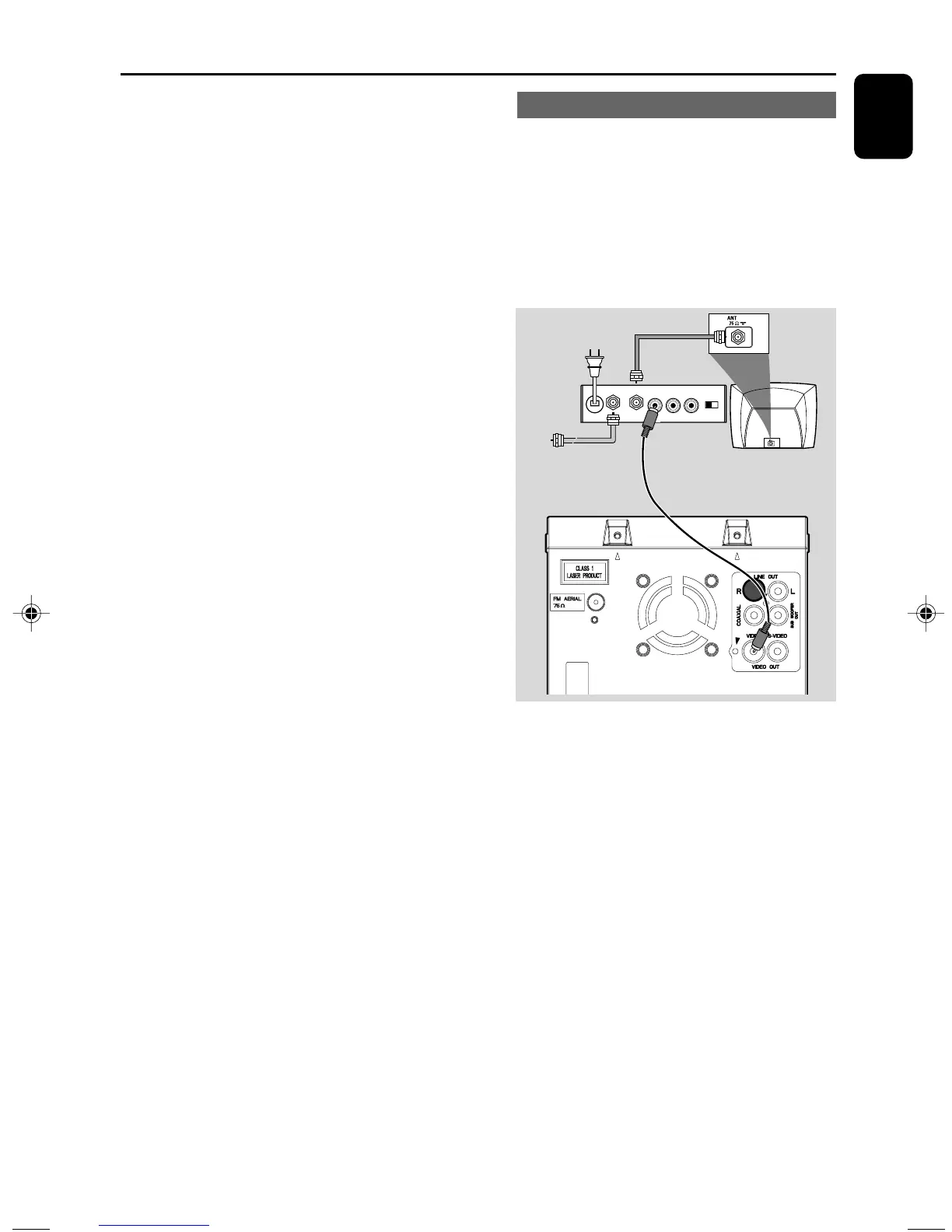
Using an accessory RF modulator
IMPORTANT!
– If your TV set only has a single
Antenna In jack (or labelled as 75 ohm or
RF In), you will need a RF modulator in
order to view the DVD playback via TV.
See your electronics retailer or contact
Philips for details on RF modulator
availability and operations.
1 Use the composite cable (yellow) to connect the
system's VIDEO jack to the video input jack on
the RF modulator.
2 Use an RF coaxial cable (not supplied) to
connect the RF modulator to your TV's RF jack.
Connections
AUDIO IN
R L
VIDEO
IN
TO TVANT IN
CH3 CH4
RF coaxial cable to TV
Back of RF Modulator
(example only)
Antenna or
Cable TV signal
pg001-pg041_MCD395-Eng 2010.4.2, 12:4615


 To Next Page