English
15
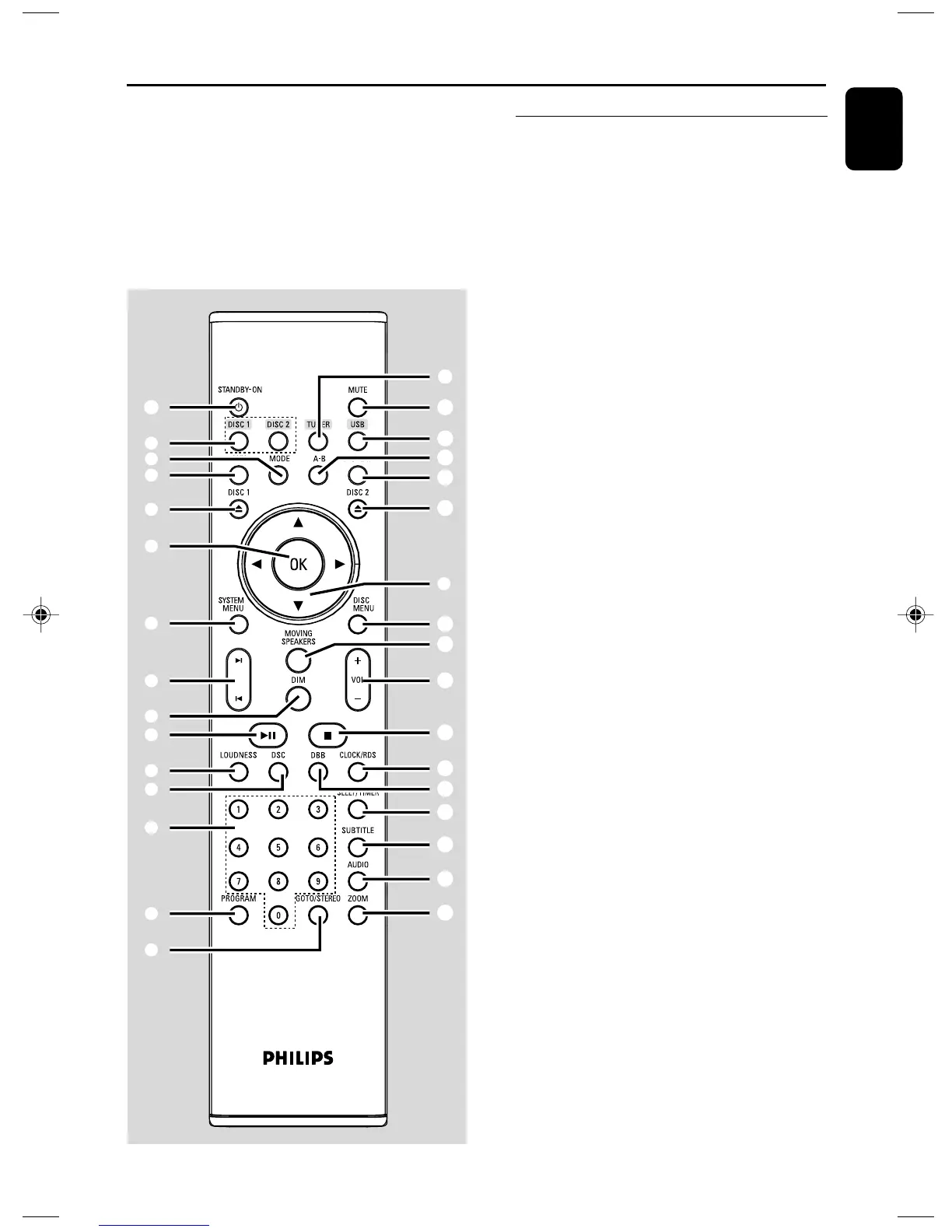
Remote control
1 B
– switches the system on or to standby mode.
2 DISC 1 / DISC 2
– selects and plays disc 1 or disc 2.
3 TUNER
– selects the tuner source.
4 USB
– selects to play from a USB massage storage
device.
5 AUX
– selects the AUX source.
6 MODE
– selects various repeat modes or the shuffle play
mode for a disc.
7 A-B
– repeats playback of a specific section on a disc.
8 DISPLAY
– displays information on TV screen during
playback
9 DISC 1ç / DISC 2ç
– opens or closes the disc compartment
0 4 / 3 / 2 / 1
– selects an item in a menu.
–moves an enlarged picture up/down/left/right.
–(2 / 1; Disc) searches backward/forward in a
disc at different speeds.
! OK
– confirms a selection
@ SYSTEM MENU (disc mode only)
– enters or exits the system menu.
# DISC MENU (disc mode only)
–DVD/VCD: enters or exits the disc contents
menu.
– VCD2.0: switches the playback control mode on
or off .
– MP3/WMA: switches between Album and Filelist.
$ ¡ / ™
– Disc: skips to the previous/next chapter/title/
track
–Tuner: selects a preset radio station.
Functional Overview
1
⁄
2
5
6
9
!
@
$
)
≤
º
ª
¡
*
^
4
8
7
9
#
%
&
£
∞
§
≥
•
™
(
3
0
% n
–connects headphones
^ LINE IN
– connects an external non-USB device.
pg 001-021_MCD988_Eng-98 2007.6.26, 15:2615



 To Next Page