1
2
3
4
5
Tip
Detailed playback features and
additional functions are described in
the accompanied owner's manual.
Step B
Enjoy
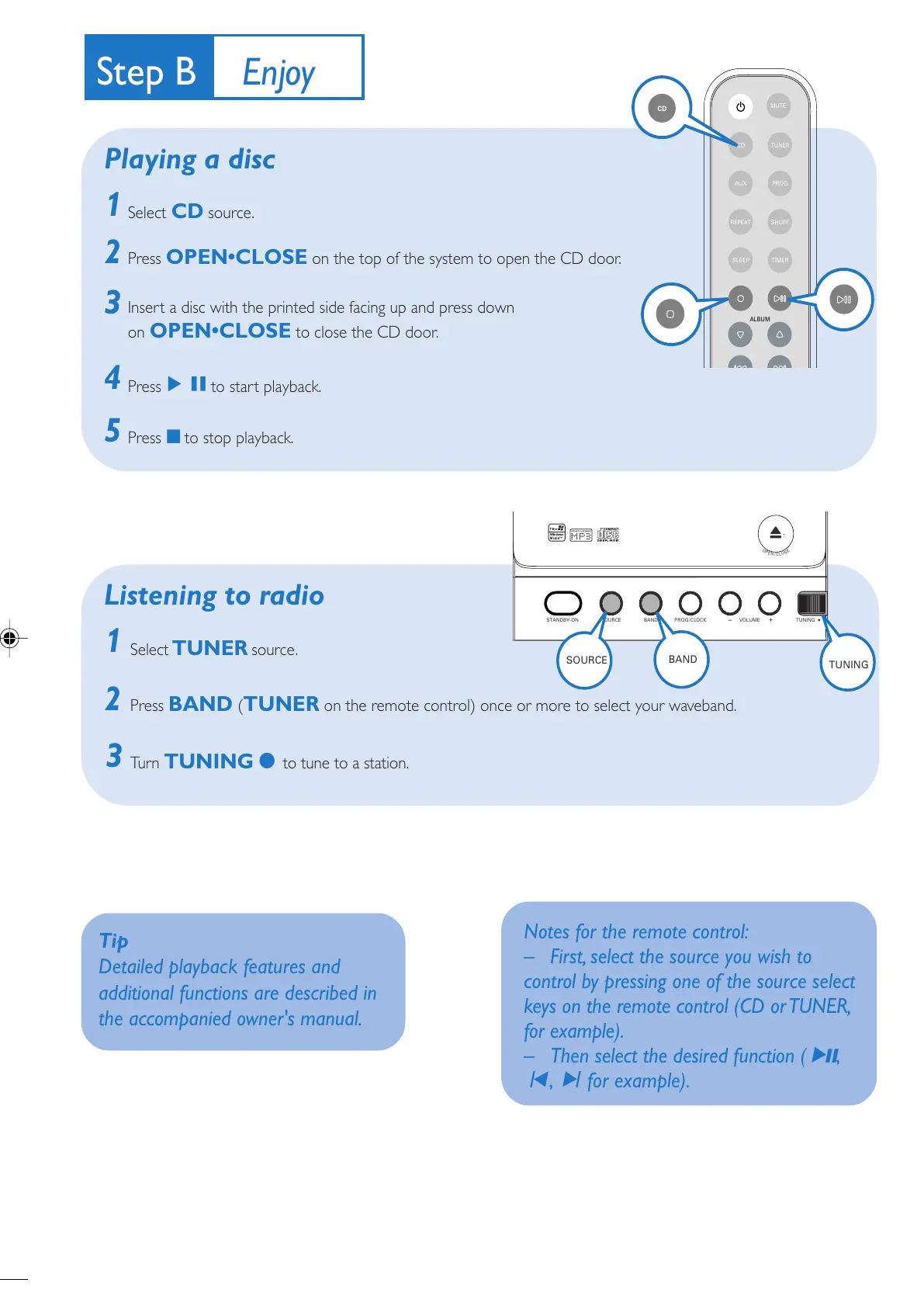
Playing a disc
1
2
Select TUNER source.
Press BAND (TUNER on the remote control) once or more to select your waveband.
Tu r n TUNING 0 to tune to a station.
Listening to radio
3
Select CD source.
Press OPEN•CLOSE on the top of the system to open the CD door.
Insert a disc with the printed side facing up and press down
on OPEN•CLOSE to close the CD door.
PressÉÅto start playback.
Press 9 to stop playback.
Notes for the remote control:
– First, select the source you wish to
control by pressing one of the source select
keys on the remote control (CD or TUNER,
for example).
– Then select the desired function (
2;
,
í
,
ë
for example).
MCM138D_12 QUG_Eng_iPod 5/16/08, 16:483


 To Next Page