Hardware Repair
MCP9350i 12. EN 41
12.4. ODD (Optical Disk Drive)
12.4.1. ODD Removal
1.
Remove the top cover. See paragraph 12.1.1.
2. Remove the main bezel. See paragraph 12.2.1.
3. Remove the HDD subassembly. See paragraph 12.3.1.
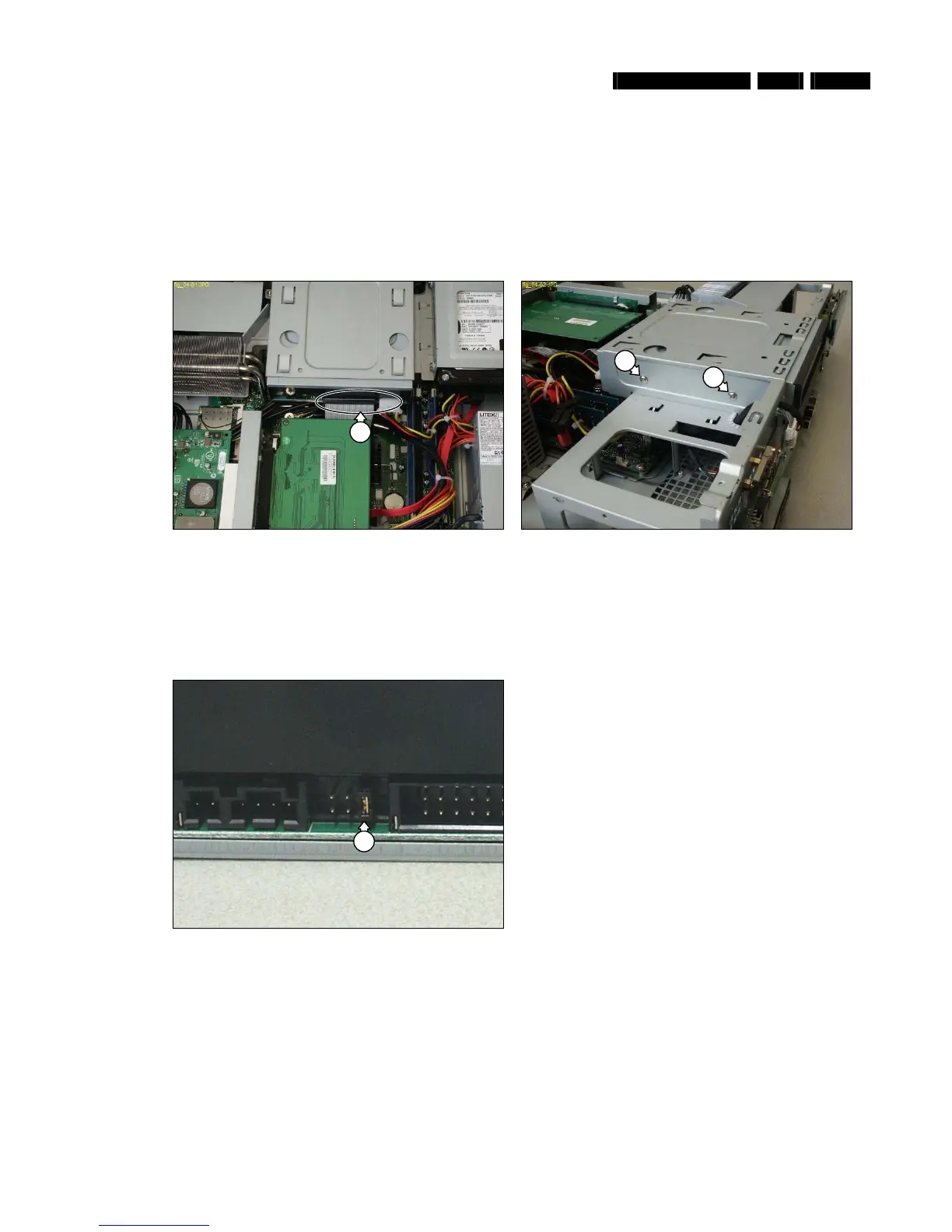
4. Disconnect all cables (1) from the ODD. See Figure 12.4-1.
5. Remove the 2 mounting screws (2) from the ODD. See Figure 12.4-2
6. Remove the ODD from the chassis by sliding it out towards the front.
Figure 12.4-1
Figure 12.4-2
12.4.2. ODD Re-Assembly
To re-assemble the ODD, do all processes described in paragraph 12.4.1 in reverse order.
Note: The torque setting required for the ODD mounting screws (2) is 4kg-cm
Note: Before re-assembly make sure that the jumper (3) at the rear of the ODD is set to the Master position. See Figure 12.4-3
Figure 12.4-3
1
2
2
3







 To Next Page