18
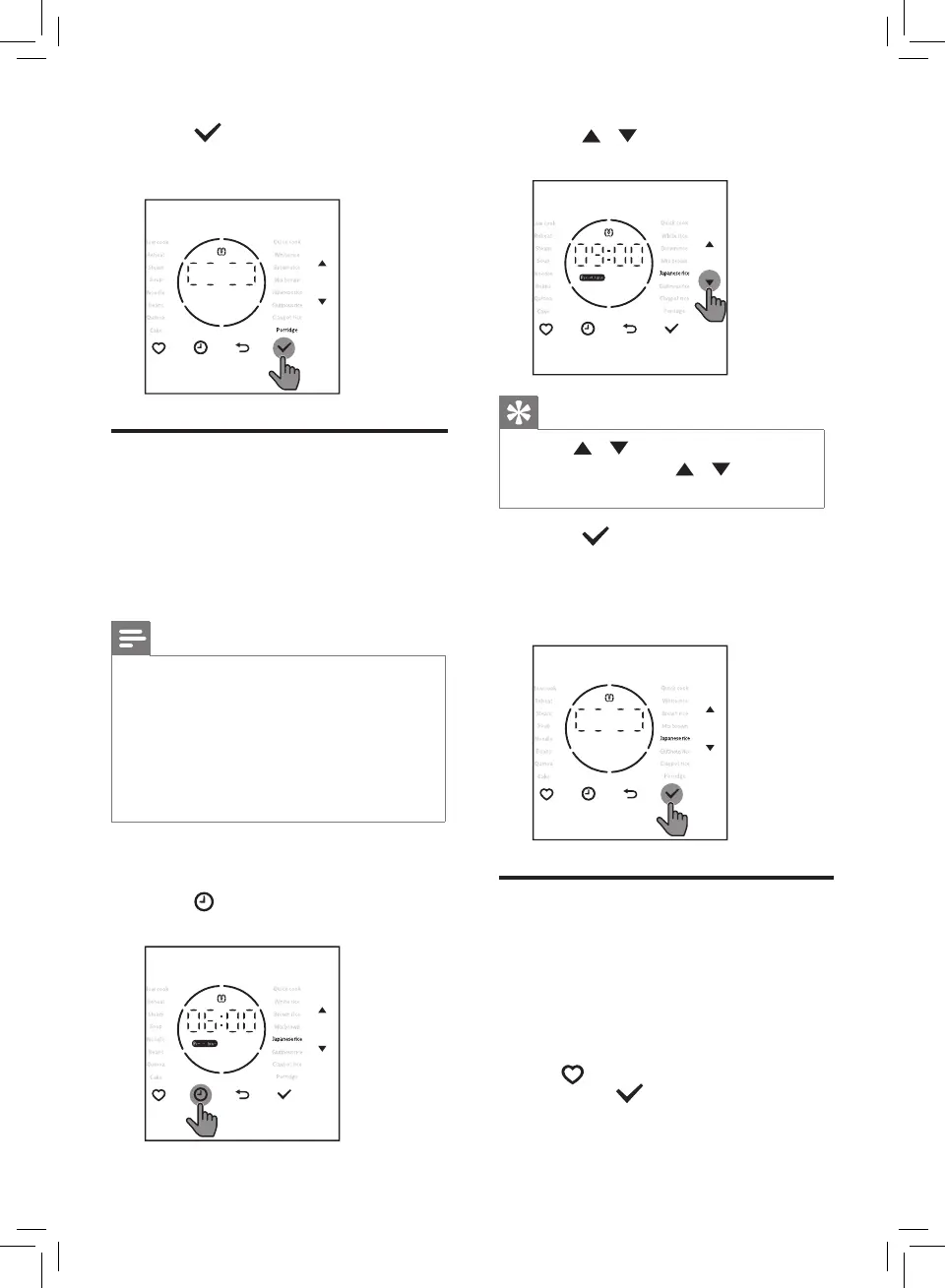
4 Press button to conrm the
cooking time and start the cooking
process.
Preset time for delayed
cooking
You can preset the delayed cooking
time in dierent cooking modes except
for Steam, Noodle, Cake and Reheat
functions. The preset timer is available
up to 24 hours.
Note
• For example. The current time is
20:00. If you want to enjoy your
breakfast at 8:00 next morning, the
preset time should be 12:00.
• If the preset time is shorter than
cooking time, cook process starts
immediately.
1 Choose a cooking function you
need.
2 Press button until Preset time
lights up.
3 Press / button to choose the
preset time.
Tip
• Press / button on the left to
adjust hour, press / button
on the right to adjust minute.
4 Press button to conrm. When
preset time is elapsed, the Mini
Rice Cooker with Induction Heating
starts working in the selected
cooking mode automatically.
Setting up My Favourite
menu
You can set any three menus as "My
Favourite". Before you make any
changes to the setting, the default
menus are White Rice, Brown Rice and
Porridge.
• Tap
button one or more times,
then press
button to access My
favourite menus.


 To Next Page