Diagnostic Software
EN 57DVDR615, MRV640 5.
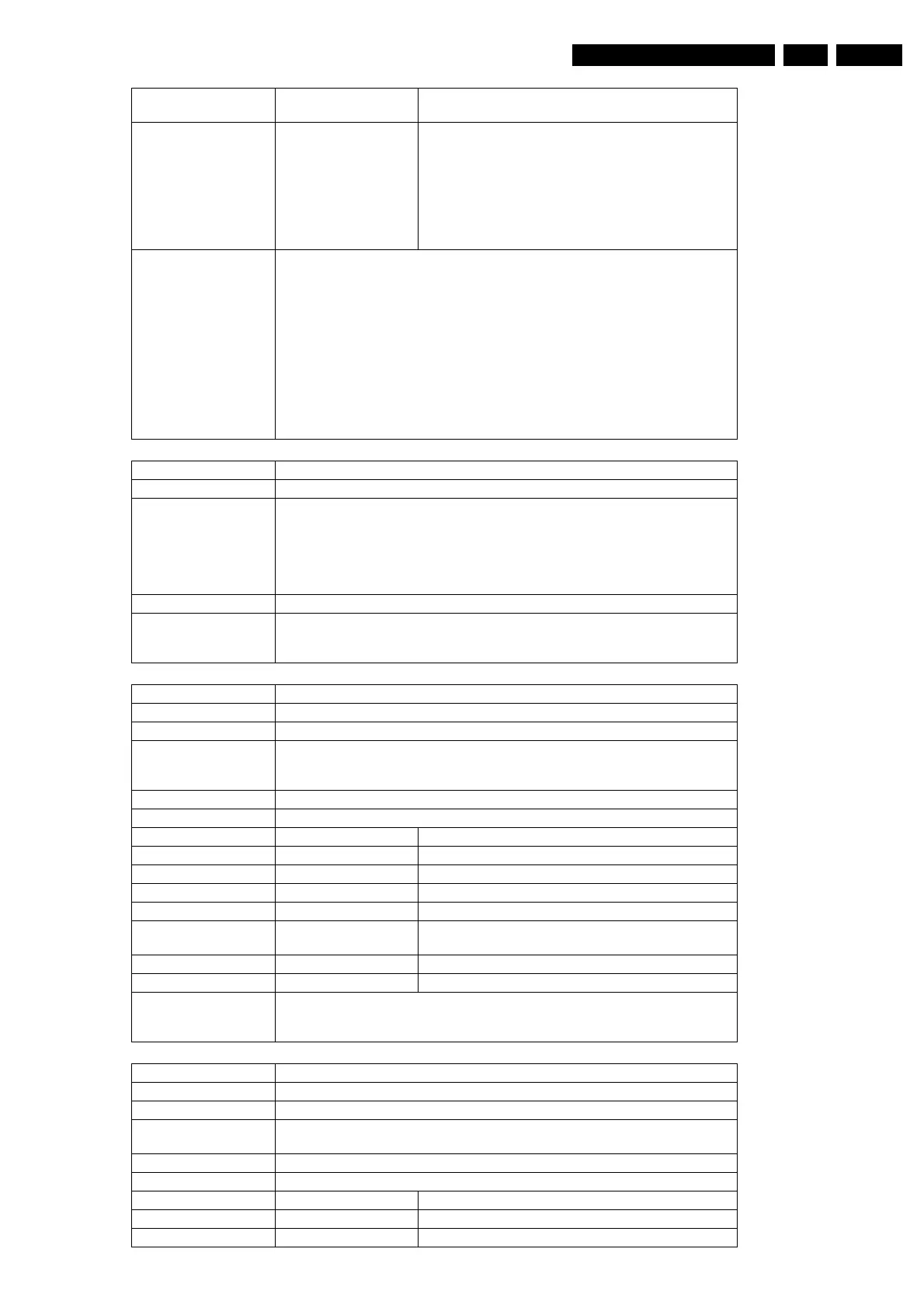
121509 The Chrysalis VideoFrontEnd-module cannot capture a
video field.
121510 When selected the RGB video input:
Error in colour red signal and/or
Error in colour green signal and/or
Error in colour blue signal.
When selected one of the other video inputs:
Error in luminance signal (Y) and/or
Error in chrominance signal (U) and/or
Error in chrominance signal (V).
Example DS:> 1215 cvbs ntsc
121500:
Test OK @
DS:> 1215 cvbs pal
121508: The VideoInputProcessor cannot detect a sync-signal.
Error @
DS:> 1215 yuv ntsc
121511:
Error in luminance signal(Y)
Error in chrominance signal(U)
Error in chrominance signal(V)
Error @
Nucleus Name DS_SYS_AudioLoop
Nucleus Number 1216
Description The user first needs to select how the audio path must be routed on the analogue
board and/or digital board before calling this nucleus. The user also has to route the
audio outputs back to the inputs by means of cables.In this nucleus the Codec gen-
erates an audio sine signal with a specific signature and sends it to the output of the
digital board. The Codec encodes the audio signal to MPEG I layer II and after this
the signature of the signal will be checked.
User Input None
Example DS:> 1216
121600:
Test OK @
Nucleus Name DS_SYS_SlashVersionSet
Nucleus Number 1217
Description Set the slash version of the system
Technical - Decode the user input for the slash version to set
- Issue the command to set the slash version to the analogue board
- Wait for the result and return this to the user
Execution Time Less than 1 second.
User Input The slash version
Error Number Description
121700 Setting the slash version succeeded
121701 Invalid slash version, no slash version is set.
121702 Setting the slash version on the Analogue Board fails.
121703 Invalid input.
121704 The returned errorcode from the analogue board is un-
known:
121705 No DS errCode known for analogue board error:
121706 There was no response from the analogue board.
Example DS:> 1217 82
121700:
Test OK @
Nucleus Name DS_SYS_SlashVersionGet
Nucleus Number 1218
Description Get the slash version of the system
Technical - Issue the command to get the slash version to the analogue board
- Return the received information to the user
Execution Time Less than 1 second.
User Input None
Error Number Description
121800 Getting the slash version succeeded
121801 Getting the slash version failed














 To Next Page