EasyManua.ls Logo

Philips MX6000I/22S - Antenna Connections; Speaker and Headphones Connections; Insert Batteries; MW Antenna

Philips MX6000I/22S
53 pages
Print Icon
To Next Page IconTo Next Page
To Previous Page IconTo Previous Page
Loading...
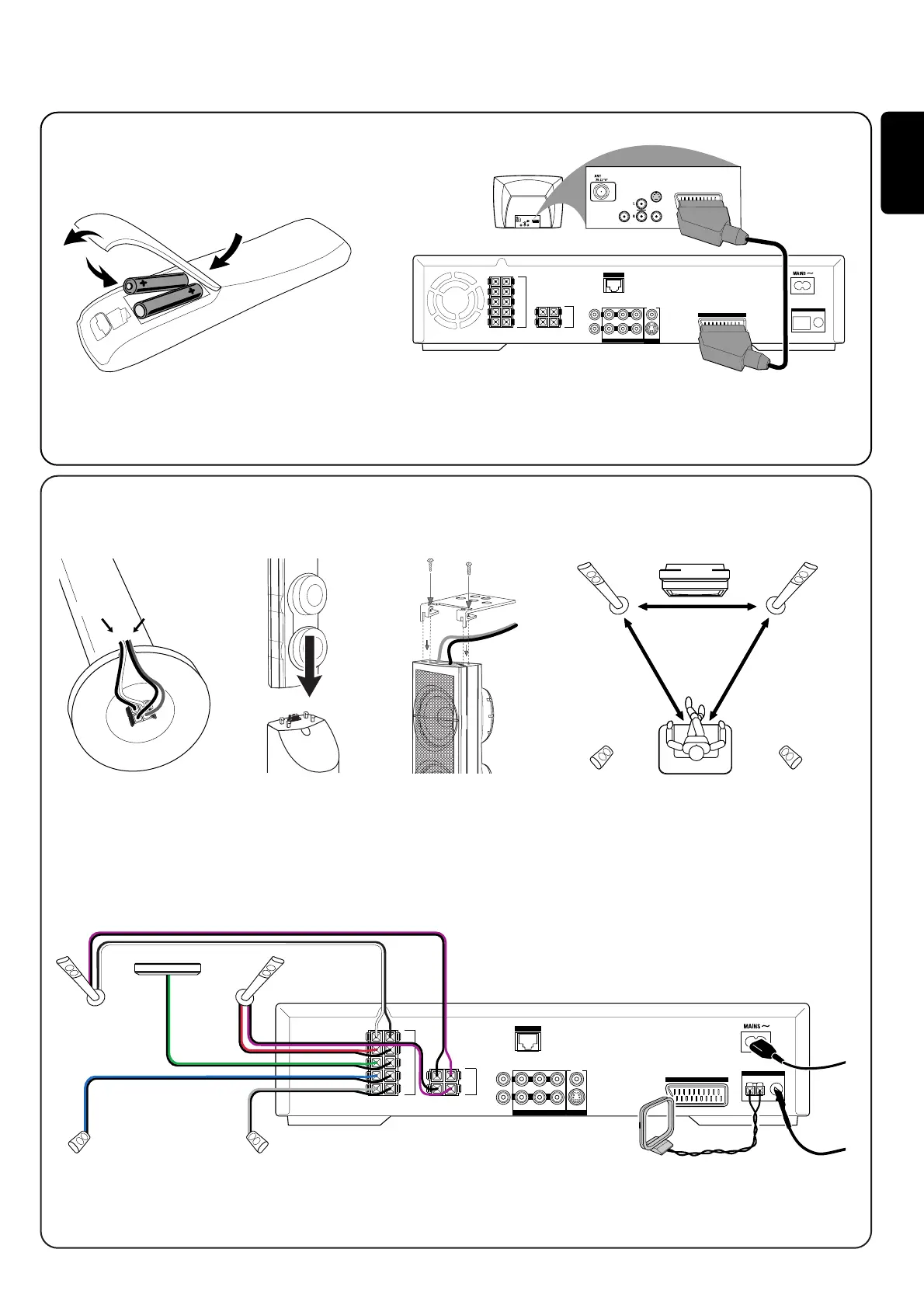
2 Mount the 2 front
speakers (white,
red socket) onto
the 2 subwoofers.
1
English
white (red) purple
Quick use guide MX6000i
FRONT
LEFT
FRONT
RIGHT
CENTRE
SURR
LEFT
SURR
RIGHT
SUB-W
LEFT
SUB-W
RIGHT
ETHERNET
DIGITAL
IN
AUX IN TV IN LINE OUT S - VIDEO
AM FM
DIGITAL
OUT
R
L
ANTENNA
CVBS
AUDIO VIDEO OUT
to TV
AUDIO
OUT
S-VIDEO
IN
VIDEO IN
AUDIO
OUT
S-VIDEO
IN
VIDEO IN
AUDIO
DIGITAL OUT
AUDIO
DIGITAL OUT
FRONT
LEFT
FRONT
RIGHT
CENTRE
SURR
LEFT
SURR
RIGHT
SUB-W
LEFT
SUB-W
RIGHT
ETHERNET
DIGITAL
IN
AUX IN TV IN LINE OUT S - VIDEO
AM FM
DIGITAL
OUT
R
L
ANTENNA
CVBS
AUDIO VIDEO OUT
to TV
front R,
subwoofer
rear R
centre
rear L
front L,
subwoofer
1 Connect the speaker
cables to the base of
the subwoofers.
Connect the Scart socket on the TV to the Scart socket (to TV) on the
Streamium System with the supplied Scart cable. If your TV has no Scart
socket, please see page 12 of the user´s manual.
5 Connect the speaker cables to the Streamium System.
6 Connect the FM and the MW antenna.
7 After making all other connections connect
the mains cable to MAINS ~ on the Streamium
System and to the wall socket.
3 Mount the 2 mini
speaker stands onto
the 2 rear speakers
(blue, grey socket)
and connect the
corresponding
speaker cables.
4 Position the speakers.
1 Insert batteries 2 Connect TV
3 Connect speakers and antenna
Match the colours of the speaker cables and of the speaker sockets!


Table of Contents

Related product manuals