EasyManua.ls Logo

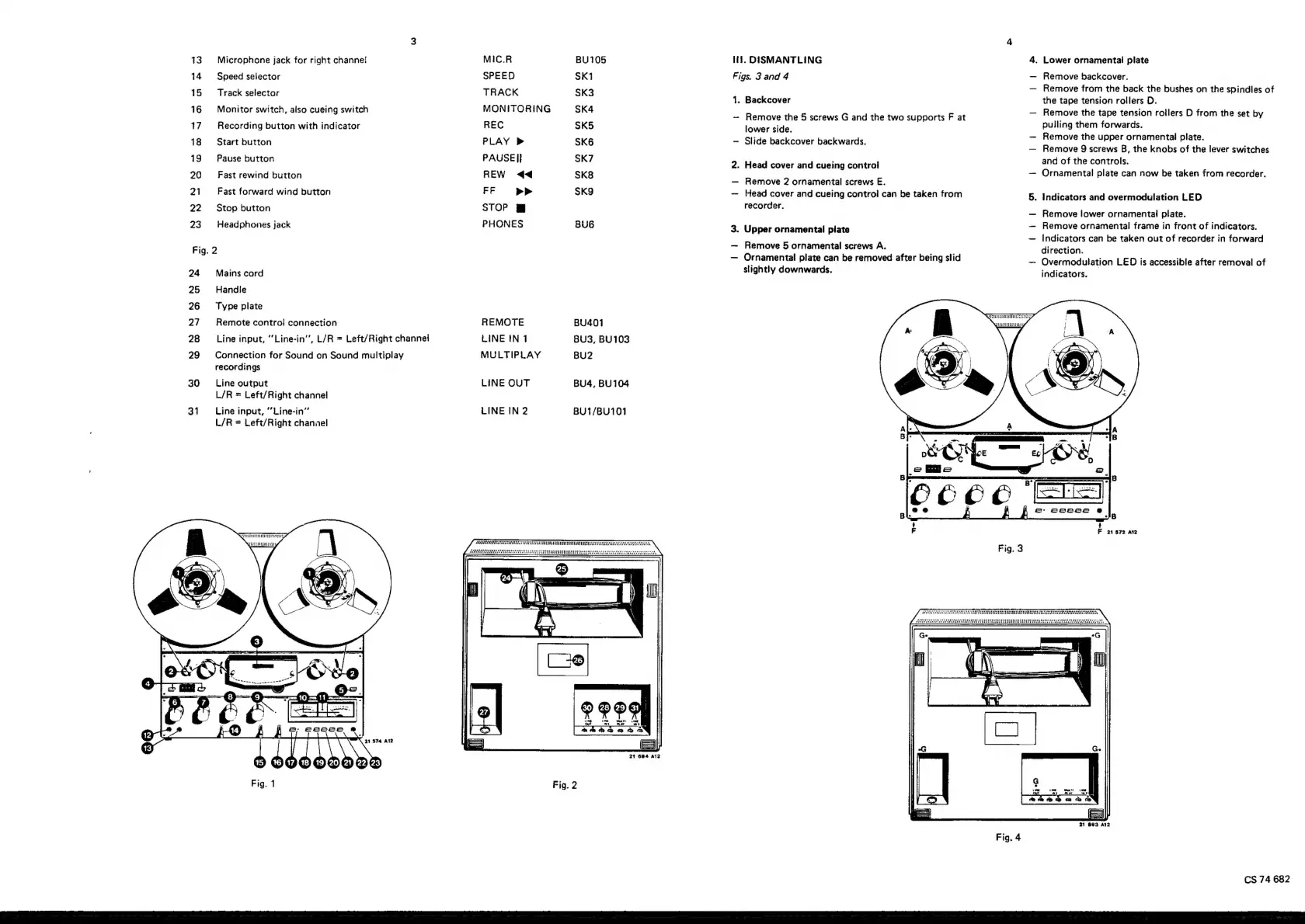
Philips N 7300 - Secondary Controls and Connections; Dismantling; External Component Removal

Philips N 7300
30 pages
Print Icon
To Next Page IconTo Next Page
To Previous Page IconTo Previous Page
Loading...
13.
Microphone
jack
for
right
channe!
14
Speed
selector
15
Track
selector
16
Monitor
switch,
also
cueing
switch
17.
Recording
button
with
indicator
18
Start
button
19
Pause
button
20
=
Fast
rewind
button
21
~=Fast
forward
wind
button
22
Stop
button
23
Headphones
jack
Fig.
2
24
Mains
cord
25
Handle
26
~=Type
plate
27
Remote
control
connection
28
~—_
Line
input,
‘’Line-in’’,
L/R
=
Left/Right
channel
29
Connection
for
Sound
on
Sound
multiplay
recordings
30
~=—_
Line
output
L/R
=
Left/Right
channel
31
~~
Line
input,
“’Line-in’
L/R
=
Left/Right
channel
MIC.R
SPEED
TRACK
MONITORING
REC
PLAY
>
PAUSE
|!
REW
<4
FF
>>
STOP
PHONES
REMOTE
LINE
tN
1
MULTIPLAY
LINE
OUT
LINE
IN
2
BU105
SK1
SK3
SK4
SK5
SK6
SK7
SK8
SK9
BUG
BU401
BU3,
BU103
BU2
BU4,
BU104
BU1/BU101
Fig.
2
lii.
DISMANTLING
Figs.
3
and
4
1.
Backcover
Remove
the
5
screws
G
and
the
two
supports
F
at
lower
side.
Slide
backcover
backwards.
2.
Head
cover
and
cueing
control
Remove
2
ornamental
screws
E.
Head
cover
and
cueing
control
can
be
taken
from
recorder.
3.
Upper
ornamental
plate
Remove
5
ornamental
screws
A.
Ornamental
plate
can
be
removed
after
being
slid
slightly
downwards.
.
Lower
ornamental!
plate
Remove
backcover.
Remove
from
the
back
the
bushes
on
the
spindles
of
the
tape
tension
rollers
D.
Remove
the
tape
tension
roilers
D
from
the
set
by
pulling
them
forwards.
Remove
the
upper
ornamental
plate.
Remove
9
screws
B,
the
knobs
of
the
lever
switches
and
of
the
controls.
Ornamental
plate
can
now
be
taken
from
recorder.
.
Indicators
and
overmodulation
LED
Remove
lower
ornamental
plate.
Remove
ornamental
frame
in
front
of
indicators.
Indicators
can
be
taken
out
of
recorder
in
forward
direction.
Overmodulation
LED
is
accessible
after
removal
of
indicators.
F
21572
atz
21
693
A12
Fig.
4
CS
74
682

Related product manuals