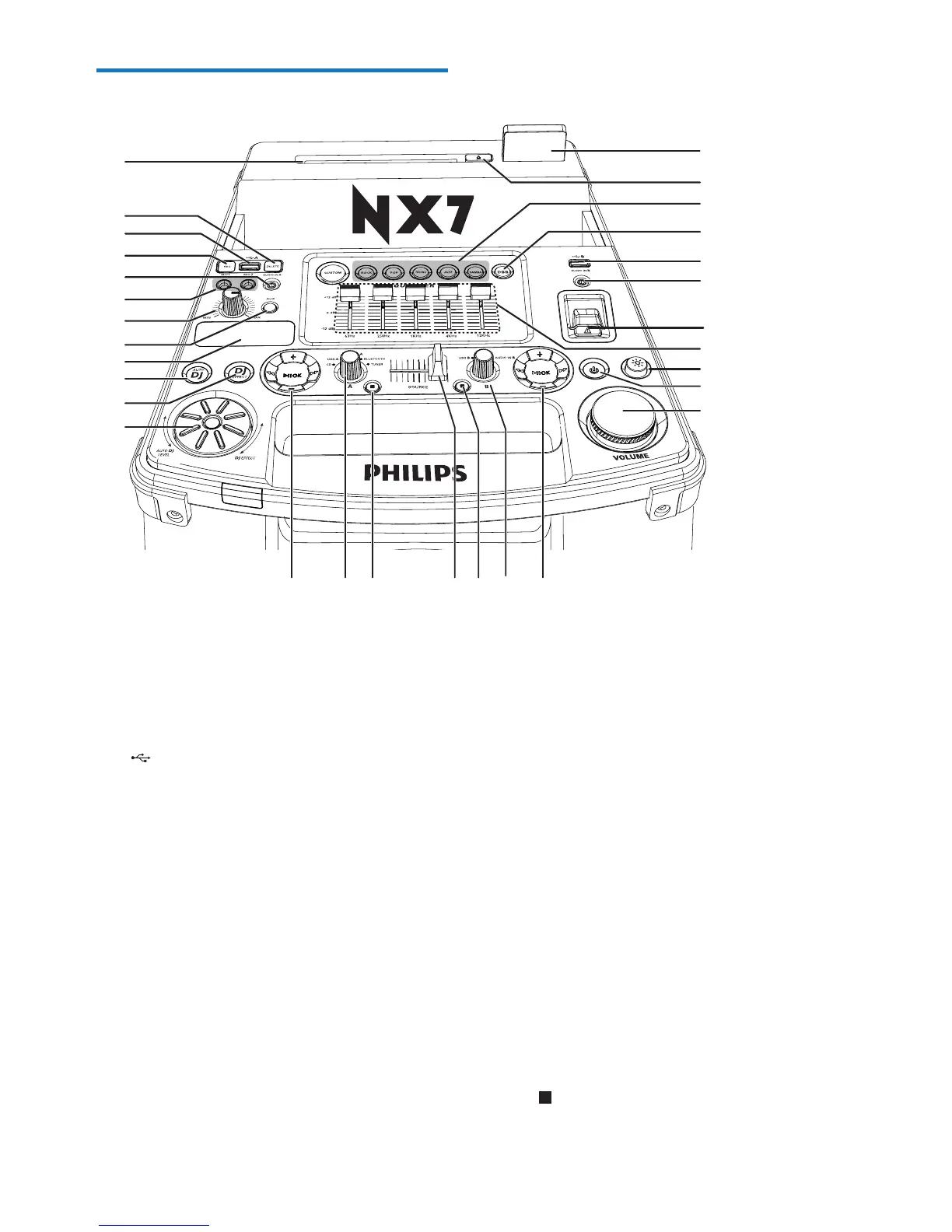
a Disc slot
b DELETE
• InUSBAmode,deleteaudioles
stored on a USB device.
c A/B
• Jacks for USB mass storage devices.
d REC
• Record to a USB.
e AUDIO IN A/B
• Audio input jack (3.5mm) for an
external audio device.
f MIC 1/2 (Microphone ports)
• Jack for a microphone.
g MIC volume dial
• Rotate to adjust microphone volume.
h AUX
• Select an audio source from DVD, PC,
TV or GAME.
b
c
c
d
e
e
f
h
g
s
q
t
no p
i
m
u
v
w
x
y
z
{
j
k
l
n
a
r
i Display panel
• Show status.
j AUTO DJ
• In USB A mode, apply AUTO DJ effect
automatically.
k DJ EFFECT
• In Disc/USB A/Bluetooth/Tuner/Audio
in A mode, apply DJ effects manually.
l DJ EFFECT dial
• Increase/decrease DJ effect and AUTO
DJ effect level.
m Control play panel (left)
• Control play for Source A modes
(including Disc, USB A, Bluetooth, Tuner
and Audio in A modes).
n Source selection dials
• Select a source.
o (Left)
• In Disc/USB A mode, stop playing.


 To Next Page