EasyManua.ls Logo

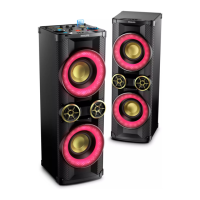
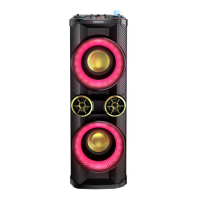
Philips NTX800 - User Manual

Philips NTX800
26 pages
Print Icon
To Next Page IconTo Next Page
Loading...
www.philips.com/support
NTX800
User manual
Always there to help you
Register your product and get support at
Question?
Contact
Philips

Other manuals for Philips NTX800

Question and Answer IconNeed help?

Do you have a question about the Philips NTX800 and is the answer not in the manual?

Summary

1 Important Safety Information

Safety Warnings and Symbols

General safety instructions, warnings, and explanation of symbols.

2 Your Mini Hi-Fi System

Product Introduction

Overview of the system's features and sound effects.

Package Contents

Lists all items included in the product box.

Main Unit Overview

Connectivity Ports

Identifies USB, AUDIO IN, AUX, Headphone, and MIC sockets.

Audio and Effect Controls

Explains volume, EQ, DBB, DJ, NX Bass, and MIC volume adjustments.

Source Selection and Playback

Details source selectors, crossfader, and playback controls.

Additional Main Unit Features

Covers NFC, Bluetooth indicator, light, demo mode, and flip display.

Remote Control Overview

Basic Remote Operations

Power, source selection, volume, and mute controls.

Playback and Track Management

Controls for playback, repeat, random, and track programming.

USB and Special Functions

USB recording, deletion, AUTO DJ, and light controls.

3 Get Started

Antenna Connections

Connects FM and AM antennas for radio reception.

Remote Control Setup

Instructions for inserting batteries into the remote control.

Speaker and Power Connections

Speaker and LED Connections

Connects speaker wires and LED wires to the main unit.

Power Connection and Voltage

Steps to connect the power cord and select the correct voltage.

Initial Operation

Powering On and Standby Mode

How to turn the unit on, switch to standby, and the indicator light.

Demo Mode Operation

How to activate or deactivate the unit's demo mode.

4 Play Audio

Playing Audio from Discs

Steps to play audio from a CD.

USB A Playback and Management

Playing audio, deleting files, and formatting USB A devices.

USB Playback and Recording

Recording to USB Devices

How to record audio from various sources to a USB device.

USB B Playback and Options

Playing audio from USB B and setting playback modes.

Bluetooth Audio Streaming

NFC Device Pairing

Connects a Bluetooth device using NFC technology.

Manual Bluetooth Pairing

Connects a Bluetooth device manually without NFC.

Bluetooth and External Playback

Bluetooth Playback and Disconnection

Playing audio and disconnecting Bluetooth devices.

External Audio Device Playback

Connecting and playing audio from external devices like MP3 players.

5 Listen to Radio

Radio Tuning and Programming

Tuning to stations, auto/manual programming, and preset selection.

AM Tuning Grid Adjustment

Modifies AM tuning frequency increments for better reception.

6 Adjust Volume and Sound Effects

Volume and Muting

How to adjust volume and mute the audio output.

DJ and Preset Sound Effects

Applying AUTO DJ, manual DJ effects, and EQ presets.

Advanced Sound Adjustments

Bass Enhancement

Adjusts Dynamic Bass Enhancement (DBB) and NX Bass effects.

Custom Equalizer Settings

Fine-tuning equalizer settings for specific frequency ranges.

7 Other Features

Microphone and Sound Mixing

Using a microphone and playing two sources simultaneously.

Lighting, Display, and Headphones

Controls for lights, display, and headphone listening.

8 Product Information

Technical Specifications

Details on Amplifier, Tuner, Disc, Speakers, Bluetooth, and General Specs.

USB Compatibility and Maintenance

USB Playability Information

Details compatible USB devices and supported file formats.

Maintenance and Cleaning

Instructions for cleaning the unit, discs, and disc lens.

9 Troubleshooting

General and Remote Issues

Troubleshooting power, sound, response, and remote control problems.

Disc, USB, and Radio Issues

Problems with discs, USB devices, and radio reception.

USB B Mode Limitations

Specific issues with sound effects and deletion in USB B mode.

Bluetooth Device Troubleshooting

Improving Audio Quality

Tips to enhance Bluetooth audio quality and range.

Connection and Stability Issues

Troubleshooting connection errors and intermittent Bluetooth links.

10 Notice

Environmental Care and Disposal

Guidance on proper disposal of the product and batteries.

Trademark and Copyright Notices

Information on registered trademarks and copyright.

Summary

1 Important Safety Information

Safety Warnings and Symbols

General safety instructions, warnings, and explanation of symbols.

2 Your Mini Hi-Fi System

Product Introduction

Overview of the system's features and sound effects.

Package Contents

Lists all items included in the product box.

Main Unit Overview

Connectivity Ports

Identifies USB, AUDIO IN, AUX, Headphone, and MIC sockets.

Audio and Effect Controls

Explains volume, EQ, DBB, DJ, NX Bass, and MIC volume adjustments.

Source Selection and Playback

Details source selectors, crossfader, and playback controls.

Additional Main Unit Features

Covers NFC, Bluetooth indicator, light, demo mode, and flip display.

Remote Control Overview

Basic Remote Operations

Power, source selection, volume, and mute controls.

Playback and Track Management

Controls for playback, repeat, random, and track programming.

USB and Special Functions

USB recording, deletion, AUTO DJ, and light controls.

3 Get Started

Antenna Connections

Connects FM and AM antennas for radio reception.

Remote Control Setup

Instructions for inserting batteries into the remote control.

Speaker and Power Connections

Speaker and LED Connections

Connects speaker wires and LED wires to the main unit.

Power Connection and Voltage

Steps to connect the power cord and select the correct voltage.

Initial Operation

Powering On and Standby Mode

How to turn the unit on, switch to standby, and the indicator light.

Demo Mode Operation

How to activate or deactivate the unit's demo mode.

4 Play Audio

Playing Audio from Discs

Steps to play audio from a CD.

USB A Playback and Management

Playing audio, deleting files, and formatting USB A devices.

USB Playback and Recording

Recording to USB Devices

How to record audio from various sources to a USB device.

USB B Playback and Options

Playing audio from USB B and setting playback modes.

Bluetooth Audio Streaming

NFC Device Pairing

Connects a Bluetooth device using NFC technology.

Manual Bluetooth Pairing

Connects a Bluetooth device manually without NFC.

Bluetooth and External Playback

Bluetooth Playback and Disconnection

Playing audio and disconnecting Bluetooth devices.

External Audio Device Playback

Connecting and playing audio from external devices like MP3 players.

5 Listen to Radio

Radio Tuning and Programming

Tuning to stations, auto/manual programming, and preset selection.

AM Tuning Grid Adjustment

Modifies AM tuning frequency increments for better reception.

6 Adjust Volume and Sound Effects

Volume and Muting

How to adjust volume and mute the audio output.

DJ and Preset Sound Effects

Applying AUTO DJ, manual DJ effects, and EQ presets.

Advanced Sound Adjustments

Bass Enhancement

Adjusts Dynamic Bass Enhancement (DBB) and NX Bass effects.

Custom Equalizer Settings

Fine-tuning equalizer settings for specific frequency ranges.

7 Other Features

Microphone and Sound Mixing

Using a microphone and playing two sources simultaneously.

Lighting, Display, and Headphones

Controls for lights, display, and headphone listening.

8 Product Information

Technical Specifications

Details on Amplifier, Tuner, Disc, Speakers, Bluetooth, and General Specs.

USB Compatibility and Maintenance

USB Playability Information

Details compatible USB devices and supported file formats.

Maintenance and Cleaning

Instructions for cleaning the unit, discs, and disc lens.

9 Troubleshooting

General and Remote Issues

Troubleshooting power, sound, response, and remote control problems.

Disc, USB, and Radio Issues

Problems with discs, USB devices, and radio reception.

USB B Mode Limitations

Specific issues with sound effects and deletion in USB B mode.

Bluetooth Device Troubleshooting

Improving Audio Quality

Tips to enhance Bluetooth audio quality and range.

Connection and Stability Issues

Troubleshooting connection errors and intermittent Bluetooth links.

10 Notice

Environmental Care and Disposal

Guidance on proper disposal of the product and batteries.

Trademark and Copyright Notices

Information on registered trademarks and copyright.

Philips NTX800 Specifications

General IconGeneral
TypeParty Speaker
BluetoothYes
USBYes
Audio PlaybackMP3, WAV
Lighting EffectsYes
Karaoke FunctionYes
Power SourceAC Power
Power Output1000W
ColorBlack
ConnectivityBluetooth, USB, AUX

Related product manuals