PDS-150e Product Guide10
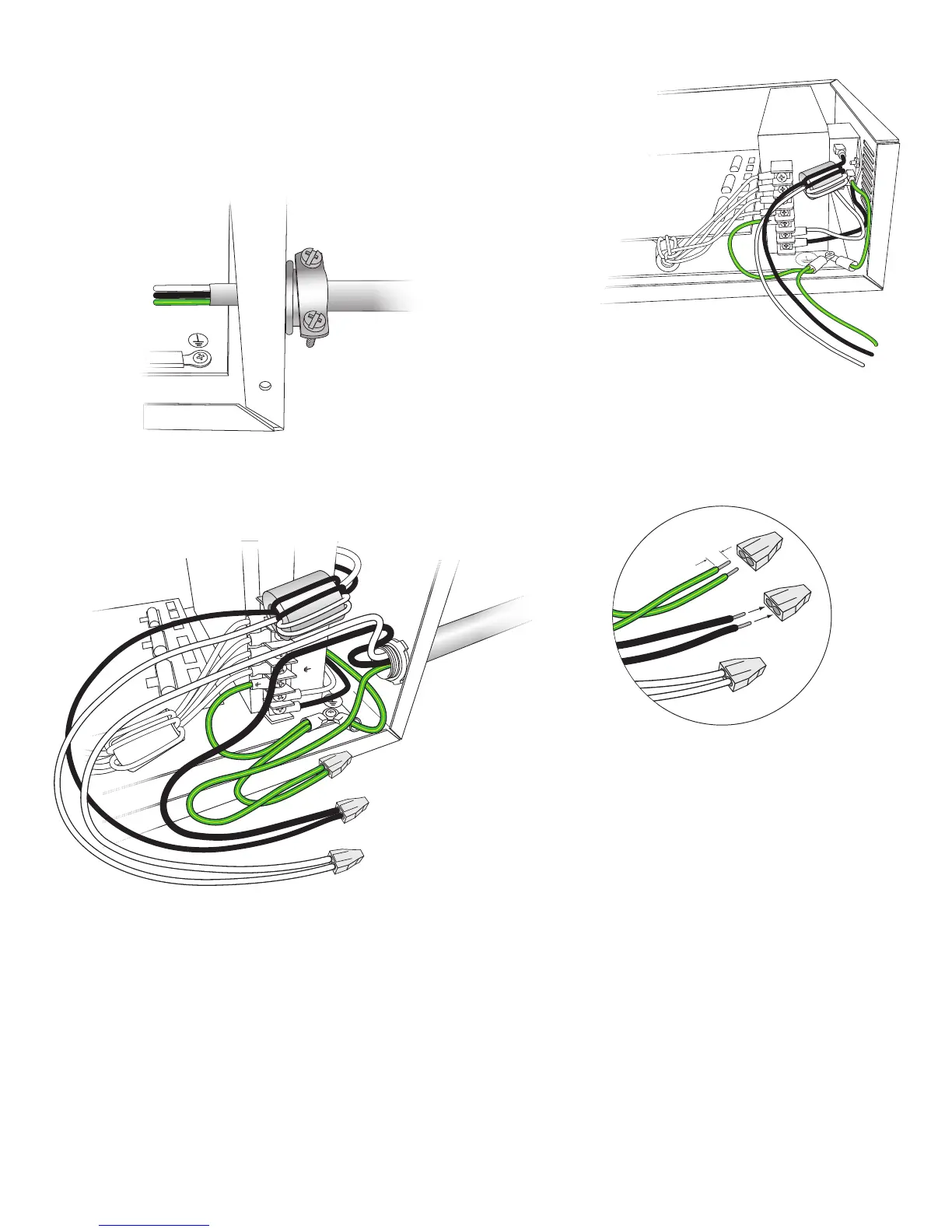
Connect to Line Power
ThePDS-150eshipswiththedevice’sline,neutral,andgroundwiresconnected
totheterminalblock.Youconnectpowertothedevice’sflyingleadsbyusingthe
includedpushwireconnectors.
1.Installtheincludedcablestrainreliefconnectorinoneofthedevice’s.88in(22
mm)openings.Ifnecessary,useconduitasrequiredbylocalelectricalcodes.
2.Runthemainsvoltagepowercablethroughtheopening.Pullatleast6in(152
mm)ofwireintothehousing.
3.Stripatleast.38in(10mm)ofinsulationfromthewires.Jointhemainslinewire
withtheflyingleadsusingtheincludedpushwireconnectors.
4.IfyouneedtoassignDMXaddressesyourxtures,orcongurethePDS-150e
overanEthernetnetwork,followthestepsintheAddressing and Conguration
Guidepriortoclosingthedevice.Otherwise,securethewireconnectionsinside
thehousing,putthecoveroverthedevice,anduseeightoftheincludedscrews
andwasherstocloseandsecurethedevice’scover.
.38 in
10 mm
+V
+V
+V
–V
–V
–V
L
L
N
+V
+V
–V
–V
L
N
E Refer to your local electrical code for
requirements for proper connection to line
voltage.


 To Next Page