2. Monitor installation
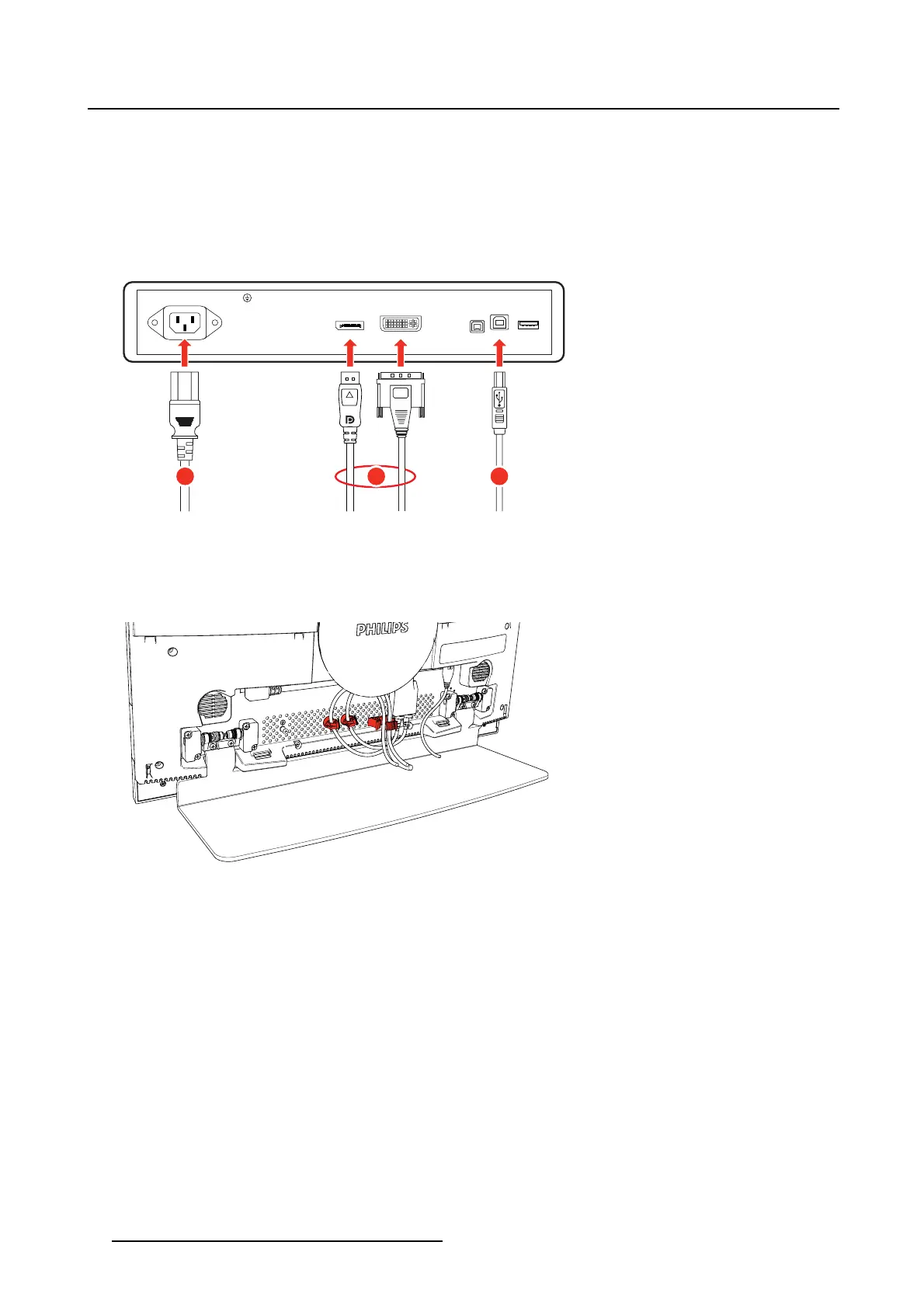
Connect signal and power cables
1. Connect one or more video source(s) to the corresponding video inputs of the monitor. Use the appro-
priate video cable(s) to do this.
2. Connect the USB upstream connector to a USB host if you want to make use of any of the monitor USB
downstream connectors (e.g. to connect a keyboard, mouse or other peripheral).
3. Connect the mains power input to a grounded power outlet.
13 2
MAIN INPUT DVI2 5V USB-B USB-ADP
Image 2-3
Route cables a nd reattach cable cover
1. Route all cables trough the provided cable routing channel at the back of the monitor. Use the cable
straps at the inside of the connector compartment to fix the cable
s.
Image 2-4
Reattach cable cover
1. Slide the 4 position clips on top of the cable cover in the matching fixation holes at the back of the
monitor.
2. Attach the cable cover by pushing the bottom into the monitor until you hear a “click” sound at both
ends of the cover.
6
K5902097 (451920611672) PS27QHDCR 22/05/2015










 To Next Page