EasyManua.ls Logo

Philips RC759 RDS - Page 14

Philips RC759 RDS
26 pages
Print Icon
To Next Page IconTo Next Page
To Previous Page IconTo Previous Page
Loading...
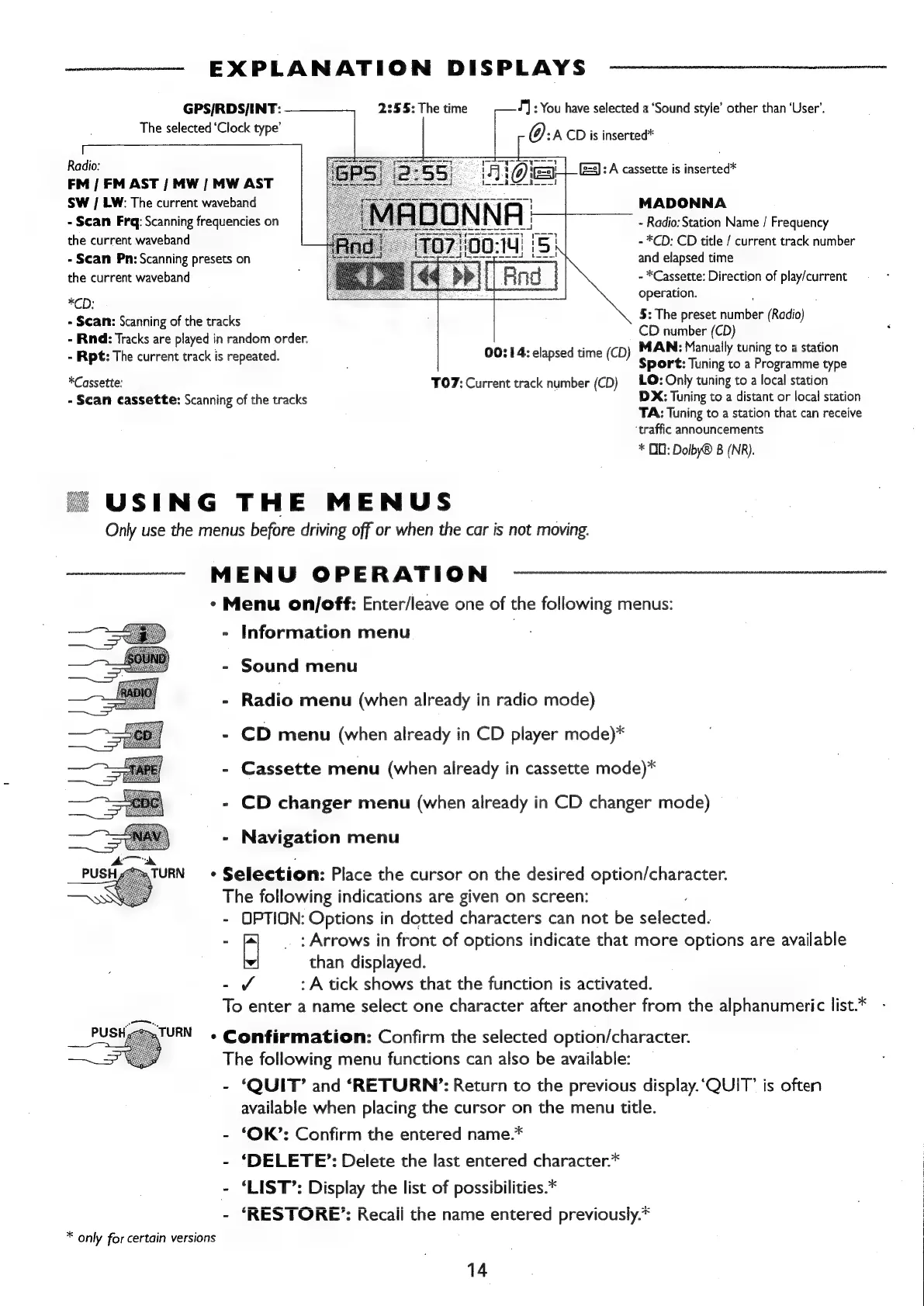
EXPLANATION
DISPLAYS
2:55:
The
time
GPS/RDS/INT:
The
selected
‘Clock
type’
Radio:
FM
|
FM
AST
/
MW
|
MW
AST
SW
|
LW:
The
current
waveband
-
Scan
Frq:
Scanning
frequencies
on
the
current
waveband
-
Scan
Pn:
Scanning
presets
on
the
current
waveband
+}
:
You
have
selected
a
‘Sound
style’
other
than
‘User’,
O:a
CD
is
inserted*
(23):
A
cassette
is
inserted*
MADONNA
-
Radio:
Station
Name
/
Frequency
-
*CD:
CD
title
/
current
track
number
and
elapsed
time
-
*Cassette:
Direction
of
play/current
*CD:
operation.
-
Scan:
Scanning
of
the
tracks
-
Rind:
Tracks
are
played
in
random
order.
-
Rpt:
The
current
track
is
repeated.
5:
The
preset
‘iciber
(Radio)
CD
number
(CD)
00:14:
elapsed
time
(CD)
MAN:
Manually
tuning
to
a
station
Sport:
Tuning
to
a
Programme
type
LO:
Only
tuning
to
a
local
station
DX:
Tuning
to
a
distant
or
local
station
TA:
Tuning
to
a
station
that
can
receive
‘traffic
announcements
*
OD:
Dolby®
B
(NR).
*Cassette:
-
Scan
cassette:
Scanning
of
the
tracks
TO7:
Current
track
number
(CD)
USING
THE
MENUS
Only
use
the
menus
before
driving
off
or
when
the
car
is
not
moving.
MENU
OPERATION
*
Menu
on/off:
Enter/leave
one
of
the
following
menus:
-
Information
menu
-
Sound
menu
-
Radio
menu
(when
already
in
radio
mode)
-
CD
menu
(when
already
in
CD
player
mode)*
-
Cassette
menu
(when
already
in
cassette
mode)*
-
CD
changer
menu
(when
already
in
CD
changer
mode)
-
Navigation
menu
Selection:
Place
the
cursor
on
the
desired
option/character.
The
following
indications
are
given
on
screen:
-
OPTION:
Options
in
dotted
characters
can
not
be
salegead:
-
a
:
Arrows
in
front
of
options
indicate
that
more
options
are
available
than
displayed.
-Jvo
:
A
tick
shows
that
the
function
is
activated.
To
enter
a
name
select
one
character
after
another
from
the
alphanumeric
list.*
Confirmation:
Confirm
the
selected
option/character.
The
following
menu
functions
can
also
be
available:
-
‘QUIT’
and
‘RETURN’:
Return
to
the
previous
display.‘QUIT’
is
often
available
when
placing
the
cursor
on
the
menu
title.
-
‘OK’:
Confirm
the
entered
name.*
-
‘DELETE’:
Delete
the
last
entered
character.*
-
‘LIST’:
Display
the
list
of
possibilities.*
-
‘RESTORE’:
Recaii
the
name
entered
previously.*
*
only
for
certain
versions
14

Related product manuals