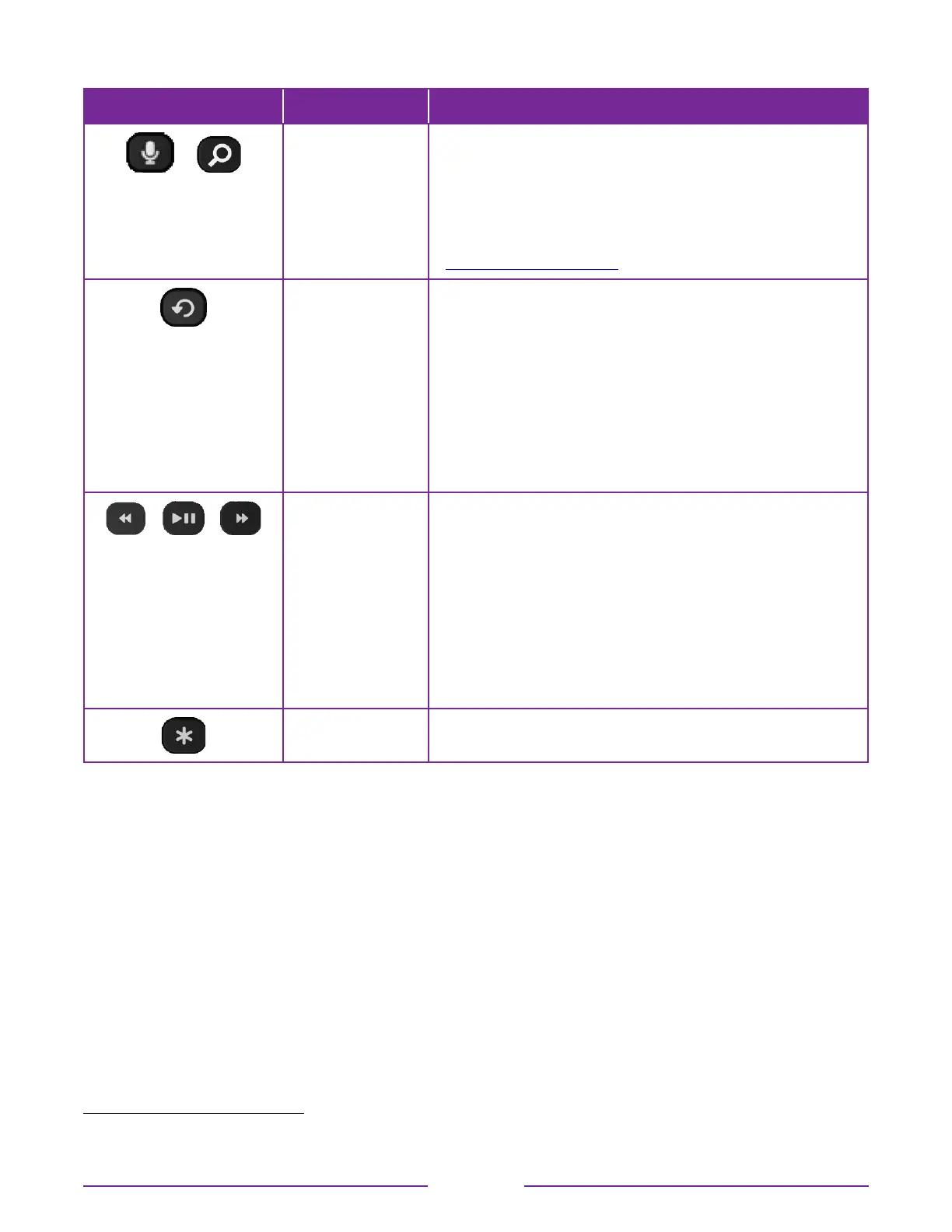
BUTTON FUNCTION DESCRIPTION
or
VOICE or SEARCH Only on select models with Roku voice remotes, hold and
say the name of a movie, TV program, actor, director, or
genre, including the special genres “free” and “4K.” Or, say a
command to start streaming, change a channel, and more
1
.
For more information, go to:
go.roku.com/voicesearch
REPLAY Select models. Streaming programs that support this feature
and TVs with Live TV Pause enabled, jumps back a few
seconds with each press and resumes playing.
If Live TV Pause is disabled, jumps to previous channel.
When using an on-screen keyboard: Backspaces in the text
you are entering.
In the Smart Guide
2
: Returns to the current day and time.
p
REWIND
o
PLAY/PAUSE
q
FAST FWD
Scan backward, pause, play, and scan forward in streaming
content and live TV channels (if Live TV Pause is enabled).
Press REWIND
p
or FAST FWD
q
one, two, or three times to
control the speed of the operation.
REWIND
p
and FAST FWD
q
also jump backward and
forward one screen at a time when viewing long lists, such as
when you are browsing programs in the channel list or Smart
Guide
2
.
STAR Displays additional options when available. On-screen hints
let you know when this button is active.
1 Voice features support English and Spanish languages when the corresponding TV language is selected
2 Smart Guide is available only in the United States.
10





 To Next Page