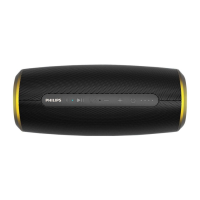
The Philips S7807 is a wireless speaker from the 7000 Series, designed to provide portable audio enjoyment with a robust set of features and specifications.
Function Description:
The primary function of the Philips S7807 is to act as a wireless speaker, allowing users to stream audio from Bluetooth-enabled devices such as mobile phones and notebooks. It supports both single-speaker playback and a stereo pairing mode, where two identical S7807 speakers can be linked for a more immersive stereo sound experience. Beyond music playback, the speaker also facilitates hands-free calling through its integrated microphone and offers control over phone calls (answer, end, reject). It can also trigger the voice assistant of a connected mobile device. The speaker is designed for portability, featuring a built-in rechargeable battery and an IP67 rating, making it dust-tight and submersible in water up to 1 meter for 30 minutes.
Important Technical Specifications:
- Output Power (RMS): 40 W
- Frequency Response: 60 Hz - 20 KHz
- Signal to Noise Ratio: > 75dB
- Drivers: 2 x 71 mm drivers, 2 x 31 mm tweeters
- Passive Radiators: 2
- Impedance: 4 Ω
- Maximum Input Power: 15 W
- Bluetooth Version: 5.2
- Bluetooth Frequency Range: 2402 - 2480 MHz
- Maximum Bluetooth Transmission Power: < 10 dBm
- Compatible Bluetooth Profiles: HFP V1.7
- Bluetooth Range: up to 20 m
- Built-in Lithium Battery: 7.4V, 5000mAh
- USB Port: 5V = 3A (for charging the speaker and external devices)
- Dimensions (W x H x D): 280 x 104 x 104 mm
- Weight (main unit): 1896 g
- Operation Ambient Temperature: 0 °C ~ 45 °C
- IP Protection Class: IP67 (dust-tight, submersible up to 1m for 30 minutes)
Usage Features:
- Power On/Off: The speaker is turned on or off by pressing the dedicated power button. A prompt sound confirms the action.
- Bluetooth Pairing: The speaker automatically enters Bluetooth pairing mode upon power-on. Users can also manually enter pairing mode by pressing and holding the Bluetooth button for 3 seconds. The Bluetooth LED indicator blinks white quickly when ready for pairing.
- Multi-point Connection: The S7807 supports connecting to two Bluetooth devices simultaneously (e.g., a mobile phone and a notebook). Music can be played from one device at a time, with the other reserved for phone calls. Playback automatically switches when a call is received on the reserved device.
- Stereo Pairing Mode: Two Philips S7807 speakers can be paired to create a stereo sound system. To activate, power on both speakers, then press and hold the Bluetooth button on both until the LED blinks red and white alternatively. One speaker will act as the primary, connected to the Bluetooth device, and the other as the secondary.
- Playback Control: Dedicated buttons allow users to pause/resume playback, skip to the next track (by pressing the play/pause button twice), and adjust volume (+/- buttons).
- Call Control: During an incoming call, users can press the play/pause button to answer or end a call, or press and hold it to reject a call. Volume can also be adjusted during calls.
- Voice Assistant Trigger: Pressing and holding the play/pause button triggers the voice assistant on the connected mobile device.
- Battery Level Indicators: A series of LEDs (LED1-LED4) indicate the battery charge level and charging progress. Users can check the battery status by pressing any button other than the power button.
- USB Charging Out: The speaker can charge external devices via its USB-C port (OUTPUT: 5V-2A).
- Automatic Power Off: The speaker will automatically turn off after 15 minutes if no audio signal is received from Bluetooth, conserving battery life.
Maintenance Features:
- Charging: The speaker is charged via a USB-C cable connected to a 5V = 3A outlet. The battery level indicators show charging progress, and the Power/Bluetooth LED blinks red slowly during charging, turning solid white when fully charged.
- Cleaning: The manual advises against removing the casing or lubricating any parts. It also recommends keeping the speaker away from water, moisture, and liquid-filled objects, despite its IP67 rating, to ensure longevity.
- Battery Safety: Important safety precautions regarding the built-in battery are provided, including warnings against incorrect replacement, exposure to excessive heat, extreme temperatures, low air pressure, and mechanical damage, all of which can lead to explosion or leakage.
- Environmental Care: The product is designed with high-quality, recyclable materials. Users are advised to dispose of the product and its integrated battery according to local regulations, emphasizing the importance of separate collection for electrical and electronic products and batteries to prevent negative environmental consequences. Instructions for safely removing the integrated battery are also included for end-of-life disposal.
- Troubleshooting: A dedicated section in the manual provides guidance for common issues such as poor audio quality, inability to find the device for pairing, connection problems, no sound, and unresponsive controls, offering solutions like adjusting volume, checking Bluetooth settings, restarting the speaker, or ensuring the speaker is within operational range. It explicitly warns against attempting to repair the speaker to maintain warranty validity.

 Need help?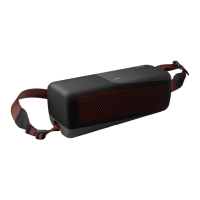

 To Next Page
 General