EN4
3 Get started
Always follow the instructions in this
chapter in sequence.
Charge the built-in
battery
The speaker is powered by a built-in
rechargeable battery.
Note
• Fully charge the built-in battery before
using.
• When the speaker is turned on and the
battery is low, the Power/Bluetooth
LED indicator blinks red.
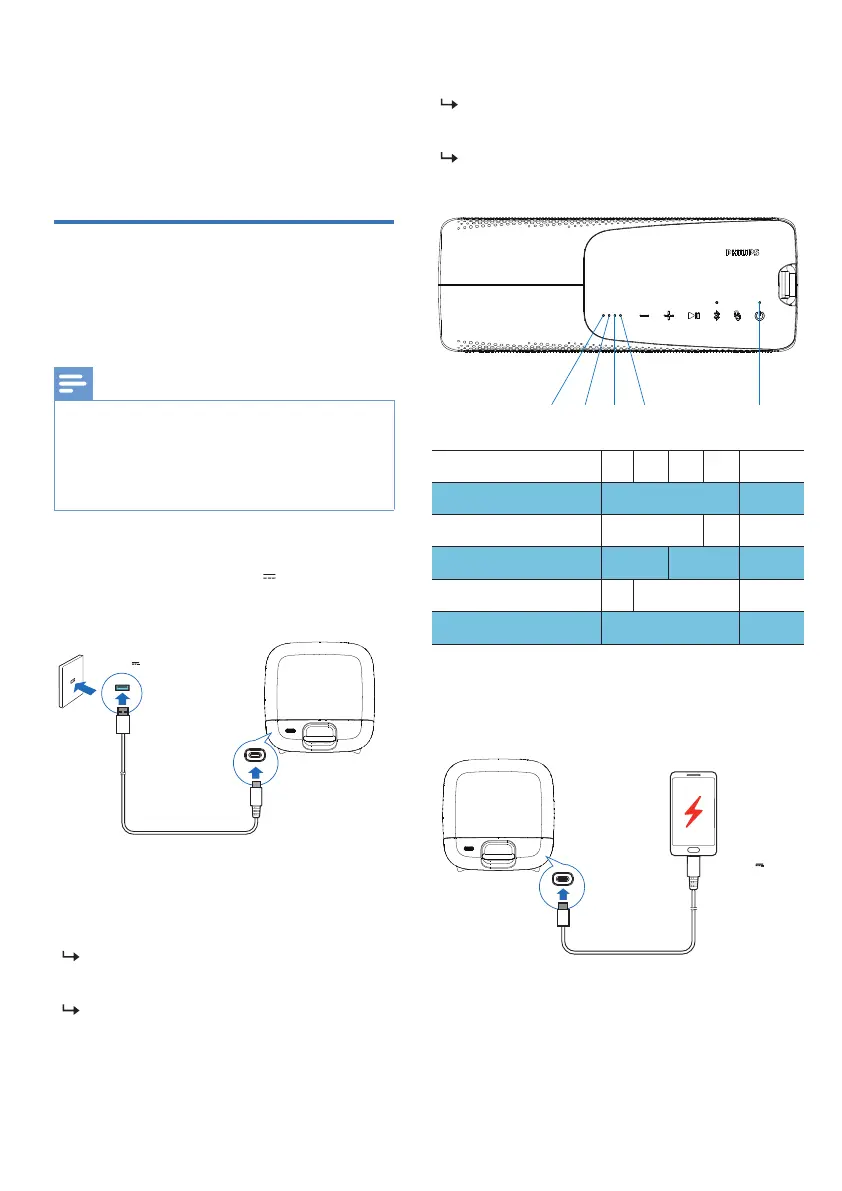
Connect the USB-C socket on the
speaker to an outlet (5V
3A) by
using the provided USB cable.
INPUT: 5V 3A
OUTPUT: 5V 2A
LED 4LED 2LED 1 LED 3
Power/
Bluetooth LED
Power on
When the speaker is being charged,
Power/Bluetooth LED blinks red slowly.
When the speaker is fullycharged,
Power/Bluetooth LED is solid white.
The speaker could charge an external
device via USB cable.
Power o
When the speaker is being charged,
Power/Bluetooth LED blinks red slowly.
When the speaker is fully charged,
Power/Bluetooth LED is o.
Battery power
Full
Solid white
Solid white OFF
OFF
OFF
Blinking
Red
Solid
white
Solid
white
OFF
LED1
LED2
LED3 LED4
Power/
Bluetooth LED
>80%
50% - 80%
20% - 40%
Low battery < 20%



 To Next Page