English
44
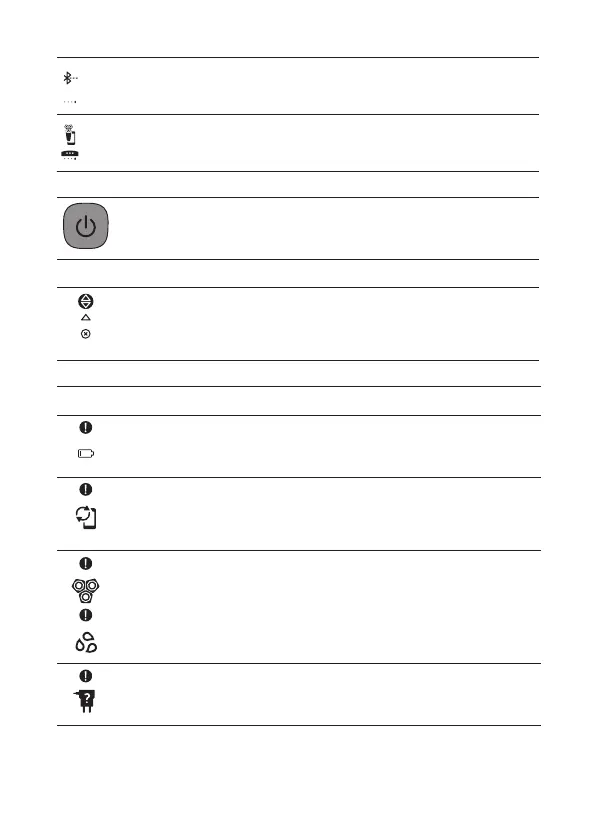
The display shows that your shaver is not paired to your
smartphone (see 'Pair the shaver and smartphone').
The display shows that your shaver is paired to your
smartphone (see 'Pair the shaver and smartphone').
-
Switching the shaver on
Press the on/o button to switch on the shaver.
Icon Meaning
When you switch on the shaver, a short animation with these
icons shows which pressure feedback setting you activated.
You can toggle through the pressure feedback settings by
pressing the menu button.
-
Warnings and notications
Icon Meaning
The battery is almost empty and you need to charge your
shaver (see 'How do I charge my appliance?').
When the data storage is almost full, you receive a
notication reminding you to synchronize your shaves. To
prevent data loss, synchronize the shaver with the app (see
'How do I connect my shaver and smartphone?').
The shaving unit is soiled or damaged to such an extent that
the motor cannot run. Clean the shaving heads thoroughly.
You are using the wrong supply unit (see 'How do I charge
my appliance?'). Only use the supply unit (HQ8505) that is
supplied with the shaver.



 To Next Page