English
65
Unpair the shaver and smartphone
You can pair your shaver with only one smartphone
at a time. To unpair your shaver from your
smartphone (e.g. when you get a new smartphone),
follow these steps:
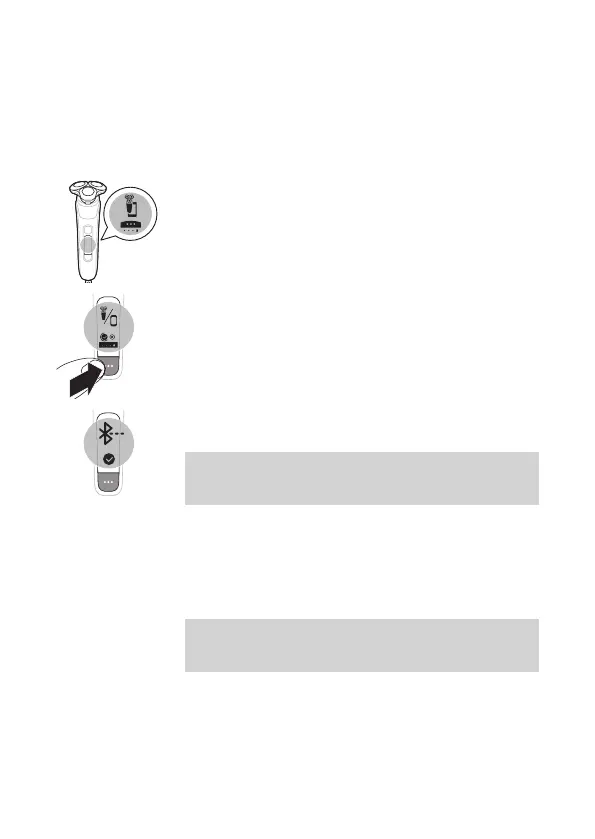
Unpair the shaver
1 Toggle through the menu items by pressing the
menu button until you reach the Bluetooth menu
(the fourth menu).
2 Press and hold the menu button until you are
presented with a cross and check mark selection.
3 Select the check mark by pressing the menu
button again to unpair your shaver.
Note: When your shaver is successfully unpaired,
you see the Bluetooth icon on your shaver handle
shown to the left.
Unpair your smartphone
1 Go to the settings on your smartphone and select
Bluetooth.
2 Tap on the name of the shaver.
3 Tap 'forget' or 'unpair'.
Note: The unpairing procedure may vary by
smartphone. Please check your smartphone
manual for more information.
How do I replace the shaving heads?
For maximum shaving performance, we advise you to
replace the shaving heads every two years.
Replace damaged shaving heads immediately.



 To Next Page