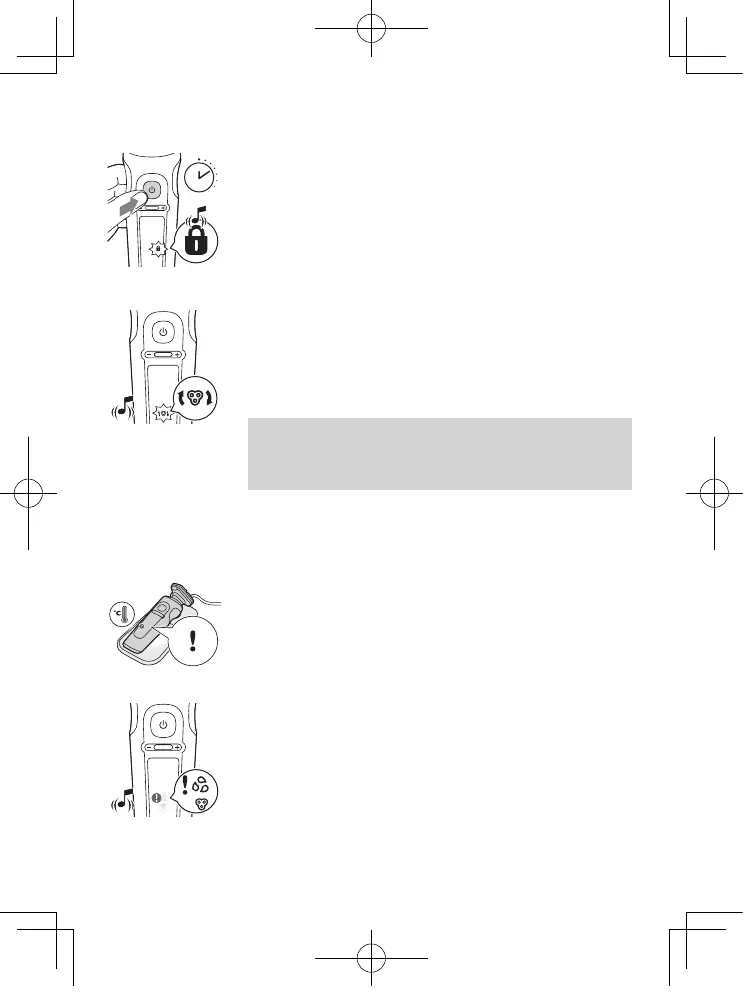
Travel lock
When you are going to travel, you can lock the shaver to
prevent it from accidentally switching on (see 'Activating
the travel lock').
Replacement reminder
For maximum shaving performance, replace the shaving
heads every two years. The shaver is equipped with a
replacement reminder which reminds you to replace
the shaving heads. The shaver beeps, the replacement
reminder lights up and the arrows ash to indicate that
you have to replace the shaving heads.
Note: After replacing the shaving heads, you can reset
the replacement reminder by pressing the on/o button
for 7 seconds. If you do not reset the replacement
reminder, the shaver resets automatically after 9 shaves.
Notication symbol
Overheating
If the shaver overheats during charging, the notication
symbol ashes. When this happens, the shaver stops
charging automatically. Charging continues once the
temperature of the shaver has decreased to the normal
level after approx. 10 minutes.
Blocked shaving heads
If the shaving heads are blocked, the notication symbol
continuously lights up red. The replacement reminder
and the cleaning reminder alternately ash white and
the shaver beeps. In this case, the motor cannot run
because the shaving heads are dirty or damaged. If the
shaving heads are dirty, you have to clean them. If the
shaving heads are damaged, you have to replace them.
3 sec.
35
SP9883_EN_A6_cc2020_0302.indd 35SP9883_EN_A6_cc2020_0302.indd 35 2023/03/02 18:192023/03/02 18:19




 To Next Page