EN
4
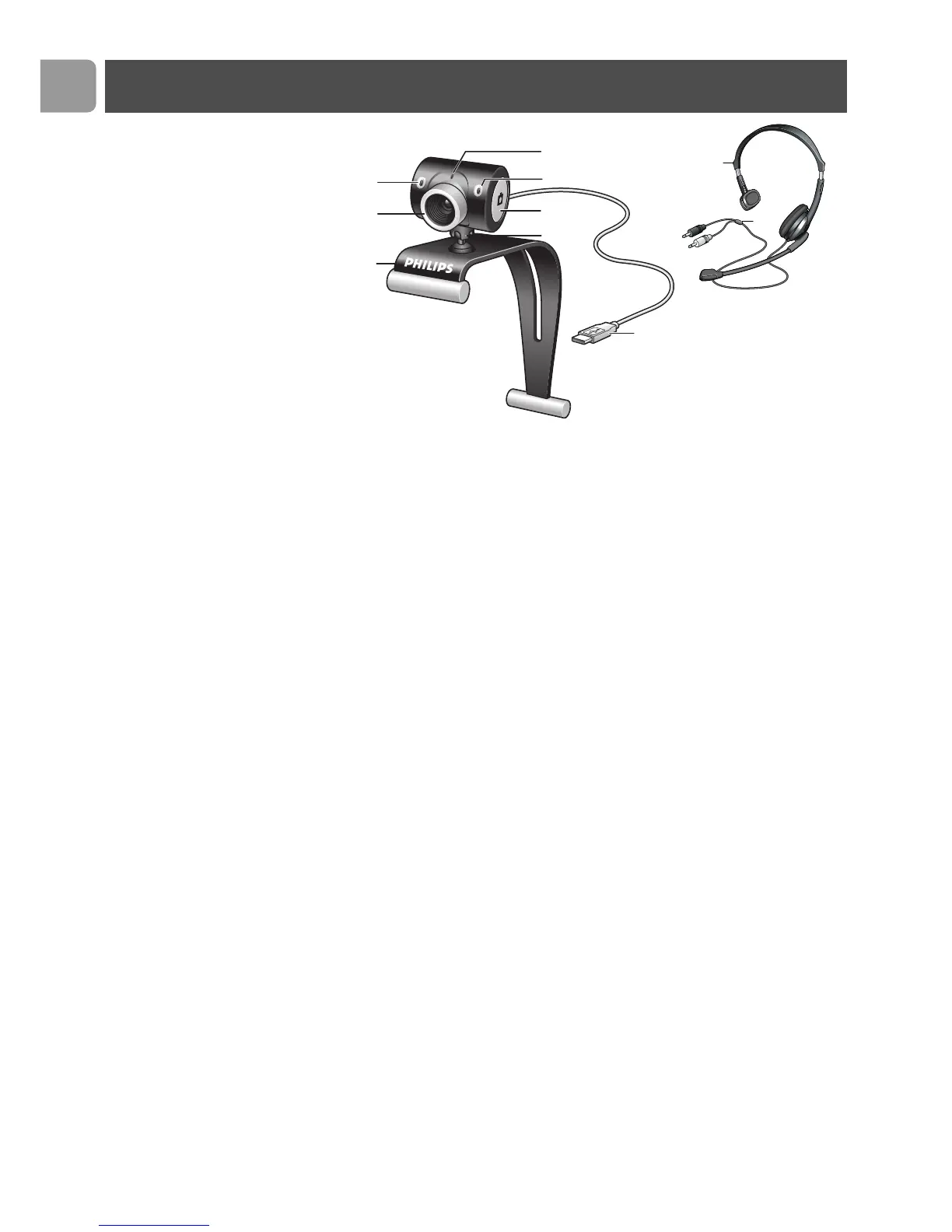
1 Digital microphone
For adding voice and sound when video chatting and video
recording.
2 Focus ring
For manually adjusting the focus of the image.
3 Clamp with rubber rims
For attaching the WebCam to your PC monitor or laptop
screen.
4 USB connector
For connecting the WebCam to the USB port of the laptop or
desktop PC.
The WebCam will derive its power from the laptop or desktop
PC when a USB connection is made.
5 Rotating foot
For manually changing the vertical angle of the WebCam.
6 Snapshot button
Enables you to take photos without using your mouse.
7 Power LED
Lights up red when the WebCam is in use.
8 Headset with headphone and microphone
(SPC525NC only)
For talking and listening to your meeting partner during video
chatting.
9 Audio cable (SPC525NC only)
Black headphone plug (n) - for connecting to the microphone
socket of the PC sound card.
Grey microphone plug (!) - for connecting to the headphone or
green socket of the PC sound card.
Legend of functions



 To Next Page