This document is the user manual for the Philips 4000 Series Headphones, model TAN4207. It provides essential information for safe operation, setup, usage, and maintenance of the wireless Bluetooth headphones.
Function Description:
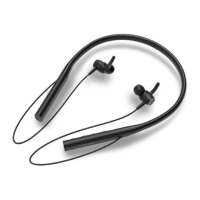
The Philips TAN4207 headphones are wireless Bluetooth neckband headphones designed for convenient hands-free calls and wireless music control. They allow users to enjoy and control music wirelessly, switch between calls and music, and connect to various Bluetooth-enabled devices such as mobile phones, notebooks, tablets, and MP3 players. The headphones feature an integrated battery for portable use and come with replaceable ear caps and ear fins for a comfortable fit.
Important Technical Specifications:
- Music Time: 20 hours
- Talk Time: 11 hours (at 100% volume)
- Standby Time: 50 hours
- Charging Time: 2 hours
- Battery: Rechargeable lithium polymer, 150 mAh
- Bluetooth Version: 5.3
- Compatible Bluetooth Profiles:
- HFP (Hands-Free Profile)
- A2DP (Advanced Audio Distribution Profile)
- AVRCP (Audio Video Remote Control Profile)
- Supported Audio Codecs: SBC
- Frequency Range: 20 – 20kHz
- Transmitter Power: ≤ 10 dBm
- Operating Range: Up to 10 meters (33 feet)
- Speaker Driver: 10mm
- Impedance: 16Ω±15% at 1000Hz 1mW
- Sensitivity: 96dB±3dB at 1000 Hz at 0.126V
- Distortion: <5%@1kHz THD
- Maximum Power Input: 3mW
- Charging Port: USB-C
- Auto Power Off: Yes
- Low Battery Warning: Available
- IP Rating: Specific product IP rating (details not explicitly stated in the provided excerpt, but mentioned in safety instructions).
- Storage Temperature: -20°C (-4°F) to 50°C (122°F) with up to 90% relative humidity.
- Operating Temperature: 0°C (32°F) to 45°C (113°F) with up to 90% relative humidity.
Usage Features:
- Controls: The headphones feature an LED indicator, Volume + and - buttons, a Power button, a Multi-function button (MFB), and a Type C charging slot.
- Power On/Off:
- Turn on: Press and hold the Power button for 2 seconds. The white LED will be on for 1 second.
- Turn off: Press and hold the Power button for 4 seconds. The white LED will be on for 1 second.
- Pairing:
- Ensure headphones are fully charged and off.
- Press and hold the Power button for 4 seconds until the blue LED flashes.
- Activate Bluetooth on your mobile phone and select "Philips TAN4207."
- Enter "0000" if prompted (not required for Bluetooth 3.0 or higher).
- The headphones store the last 4 paired devices; the earliest paired device is replaced if more than 4 devices are paired.
- If no Bluetooth device is connected within 5 minutes, the headphones will automatically switch off to save battery.
- Music Control:
- Play/Pause music: Press the MFB once.
- Adjust volume: Press +/-.
- Next track: Long press +.
- Previous track: Long press -.
- Call Control:
- Answer/Hang up a call: Press the MFB once.
- Reject a call: Long press the MFB.
- Voice Assistant:
- Trigger voice assistant (Android/iOS): Press the MFB for 2 seconds.
- LED Indicators:
- Connected to Bluetooth/Standby/Listening to music: Blue LED flashes once every 4 seconds.
- Ready for pairing: Blue and white LEDs flash alternately.
- On but not connected: Blue LED flashes twice every 3 seconds; turns off within 5 minutes if no connection.
- Low battery: White LED flashes twice every minute until out of power.
- Charging: White LED turns on.
- Battery fully charged: White LED turns off.
- Automatic Reconnection: The headphones automatically reconnect to the last connected mobile phone/Bluetooth device if available. If not, they enter pairing mode.
- Safety Guidelines: Listen at reasonable volumes, avoid continuous upward volume adjustment, do not turn up volume so high as to block out surroundings, use caution in hazardous situations, avoid excessive sound pressure, and avoid distractions from music/calls in traffic or dangerous environments.
Maintenance Features:
- Charging:
- Use the supplied Type-C charging cable.
- Connect to the charging slot on the headphones and a charger/USB port of a computer.
- The white LED turns on during charging and turns off when fully charged.
- A full charge typically takes 2 hours.
- Do not charge when the connector or socket is wet.
- Finish calls before charging, as connecting to charge will power off the headphones.
- Cleaning: Use a soft cloth, dampened with a minimum amount of water or diluted mild soap, if necessary. Avoid cleaning agents containing alcohol, ammonia, benzene, or abrasives.
- Storage: Store in a place with temperatures between -20°C and 50°C with up to 90% relative humidity.
- Battery Care:
- Do not expose the integrated battery to excessive heat (sunshine, fire, etc.).
- Danger of explosion if the battery is incorrectly replaced; replace only with the same or equivalent type.
- Disposal of a battery into fire, a hot oven, or mechanically crushing/cutting can result in an explosion.
- Leaving a battery in extremely high temperatures or extremely low air pressure can result in explosion or leakage of flammable liquid/gas.
- Battery life may be shorter in high or low temperature conditions.
- Factory Reset: Power on the headphones, then press and hold the Volume + and Volume - buttons together for more than 4 seconds.
- Disposal: The product contains a built-in rechargeable battery that should not be disposed of with normal household waste. It is advised to take the product to an official collection point or a Philips service center for professional battery removal and proper recycling. The product is designed with recyclable materials.
- Compliance: The device complies with FCC rules (Part 15), RED Directive 2014/53/EU, UK Radio Equipment Regulations SI 2017 No 1206, and Canadian Innovation, Science and Economic Development RSS(s). It also complies with applicable standards for exposure to electromagnetic fields (EMF).


 To Next Page
 General