8
2. Setting up the monitor
2.2 Operating the monitor
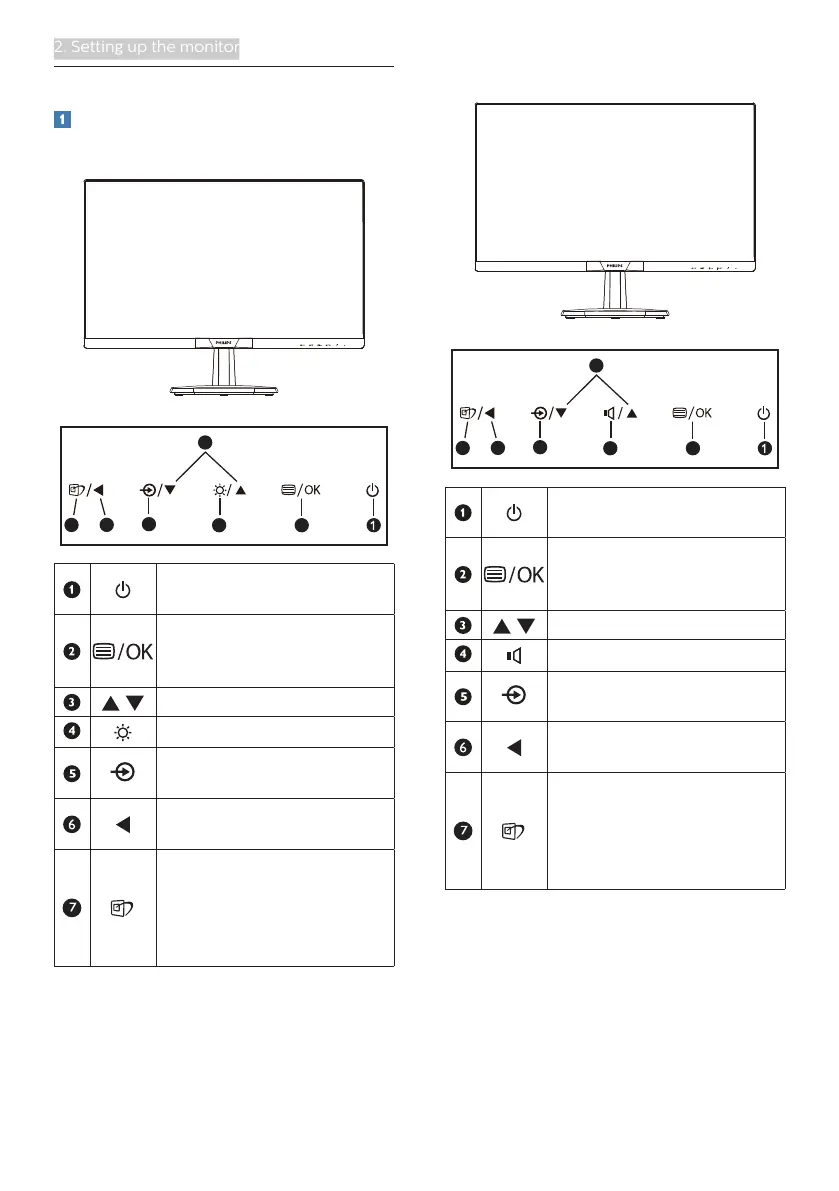
Front view product description
273V7QS/273V7QDS/273V7QHS
3
5
24
67
Switch monitor’s power ON
and OFF.
Access the OSD menu
.
Confirm the OSD
adjustment.
Adjust the OSD menu.
Adjust the brightness level.
Change the signal input
source.
Return to previous OSD
level.
SmartImage. There are
multiple selections:
EasyRead, Office, Photo,
Movie, Game, Economy,
LowBlue Mode and Off.
273V7QDA/273V7QJA
3
5
24
67
Switch monitor’s power ON
and OFF.
Access the OSD menu
.
Confirm the OSD
adjustment.
Adjust the OSD menu.
Adjust the speaker volume.
Change the signal input
source.
Return to previous OSD
level.
SmartImage. There are
multiple selections:
EasyRead, Office, Photo,
Movie, Game, Economy,
LowBlue Mode and Off.









 To Next Page