EasyManua.ls Logo

Phoenix Gold R500.1 - User Manual

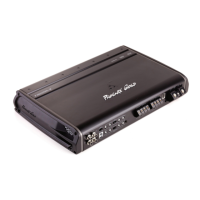
Phoenix Gold R500.1
12 pages
Print Icon
To Next Page IconTo Next Page
Loading...
Amplifier Manual
Manuel de l’amplificateur
Features Caractéristiques
Models: R1000.1, R500.1, R250.1
R500.4, R300.4
© 2010 Phoenix Gold • www.phoenixgold.com
• 12dBVariableLowPassandSubsonicCrossovers(R250.1,R500.1)
• 18dBVariableLowPassandSubsonicCrossovers(R1000.1)
• 12dBVariableHighandLowPassCrossovers(R300.4)
• 12dBVariableHighandLowPassCrossovers(R500.4)
• HighLevelInputwithSignalSensingTurn-onforEasyOEMintegration
• OversizedDirectInsertPowerand
SpeakerTerminals
• RobustUnregulatedPowerSupply
• AudiophileBi-PolarOutputTransistors
• LPL44-LowPassLevelControlReady
• RMD-RemoteMonitoringDisplayPort
• AdvancedThermalandProtectionCircuitry
• 12dBPasseBasseVariableetSubsoniqueCroisé(R250.1,R500.1)
• 18dBPasseBasseVariableetSubsoniqueCroisé(R1000.1)
• 12dBHautetPasseBasseVariableCroisé(R300.4)
• 12dBHautetPasseBasseVariableCroisé(R500.4)
• LeNiveauSupérieurentrepourl’intégrationdeFABRICANT
D’ORIGINEfacile
• DirigerlePouvoird’InsertionetlesTerminauxdeHaut-parleur
• PouvoirnonRéguléeRobust
• AudiophileTransistorsdeBipolaire
• LPL44-LaPassebasseNivellePrêtdeContrôle
• RMD-EntréeDeL’afchagedeTensionaDistance
• AvancéThermiqueetlesCircuitsdeProtection

Questions and Answers

  • T
    timothy75Aug 3, 2025
    What to do if my Phoenix Gold R500.1 Car Amplifier has power but no sound?
    • L
      Leah DixonAug 4, 2025
      First, turn off the amplifier and inspect all input, output signal cables, and power connections. Next, check the speakers for shorts using a DMM (volt meter) or by connecting them to an alternate audio source. After verifying everything is correctly set, turn the amplifier back on.
  • A
    Austin BrooksAug 8, 2025
    Why does my Phoenix Gold R500.1 Car Amplifier frequently shut down and then automatically recover?
    • N
      Nancy AdamsAug 8, 2025
      This issue suggests the amplifier is experiencing chronic thermal shutdown due to consistently high internal temperatures. Ensure you are not using a lower impedance than recommended. Also, inspect for any damaged speakers or passive crossover systems. If the amplifier continues to shut down during normal operation at high output levels, consider improving amplifier cooling, installing a higher-power amplifier, or decreasing the amplifier's output level.
  • R
    Renee BradleyAug 12, 2025
    What to do if my Phoenix Gold Car Amplifier has power but no sound and the PROTECT LED is lit?
    • S
      Scott ColeAug 12, 2025
      The red PROTECT LED indicates that the amplifier has shut down due to thermal or over-current protection. A shorted speaker lead or operation into unusually low impedance loads can trigger over-current shutdown. To restore operation, cycle power at the amplifier REM terminal. If over-current shutdown occurs, check for shorted speaker wiring, damaged speakers, or crossover systems.
  • K
    Kathryn LopezAug 16, 2025
    Why is my Phoenix Gold R500.1 Car Amplifier having 'Motor Boating' issues?
    • B
      Brent CohenAug 16, 2025
      'Motor Boating,' where the power indicator repeatedly goes off when the audio system is on, can be caused by issues with the amplifier's power supply. Check the amplifier’s connection to the battery and verify the battery voltage. If the voltage is low, recharge or replace the battery. Also, inspect all ground connections to ensure they are secure.
  • J
    Jerry HarrellAug 21, 2025
    What to do if there is no sound from one side of my Phoenix Gold Car Amplifier?
    • W
      William BlackAug 21, 2025
      First, check the balance control in the head unit. Then, inspect the speaker connections and the signal input connection to ensure they are properly connected.
  • D
    Dustin WintersAug 26, 2025
    How to troubleshoot very low output on Phoenix Gold Car Amplifier?
    • B
      Bonnie LambAug 26, 2025
      Check your head unit’s fader control and the amplifier’s input sensitivity level. Also, ensure that the HP frequency control is not set too high and the LP frequency control is not set too low simultaneously.
  • M
    Matthew SilvaAug 29, 2025
    How to check Phoenix Gold R500.1 Car Amplifier if there is no power?
    • J
      Joel WardAug 30, 2025
      Check the voltage at the amplifier using a DMM (volt meter). Measure the voltage at B+ and REM (with the head unit on). The voltage should be between 12.2V and 14.6V when using the amplifier's attached ground lead.

Summary

Specifications

Monoblock Specifications

Detailed technical specifications for monoblock amplifiers.

Four Channel Specifications

Detailed technical specifications for four-channel amplifiers.

Monoblock Amplifier Details

Input and Output Connections

Describes how to connect signal cables for input and output.

Control Functions

Details on crossover, bass boost, and level controls.

Power and Ground Connections

Instructions for connecting power, remote, and ground terminals.

Four Channel Amplifier Details

Input and Mode Selection

Explains input types, high level input, and 2ch/4ch mode.

Control and Configuration

Covers crossover, bass boost, level, and configuration settings.

Connection Terminals

Details power, remote, ground, and speaker output terminals.

System Tuning Procedures

Initial Setup

Steps for installing fuses, setting input sensitivity, and routing switches.

Level and Crossover Adjustment

Guidance on setting input levels, crossovers, and bass boost.

Fine Tuning and System Balance

Techniques for optimizing sound balance and blending speakers.

Troubleshooting Common Issues

No Power or No Sound

Diagnosing issues related to power, fuses, and signal connections.

Protection Mode and Shutdowns

Addressing protection LED activation and frequent amplifier shutdowns.

Audio Performance Problems

Troubleshooting low output, one-sided sound, and motor boating.

System Diagrams

Monoblock Subwoofer Configurations

Wiring diagrams for single and dual subwoofer systems.

Multi-Channel System Example

Wiring diagram for a solution system using 4-channel amps.

Product Warranty Information

Limited Warranty on Amplifiers

Details the one-year limited warranty for US purchasers.

International Warranties

Information regarding warranty coverage for international customers.

Phoenix Gold R500.1 Specifications

General IconGeneral
Power Output (RMS)500W
Channels1
Input Sensitivity200mV - 6V
Crossover Frequency50Hz - 250Hz
Fuse Rating40A
Low Pass Crossover50Hz - 250Hz
RMS Power @ 2 Ohms500W
Crossover TypeLow Pass
Bass Boost0dB - 12dB @ 45Hz

Related product manuals