6
P H O E N I X G O L D I N T E R N A T I O N A L
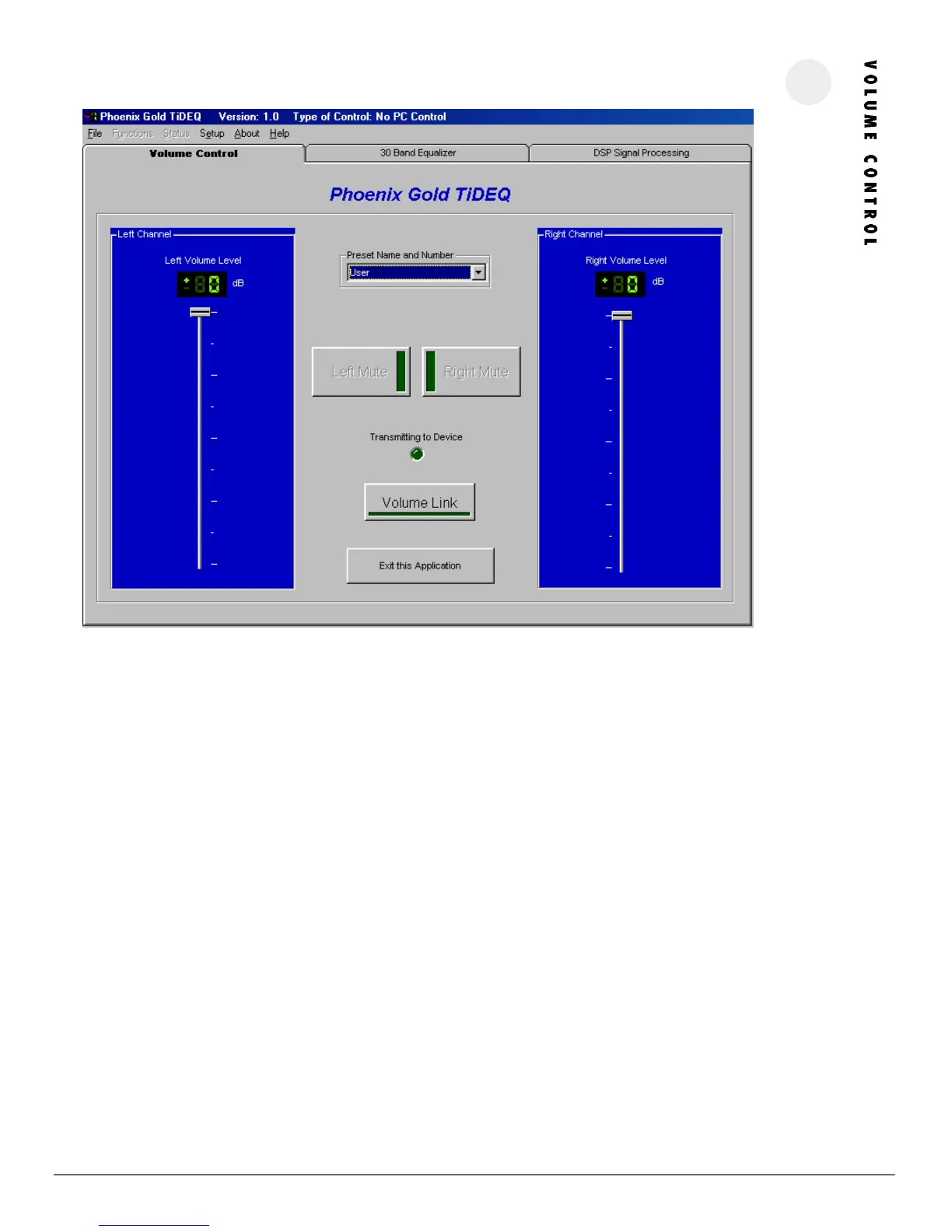
VOLU ME SL IDERS
These are used to adjust the overall levels of the equalizer’s outputs. Both sliders can be moved simultaneously by clicking on the Volume Link
Button. This setting is individually saved for each preset so volume levels can be different for the four separate presets. These sliders will control the
pink noise generator’s volume.
PRESET NA ME AND NU MBE R
This allows the preset to be changed. There are 4 presets: RTA, SPL, SQ, and USER.
LE FT AN D RIGHT MUTE
Clicking on these buttons allows you to mute one or both of the outputs of the TiDEQ Comp. Note that settings for the mute buttons are not saved
for each individual preset. If the a mute button is activated then all four of the presets will be muted, the mute function is not individually saved for
each preset.
VO LU ME L INK
Clicking on this button allows both left and right channel sliders to be adjusted simultaneously.
EXIT AP PL ICATION
Clicking on this button will exit and close the TiDEQ Comp program.




 To Next Page