05. How to Use
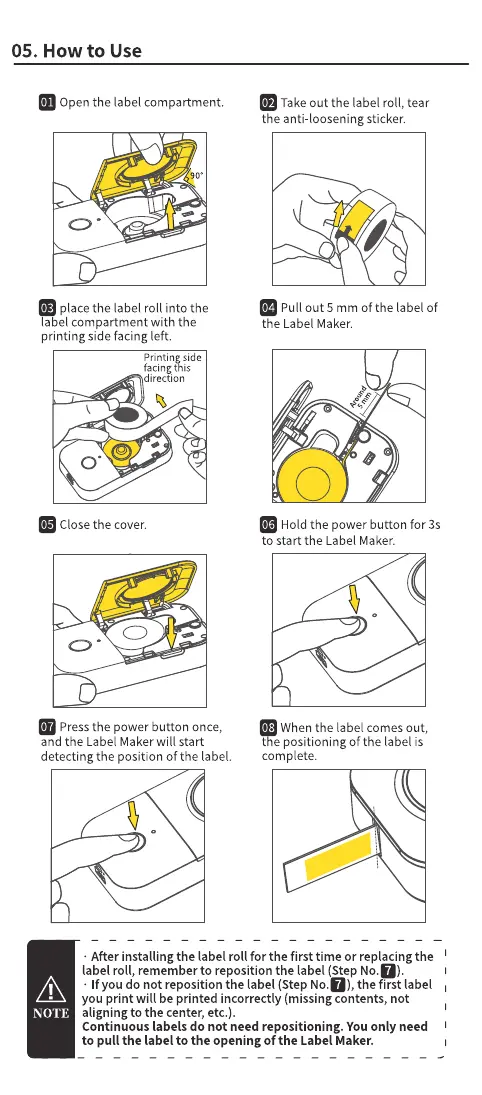
Open the label compartment.
90b
place the label roll into the
a el compartment with the
printing side facing left.
Printingside
facingthis
direction
O
Close the cover.
Pressthe power button once,
and the Label Maker will start
detecting the position Ofthe label.
Take out the label roll, tear
the anti-loosening sticker.
Pull out 5 mm of the label of
the Label Maker.
Hold the power button for 3s
to start the Label Maker.
When the label comes out,
t e positioning of the label is
complete.
NOTE
• After installing the labelroll for the first time or replacingthe I
label roll, rememberto reposition the label(StepNo.O).
• Ifyou do not reposition the label (StepNO'), the first label
you print will be printed incorrectly (missing contents, not
aligning to the center, etc.).
Continuous labels do not need repositioning. You only need
to pull the label to the opening of the Label Maker.



 To Next Page