2. For Mac
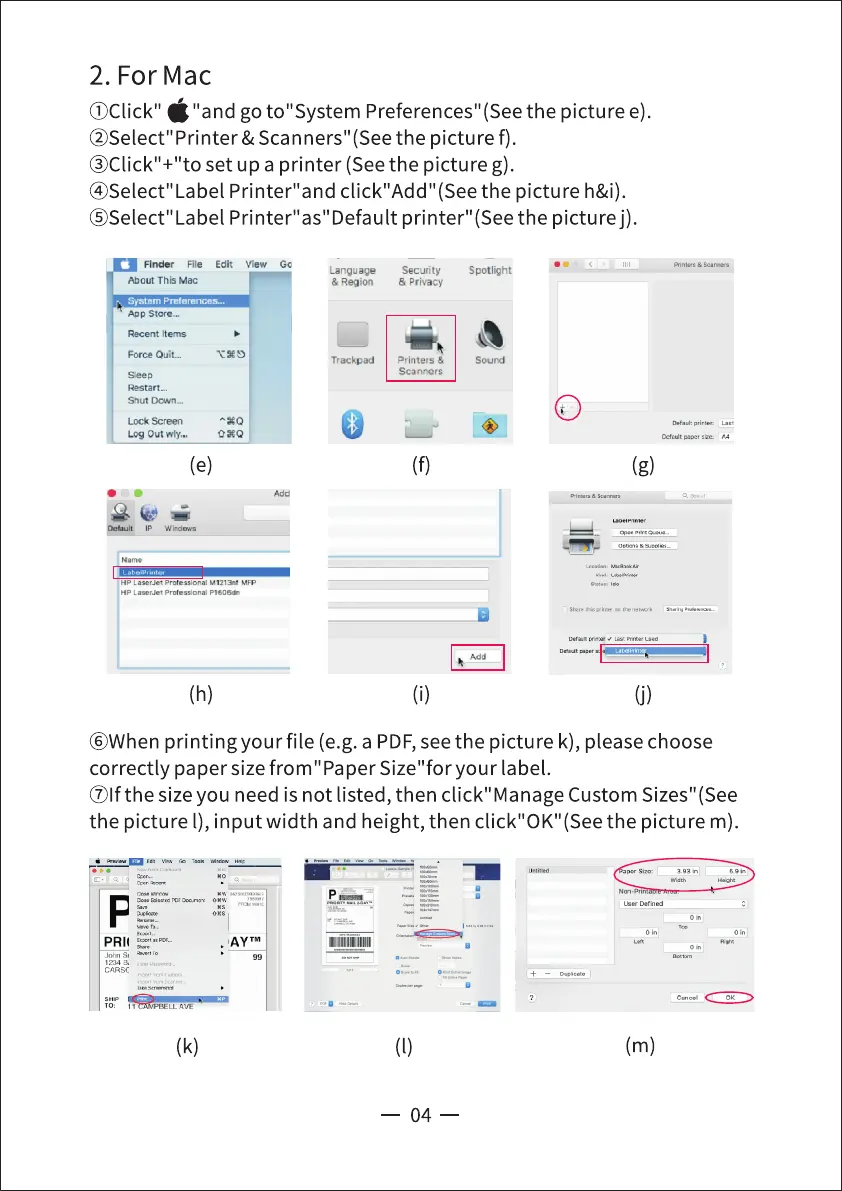
OCIick" "and go to" System Preferences" (Seethe picture e).
@Select" Printer & Scanners" (See the pictu re f).
@Click"+"to set up a printer (Seethe picture g).
@Select"Label Printer"and click"Add"(See the picture h&i).
@Select" Label Printer" as"Default printer" (Seethe picture j).
File Edit Wew Go
About This Mac
Sistem
Language
& Region
Agp Storew
Recent Items
Slee p
Shut [.Ewn—
Lock
Log Out
Security
S Privacy
printers &
Sca nners
Spotlight
Sound
xxo
oxo
(h)
(g)
(j)
@When printing your file (e.g. a PDF,see the picture k), please choose
correctly paper size from "Paper Size"for your label.
@lfthe size you need is not listed, then click" Manage Custom Sizes" (See
the picture l), input width and height, then click"OK"(See the picture m).
•A YTM
(k)
59
(m)
04



 To Next Page