Install the driver
Before installation, please ensure printer is connected and turned on.
Download the Driver
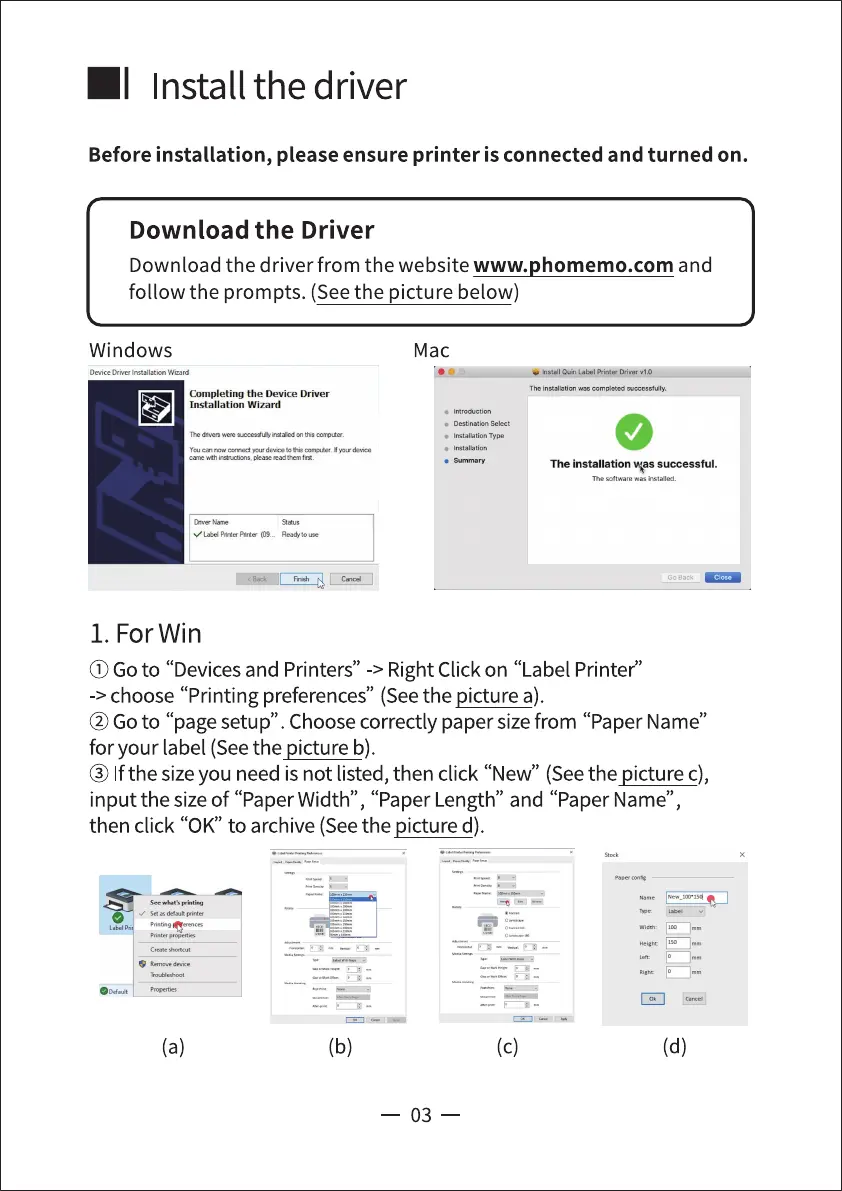
Download the driver from the website www.phomemo.com and
follow the prompts. (See the picture below)
Windows
We.d
Mac
Completing the Device Driver
Installation Wizard
• Type
The installation successful.
The
1. ForWin
(j) Goto "Devicesand Printers" -> Right Click on "Label Printed'
-> choose "Printing preferences" (Seethe picture a).
@Go to "page setup". Choosecorrectly paper sizefrom "Paper Name"
for your label (Seethe picture b).
@ Ifthe sizeyou need is not listed, then click "New" (Seethe picture c),
input the sizeof "PaperWidth" , "Paper Length" and "Paper Name",
then click "0K" to archive (Seethe picture d).
(b)
03
(c) (d)



 To Next Page