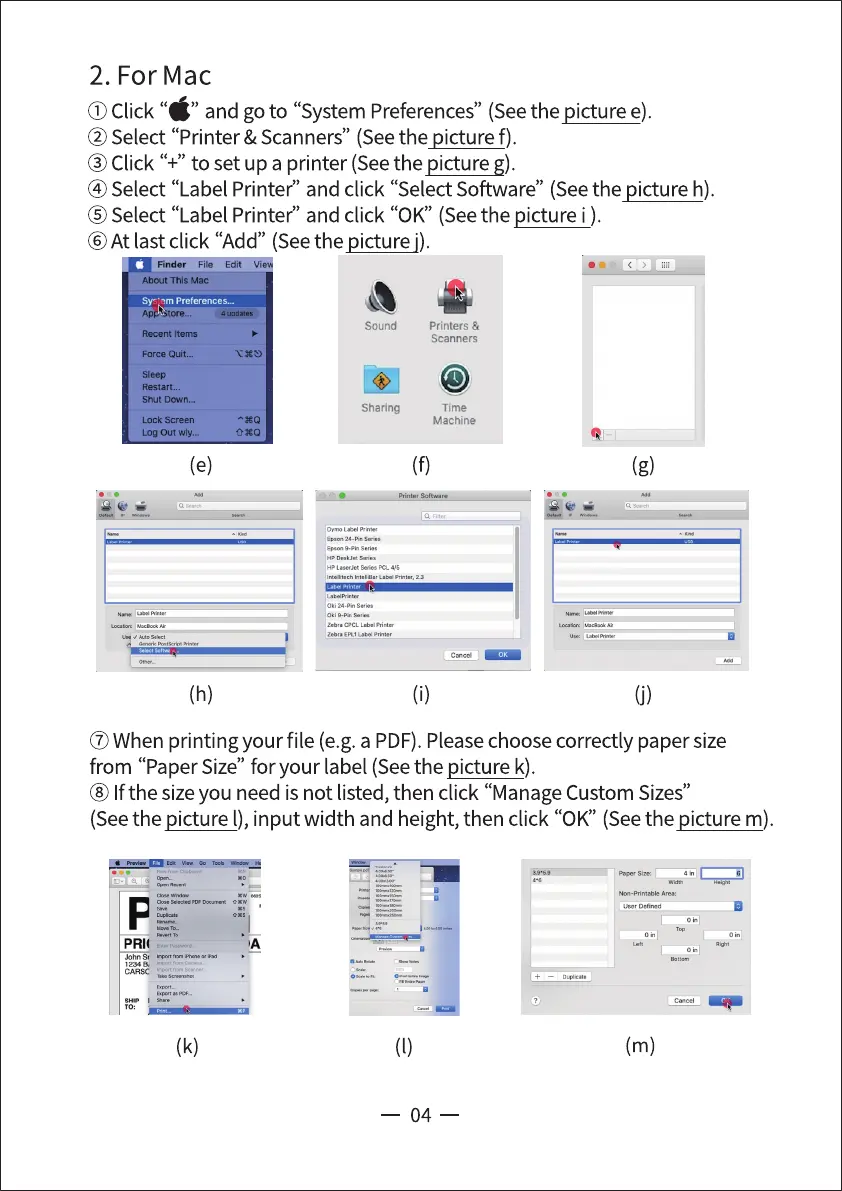
2. For Mac
(j)Click"6" andgoto"SystemPreferences"(Seethepicturee).
@Select "Printer & Scanners" (Seethe picture f).
@Click "+" to set up a printer (Seethe picture g).
@Select "Label Printed' and click "Select Software" (Seethe picture h).
@Select "Label Printed' and click "0K" (Seethe picture i ).
@At last click "Add" (Seethe picture j).
About This Mac
ST ' Preferences.„
ApgkStore...
Recent Items
Force Quit...
Sleep
Restart...
Shut Down...
Lock Screen
(h)
Sound
Sharing
Printers &
Scanners
Time
Machine
(g)
Em 9-Pi„
oki
zem EPLI
(j)
@When printing your file (e.g.a PDF).Pleasechoosecorrectly paper size
from "PaperSize" for your label (Seethe picture k).
@ If the sizeyou need is not listed, then click "ManageCustom Sizes"
(Seethe picture l), input width and height, then click "0K" (Seethe picture m).
(k)
Defmd
(m)
04



 To Next Page