OnWave system setup and operation (cont’d)
11
5a
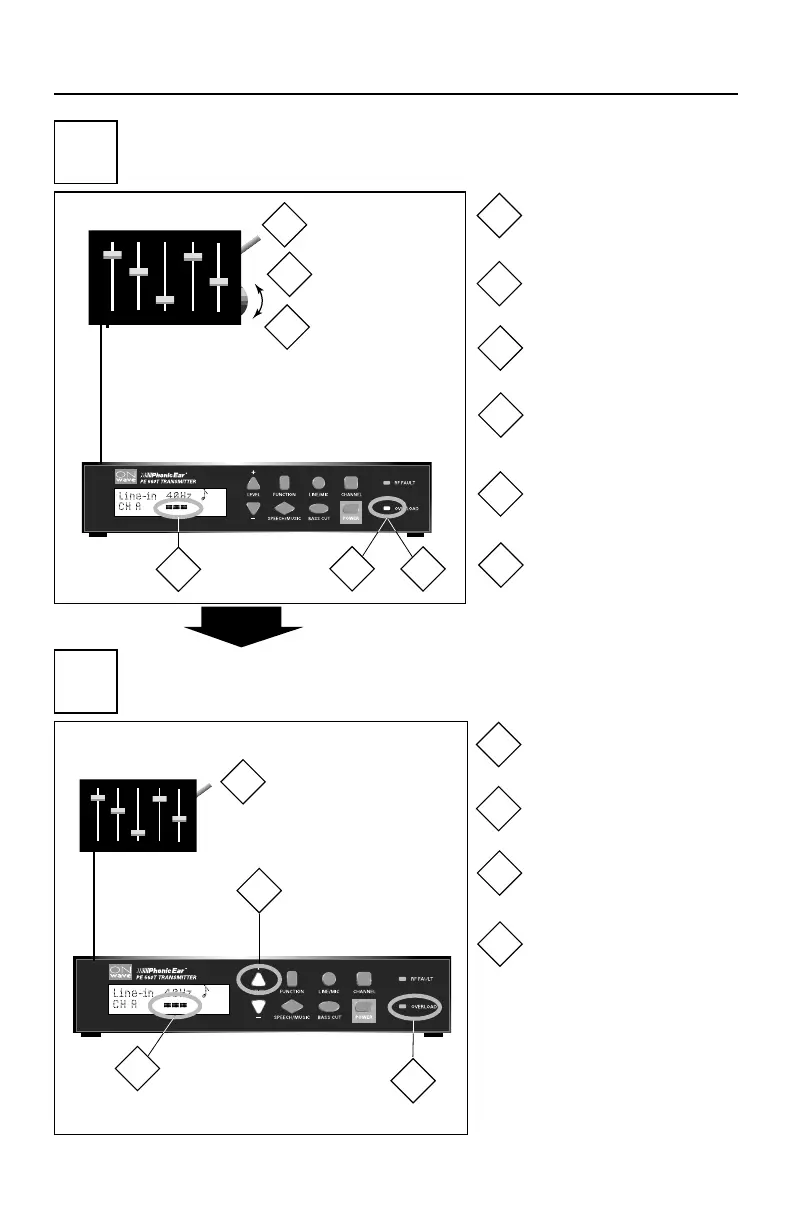
adjust output levels
(if your house system has adjustable volume)
5b
adjust output levels
(if your house system has no adjustable volume
or if further adjustment is required)
house system
house system
* When transmitter level is
increased, the auto line level
control is activated and signal
strength is automatically adjust-
ed for maximum volume with-
out distortion or clipping.
*
Increase sound system
volume until...
Turn on and play
test signal
or
...overload indicator lights
Slowly decrease sound
system volume until...
...overload indicator
goes out
Confirm that meter peaks
with signal
Increase transmitter level*
until...
Turn on and play
test signal
2-3 indicator bars appear
and peak with signal
Confirm that overload
indicator is off
2
1
4
3
2
1
4
3
2
1
4
3
6
5
2
1
4
3
6
5
3839 OnWave User Guide 1/15/04 11:40 AM Page 21


 To Next Page