OnWave system setup and operation (cont’d)
13
8b
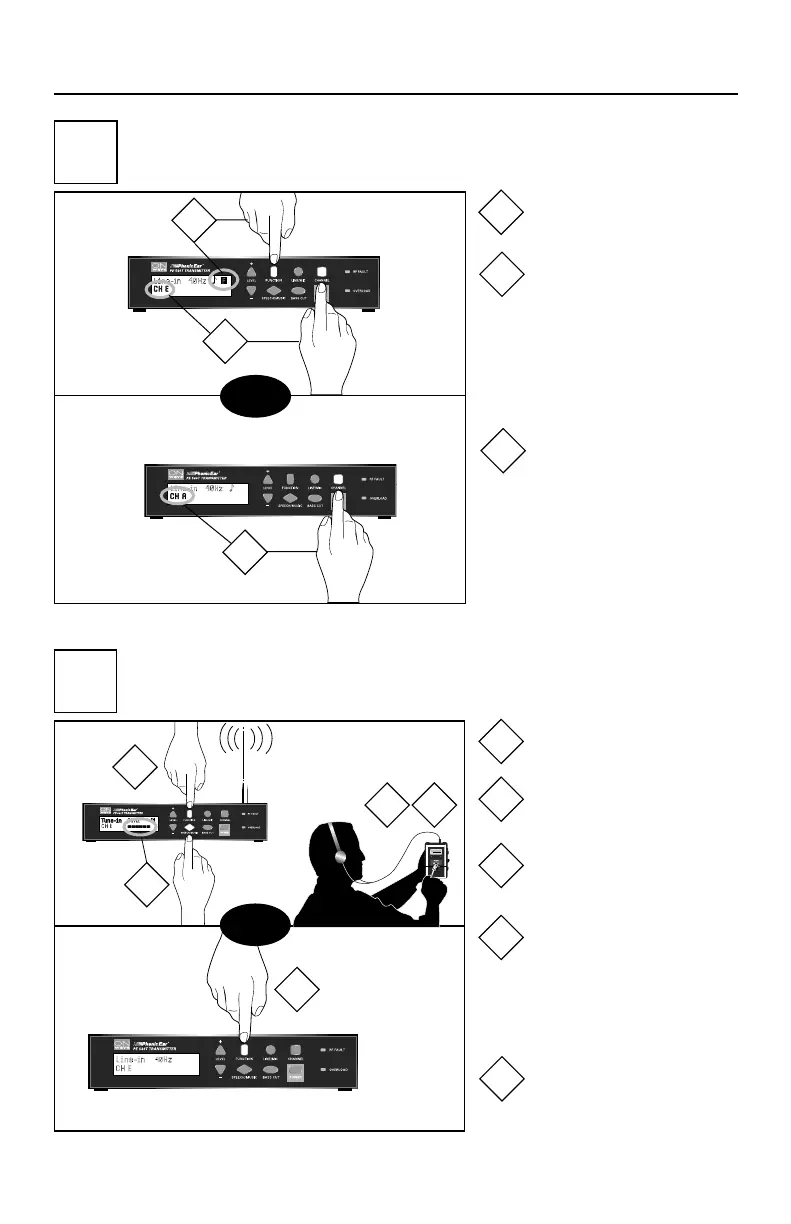
tune PE 500R receiver
(must match your transmitter!)
8a
set transmitter band & channel
(optional; must tune your receiver to match!)
then
Phonic Ear PE 500R
Wide Band Receiver
99 014737
then
For narrow-band channel and
frequency information see 506R
receiver diagram on other side.
Press channel to select
wide-band for 500R
(channels indicated by
letters) or narrow-band
for 506R (channels
indicated by numbers)
Press function
Press channel to select
channel within your
chosen band
Press function
Press speech/music to
activate test tone
Set receiver at lowest
volume
Adjust screw until test
tone is audible
(Note: screw may require sev-
eral turns to locate channel)
Press function to
deactivate test tone
2
1
3
1
2
3
1
2
3
4
5
1
2
3 4
5
3839 OnWave User Guide 1/15/04 11:40 AM Page 17


 To Next Page