N O
P
Q
S
T
R
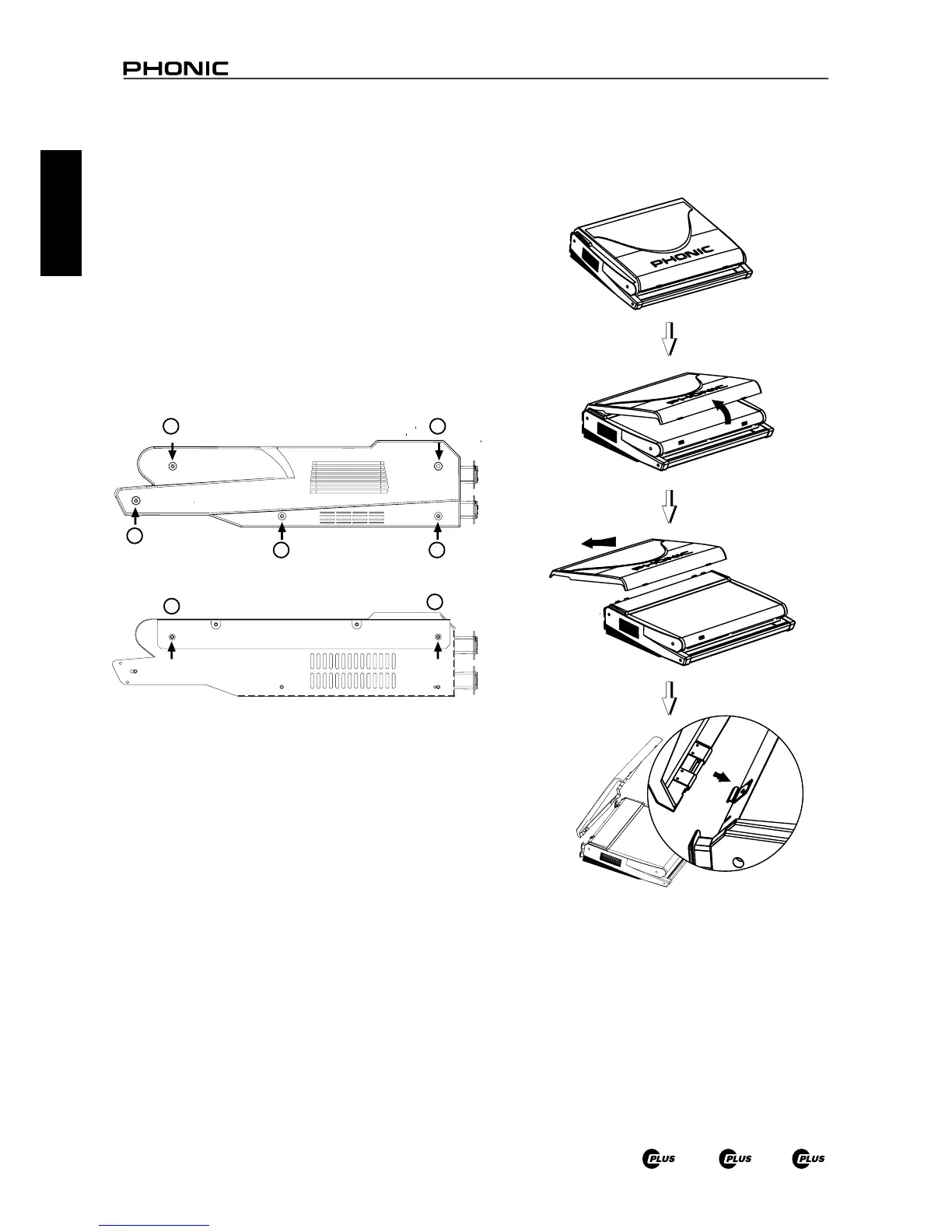
Opening the cover
Removing the cover
Attaching the cover
Place your ngers on
the two extrusioins
and pull up to open.
Place the small
connecting rods of
the molded cover
underneath the
mixer's hooks.
Optional Rack Mounting
1. The K-12 Plus and 1860 Plus are both rack mountable. The
ER K-12 Plus rack mounting kit can be used to install this
product. You will need 13 units of free rack space to install
one of these mixers.
2. To install, rst ensure that the rack you are using will provide
suitable ventilation for the Powered Mixers, as a sealed rack
will cause overheating in the product. Keep 1 U rack space
between the powered mixer and any other device. This will
also ensure overheating does not occur.
3. Remove the screws ① ~ ⑤ (indicated on the below image)
on both sides of the mixer, along with the side panel.
4. Fasten the rack mount to each side of the mixer using
screws ⑥ ~ ⑦ , as indicated below.
5. Final step: attach the rack mountable mixer to the rack.
The Protective Molded Cover



 To Next Page