Master Section
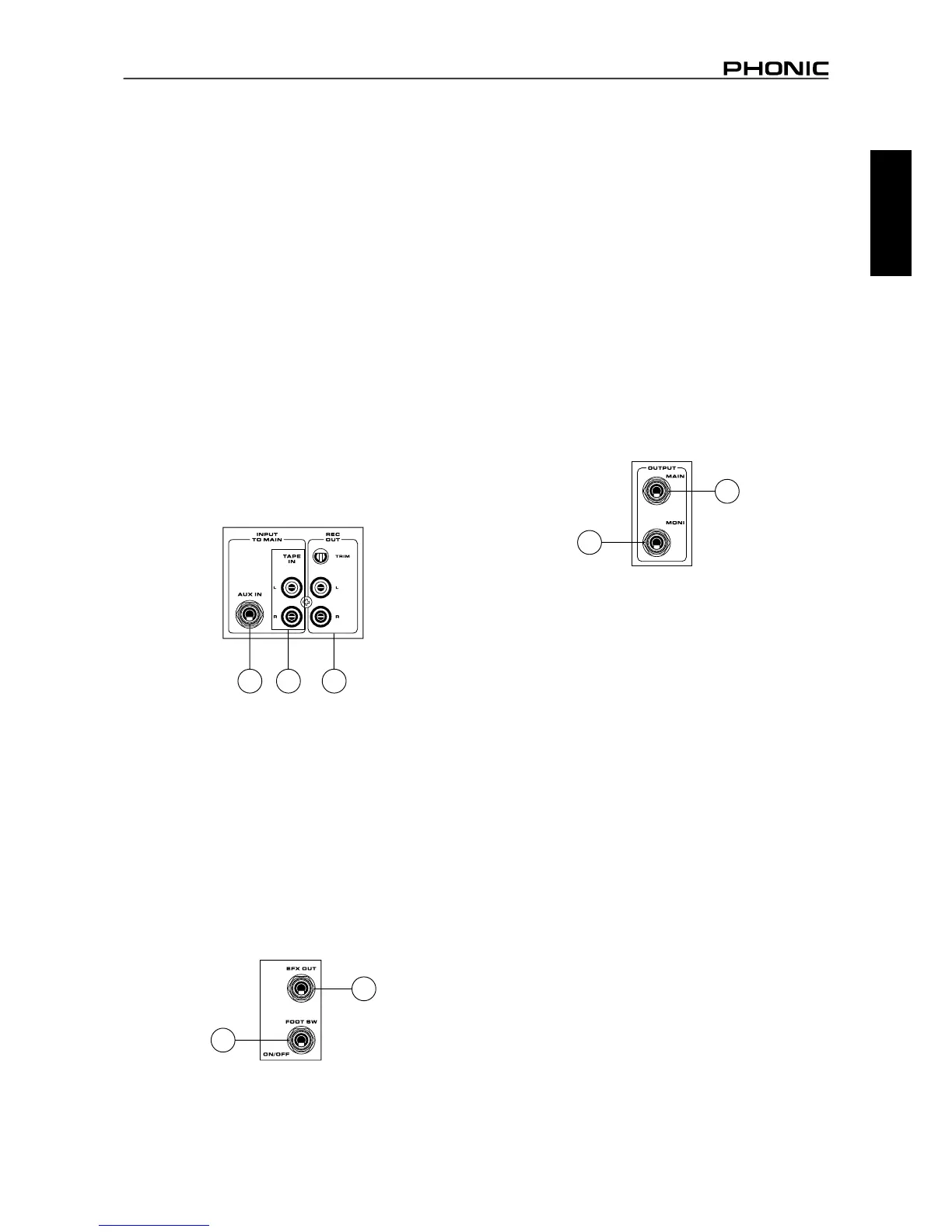
4. Tape In (L and R)
The rst of these inputs accommodates RCA cables from such
devices as tape and CD players. In addition to these inputs,
however, Phonic has incorporated a mini stereo jack for the
inclusion of such devices as mini disc (MD), portable CD, and MP3
players (such as the Apple iPod), as well as laptop computers. The
line from this feed is directed to the Tape In mixing bus, before
being fed through to the Main 1/2 mix.
5. Record Outputs (L and R)
As with the Tape In ports, these outputs will accommodate RCA
cables, able to be fed to a variety of recording devices. Also, similar
to the Tape In ports, included are mini stereo jacks for the addition
of recording devices such as MD players and laptop computers.
A trim control is featured on these outputs to accommodate for
devices with different recording levels.
6. AUX Input
These 1/4" TS phone jack inputs connect the mixer with parallel
external devices, such as sub mixers or external effect processors,
receiving the processed signal from another source and feeding it
to the AUX mix.
7. Foot Switch Jack
This port is for the inclusion of a non-latching foot switch, used to
remotely adjust properties of the built-in Digital Effect processor.
The Powerpod 740 and 780 models all feature a single foot switch
jack, which allows the user to remotely turn on and off the digital
effects.
8. EFX (Effect) Outputs
These 1/4" TS outputs are the nal output from the EFX send
mixing bus. This feed may be used to connect to an external digital
effect processor, or even to an amplier and speakers, depending
on your desired settings.
9. Monitor Outputs
These 1/4" TS outputs are the nal output from the Monitor send
mixing bus. This feed may be used to connect to an amplier and
speaker. Feeding the output from the Monitor out to an amplier
(and possibly an equalizer) and then to a oor monitor speaker
allows artists to monitor their own instruments or vocals whilst
performing, or an engineer to monitor the mix.
10. Main Outputs
These jacks will output the nal stereo line level signal sent from
the main mixing bus. The primary purpose of these jacks is to send
the Main output to external devices that may run in parallel with
the mixer. This may include additional power ampliers, mixers,
PA systems, as well as a wide range of other possible signal
processors. Powerpod 740 and 780 models all feature monaural
main outputs.
546
7
8
9
10



 To Next Page