55
IT-ENFunzioni • Functions
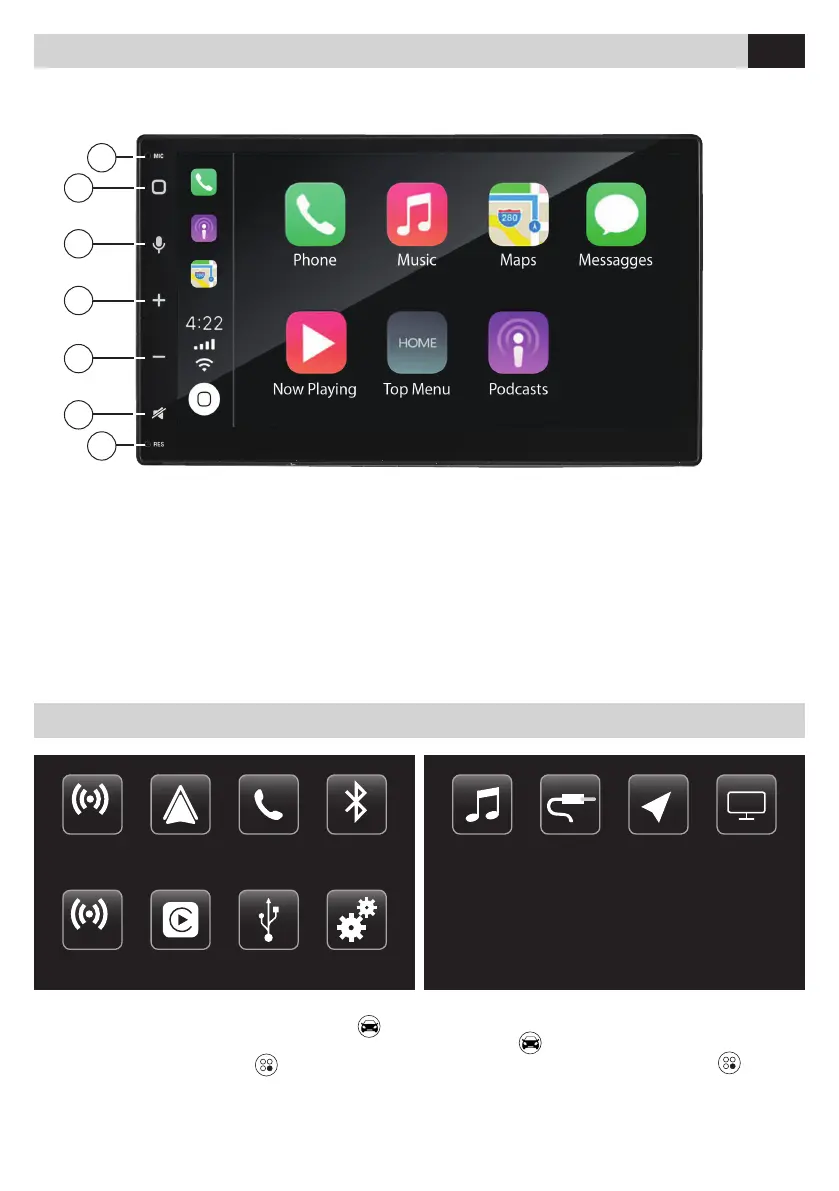
1. Microfono interno
2. Menu principale – Accensione/Spegnimento
3. Comandi vocali (Siri iOS – Google Voice ANDROID)
4. VOL +
5. VOL –
6. Mute
7. Tasto RESET
1. Internal microphone
2. Main menu - ON/OFF
3.
Voice commands (Siri iOS - Google Voice ANDROID)
4. VOL +
5. VOL –
6. Mute
7. Tasto RESET
1
2
3
4
5
6
7
IT EN
INGRESSO VIDEO - VIDEO INPUT
INGRESSO AUDIO DX - RIGHT AUDIO INPUT
INGRESSO AUDIO SX - LEFT AUDIO INPUT
Menu • Menu
All’accensione il VM012 avvia il menu principale .
È possibile personalizzare questo menu con le icone
installate presenti nel menu APP
.
When the VM012 is turned on, the main menu starts
automatically
. You can customize this menu with
the desired installed icons in the APP menu
.
IT EN
FM
AM Apple CarPlay USB Settaggi
Android Auto Telefono Bluetooth
FM
AM
iPod AUX Navigazione AUX Video



 To Next Page