77
IT-ENImpostazioni di Sistema • System Settings
IT
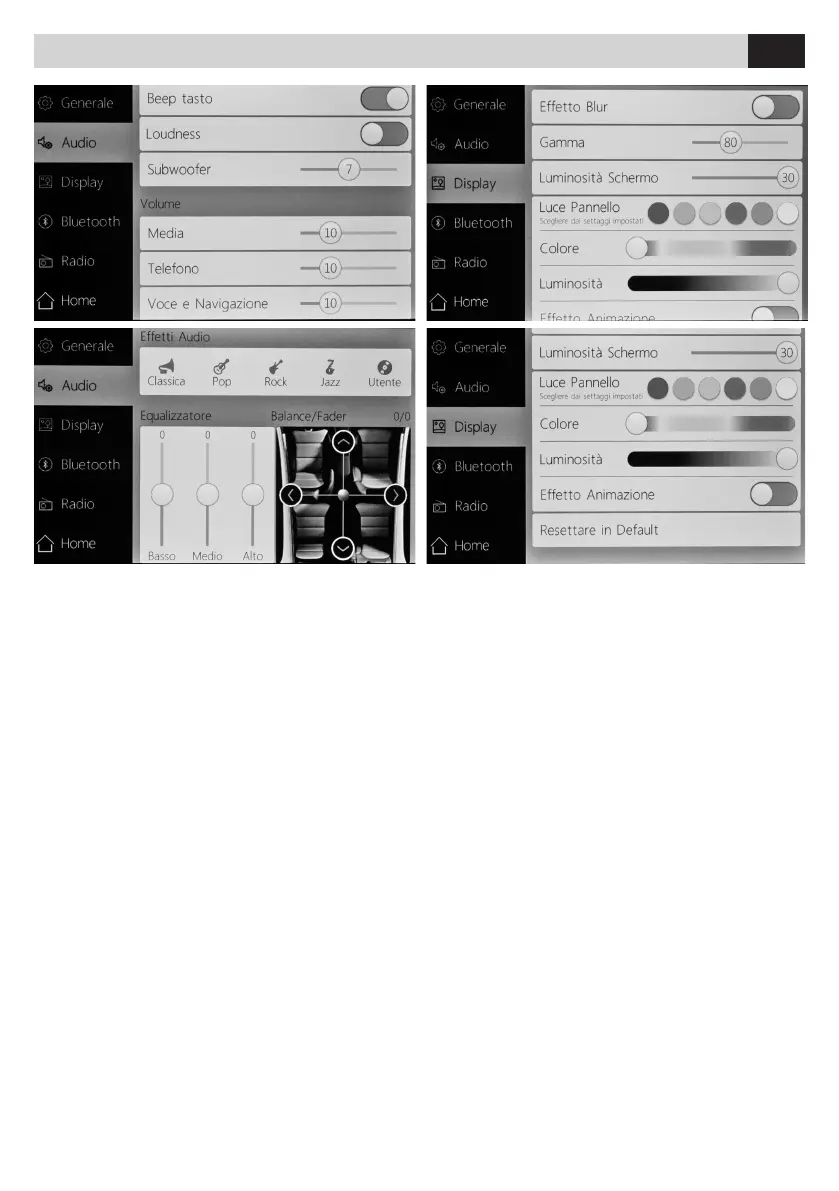
AUDIO
• BEEP TASTO Attiva / Disattiva
• LOUDNESS Attiva / Disattiva
• SUBWOOFER Regola volume
• MEDIA Regola volume
• TELEFONO/ VOCE E NAVIGAZIONE Regola volume
• EFFETTI AUDIO Selezionare fra i modi preimpostati
o utente.
• EQUALIZZATORE Regola bassi, medi, alti, balance e
fader.
DISPLAY
• EFFETTO BLUR Attiva / Disattiva sfuocatura
• GAMMA Regola gamma colore
• LUMINOSITÁ SCHERMO Regola luminosità schermo
• LUCE PANNELLO Personalizza colore illuminazione
led
• EFFETTO ANIMAZIONE Attiva / Disattiva
• RESETTARE Ripristina impostazioni di fabbrica del
display
AUDIO
• KEY BEEP Enable / Disable
• LOUDNESS Enable / Disable
• SUBWOOFER Adjusts the volume
• MEDIA Adjusts the volume
• TELEPHONE/ VOICE AND NAVIGATION
Adjusts the volume
• AUDIO EFFECTS Selects between preset or user
modes.
• EQUALIZER Adjusts bass, medium, treble frequen
-
cies, balance and fader.
DISPLAY
• BLUR EFFECT Enable / Disable blur
• GAMMA Adjusts color range
• DISPLAY BRIGHTNESS Adjusts display brightness
• LIGHT PANEL Customizes color LED lighting
• ANIMATION EFFECT Enable / Disable
• RESET Restore display factory settings
EN



 To Next Page