8
IT-ENBluetooth - Radio
IT EN
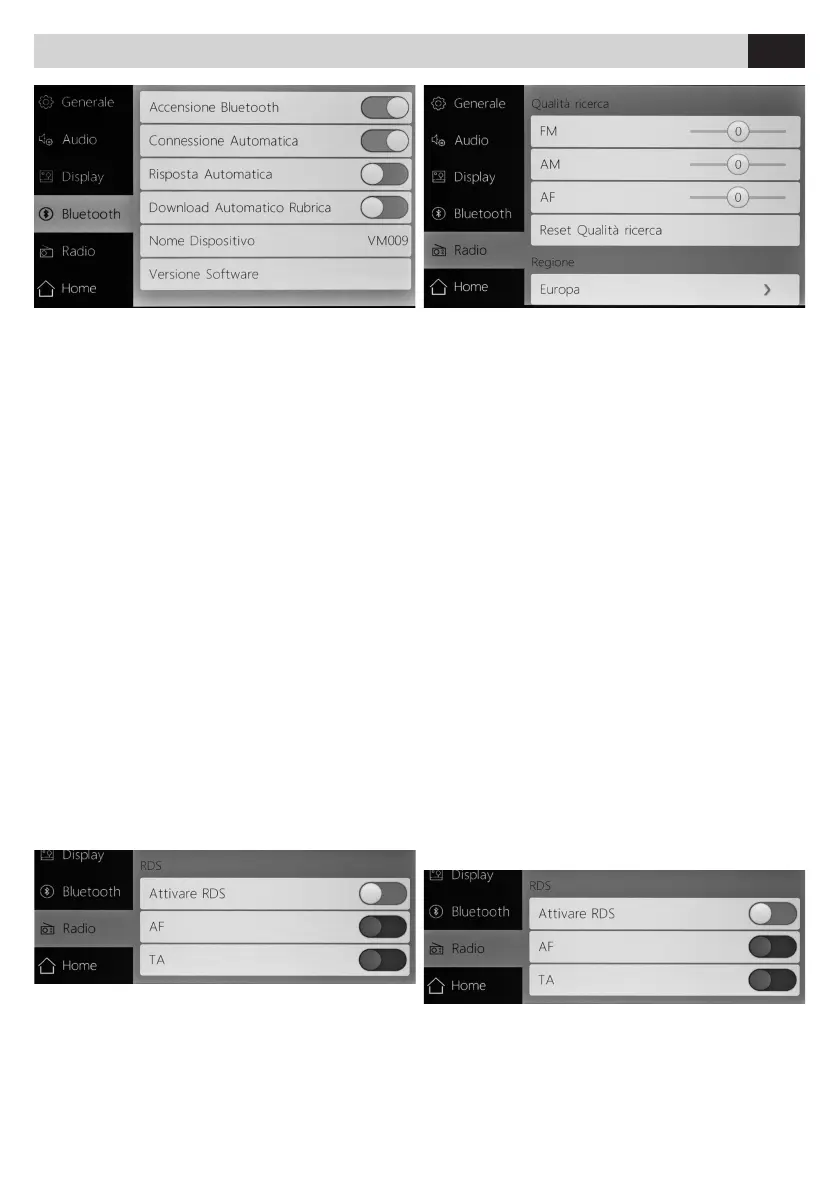
BLUETOOTH
•
ACCENSIONE BLUETOOTH Attiva / Disattiva
•
CONNESSIONE AUTOMATICA Attiva / Disattiva
•
RISPOSTA AUTOMATICA Attiva / Disattiva
•
DOWNLOAD AUTOMATICO RUBRICA Attiva / Disattiva
•
NOME DISPOSITIVO Personalizza nome dispositivo
•
VERSIONE SOFTWARE Indica le versione del software
BLUETOOTH
• BLUETOOTH POWER On / Off
• AUTOMATIC CONNECTION Enable / Disable
• AUTO-ANSWER Enable / Disable
• PHONEBOOK AUTOMATIC DOWNLOAD Enable /
Disable
• DEVICE NAME Customizes device name
• SOFTWARE VERSION Displays the software version
software
RADIO
•
FM: Regola sensibilità FM
•
AM: Regola sensibilità AM
•
AF: Regola sensibilità AF
La funzione AF permette di mantenere una emittente
radio spostandosi in aree diverse cambiando automa
-
ticamente la frequenza.
Questa regolazione determina il livello di segnale ra
-
dio minimo per passare ad una frequenza alternativa.
Una bassa sensibilità del AF permette un passaggio di
frequenza più rapido.
•
RESET QUALITÁ RICERCA: Ripristina le impostazioni di
fabbrica di Qualità ricerca.
REGIONE: Seleziona area radio
• ATTIVARE RDS Attiva/Disattiva
• AF Attiva/Disattiva
• TA Attiva/Disattiva
RADIO
• FM Adjusts FM sensitivity
• AM Adjusts AM sensitivity/0}
• AF Adjusts AF sensitivity
The AF function allows to maintain a radio station,
moving in different areas, by automatically chan
-
ging the frequency.
This adjustment indicates the minimum level radio
signal, in order to switch to an alternative frequency.
A low AF sensitivity allows faster frequency switch.
• RESET QUALITY RESERCH Restores Quality search
factory settings.
REGION Select radio region
ENABLE RDS On / Off
AF On / Off
TA On / Off


 To Next Page