9 10
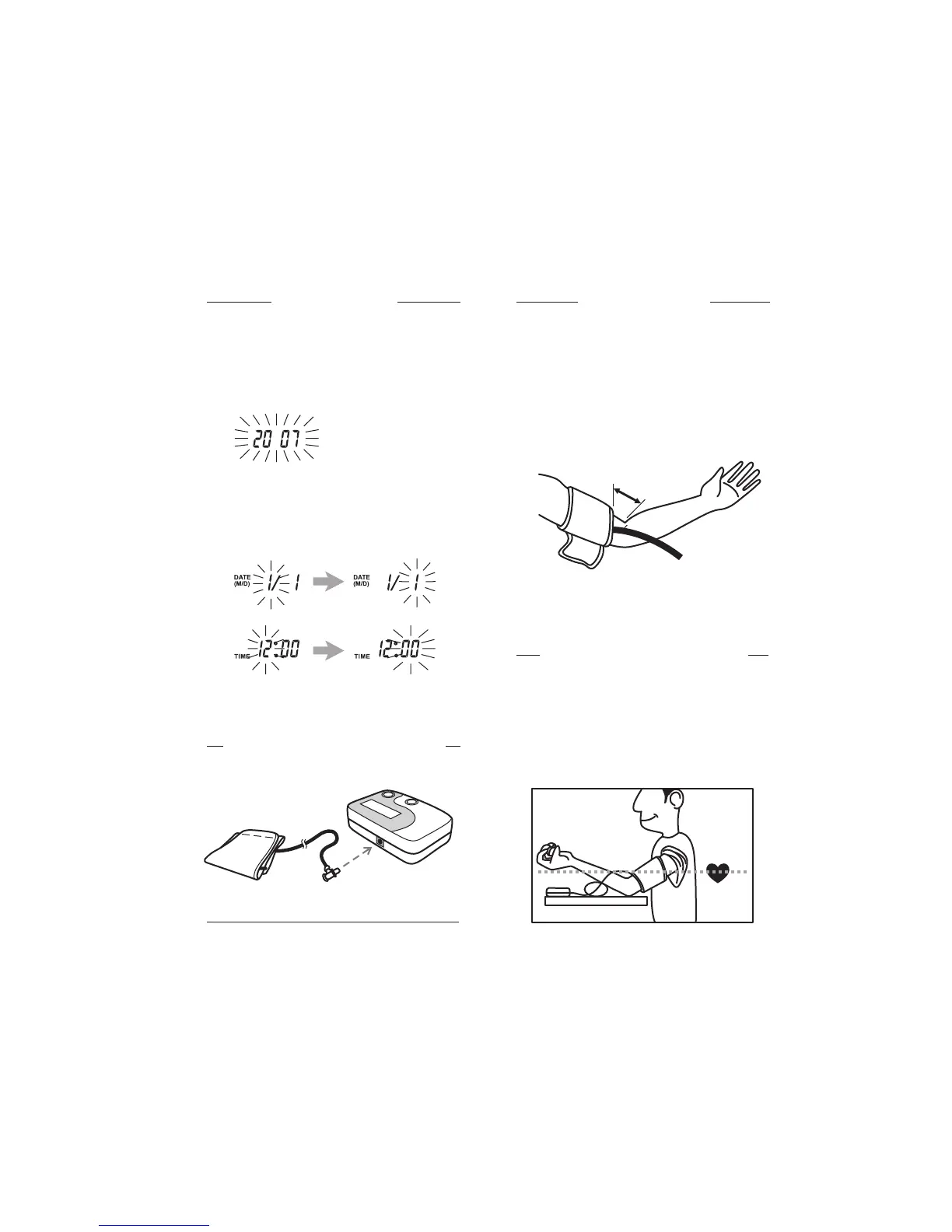
To set the clock
To attach the cuff to the unit
To apply the cuff
1. To enter clock setting mode, press and hold
the MEMORY button for three (3) seconds.
2. The display will show a blinking year. To set
the year, press the START/STOP button
repeatedly until the desired value is reached.
3. Press the MEMORY button again to adjust
the month and use the START/STOP button
to adjust the value. Repeat this step again
to set the day, hour and minute.
1. Clothing sleeves should be rolled up and the
cuff should be wrapped on bare skin for
correct measurements.
2. Apply cuff to the left upper arm.
3. Fasten the cuff, making sure it is snug but not
too tight. Ensure that the edge of the cuff is
approx. 1” (2.5 cm) from the crook of your
arm, as illustrated.
4. If your physician has diagnosed you with
poor circulation in your left arm, carefully
place the cuff around your right arm.
Connect the tube to the socket at the back
of the unit.
Correct Measuring Posture
1. Place your elbow on a table so that the cuff
is at the same level as your heart. If needed,
use a soft object such as a folded towel to
support your forearm in a proper position.
Turn your palm upwards, sit upright in
a chair, and take 5-6 deep breaths. Avoid
leaning back.
1”(2.5 cm)


 To Next Page