11
12
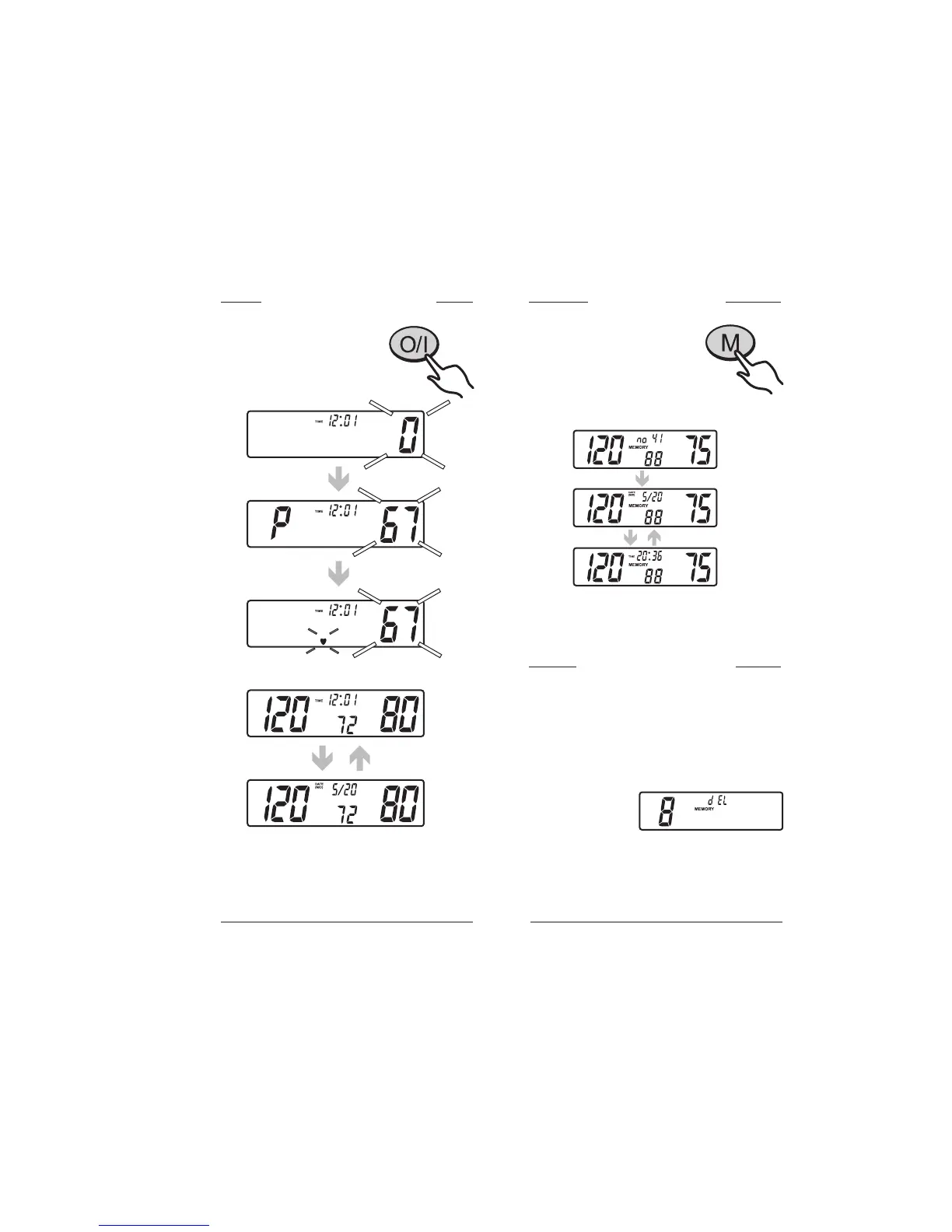
Taking a measurement To recall memory
Wrap the cuff on your arm
as described. Press and release
the START/STOP button to
start measurement automatically.
1. To recall the last reading,
press and release the
MEMORY button.
The display will show the last
stored reading, alternating with
the corresponding pulse.
2. Press the MEMORY button again
to view the previous readings.
When measurement is completed, the display
will show your blood pressure and pulse rate.
Press the START/STOP button to turn off the
unit or it will turn itself off automatically after
150 seconds.
Initial display
Pumping
Measuring and
buzzer sounds
Results
To erase memory (1)
To delete only one stored reading:
1. Press and release the MEMORY button once
to recall memory, and again until you reach
the reading that you wish to delete.
2. Press and hold the START/STOP button
until the display shows « dEL » with the
number of the
reading selected.
3. Press and hold the START/STOP button.
Three (3) beeps will signal that the selected
reading is now deleted.


 To Next Page