10
EssentiA
+
Instruction Manual
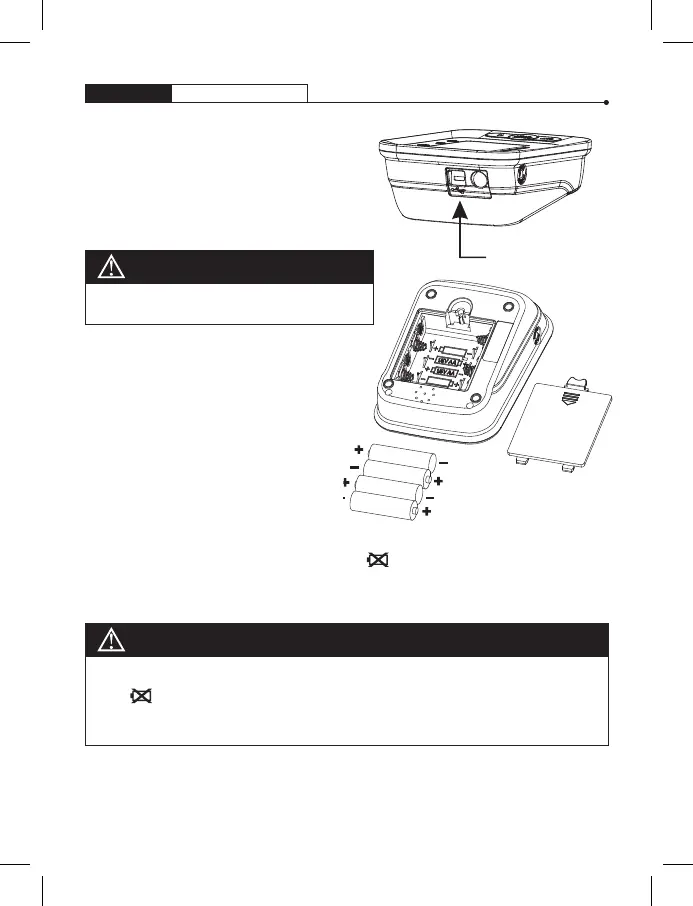
POWER OPTIONS
• Battery: 4 x AA alkaline batteries
• USB Power Source
(Cable not included)
USB Power Source
Installing and Replacing Batteries
1. Slide off the battery cover.
2. Install the batteries by matching
the correct polarity, as shown.
3. Close the cover.
Low Battery Indicator
4 short warning beeps sound when battery life is depleting and
unable to inflate cuff for testing. The appears simultaneously
for approximately 5 seconds prior to shutting off. Replace batteries
at this time. No memory loss will occur throughout this process.
CAUTION
CAUTION
Do not use any other type of battery
as it may harm the unit.
Replace the batteries if any of the following should occur:
• The
indicator appears
• The display appears dim
• The display does not light up
Note: Remove the batteries if the unit will not be used for an
extended period of time. Always replace all the batteries with
new ones at the same time.


 To Next Page