18
EssentiA
+
Instruction Manual
USING THE MEMORY
Memory Check
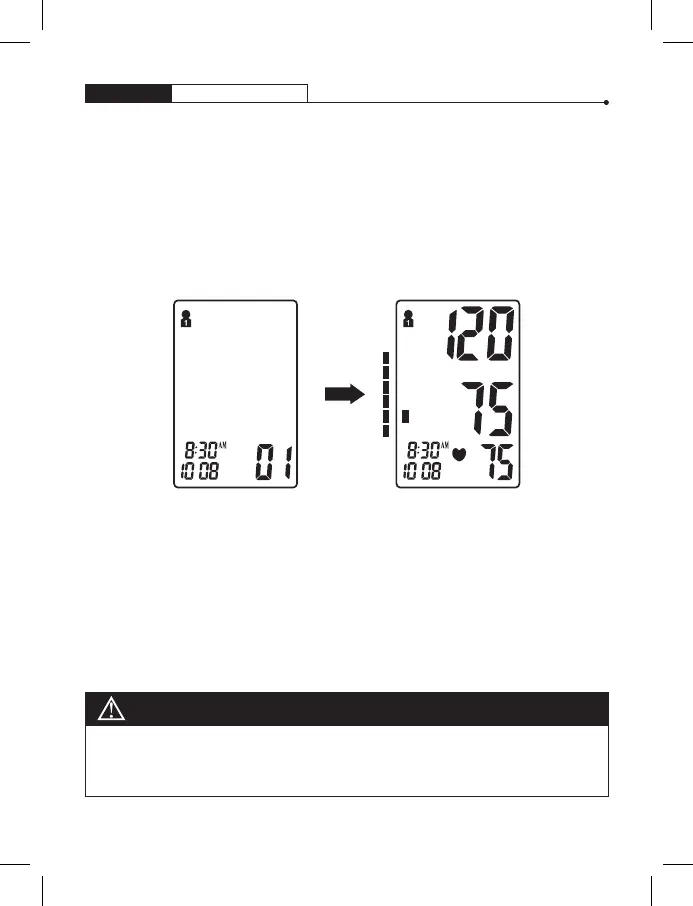
You may check past test results by using the “M“ button. The most
recent and oldest test result in memory can be viewed by pressing and
holding the “M“ button. Upon activating test results you can press
the “M” button to scroll through all test results stored in memory.
If the number of tests surpasses the allotted 60 memories per group,
the most recent tests will appear first, thus eliminating the oldest
readings.
mmHg
M
D
M
D
No
NOTE
Past readings will only be displayed from the most recently used memory zone.
To check past test results in another memory zone, you must first select the
desired zone and then turn monitor off. (See “Select Memory Zone” on page 11)


 To Next Page