UP DOWN
MEM
SET
USING THE MEMORY
USING THE MEMORY
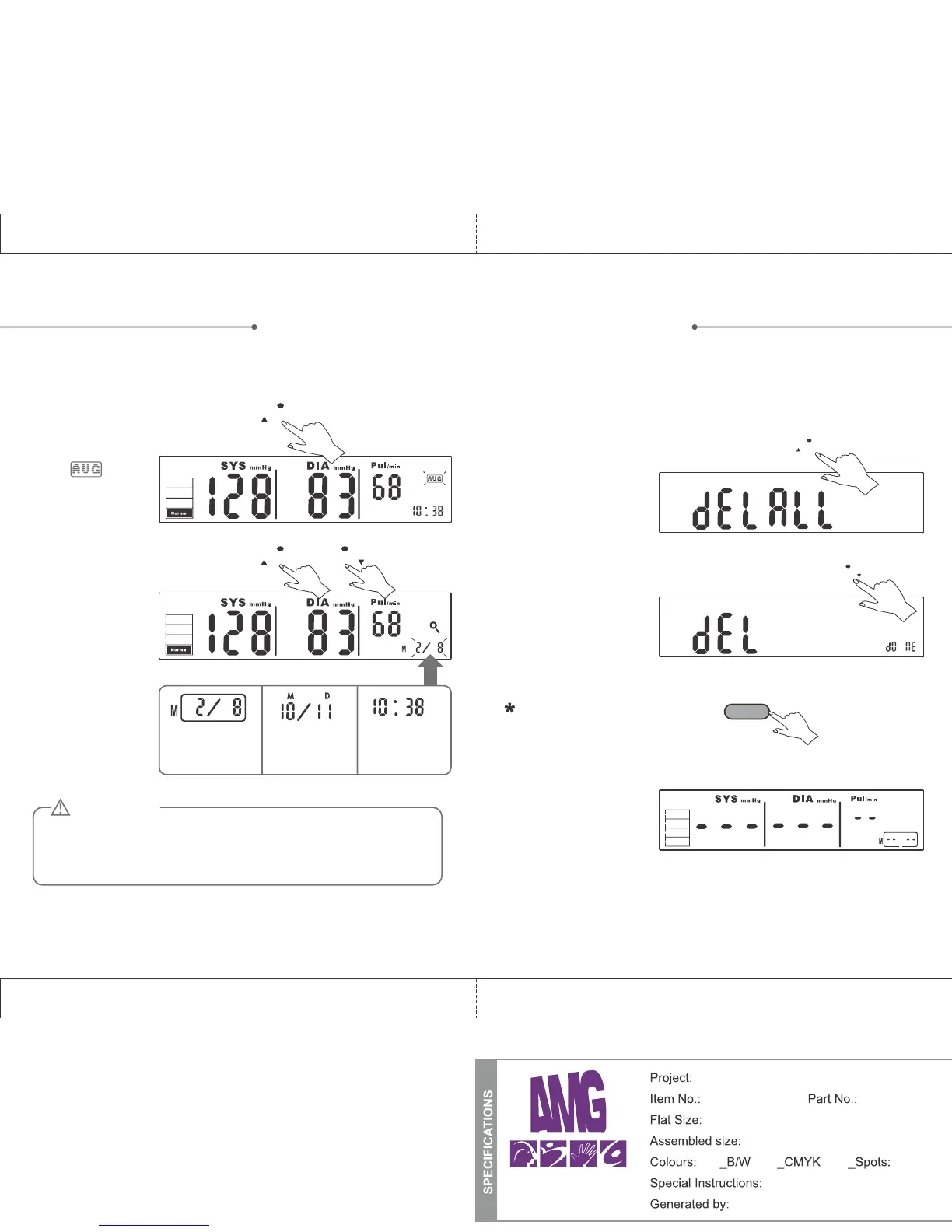
Recalling the records
1. Press the MEM button to turn
on the monitor and access the
memory bank. You can then
select the memory you’d like to
view using the following steps:
2. Press the MEM or SET
button to get to the
record you want to view.
The sign will
appear in the top
right corner.
MEM makes the
selection go up,
SET makes the
selection go down.
The memory
number, and its
corresponding date
& time will display
alternately
The current reading
being shown is
memory 2 of 8
The corresponding
date of the reading
being shown
(October 11th)
The corresponding
time of the reading
being shown
(10:38)
The most recent record (1) is shown first. Each new measurement is
assigned to the first (1) record. All other records are pushed back one
digit (e.g., 2 becomes 3, and so on), and the last record (60) is
dropped from the list.
MEM
ATTENTION
MEM
START/STOP
Deleting all records from memory
If you would like to clear the unit’s memory, you can delete all
results by following the steps listed below.
1. Press and hold MEM
for 3 seconds. The
diplay will flash
“DEL ALL”.
2. Press SET to confirm
deleting, then the
monitor will turn off
automatically.
3. If there are no
memories in the bank,
the screen pictured at
right will appear when
you press the MEM
button.
If you don’t want to delete the
records, press “START/STOP” to
escape.
1211
SET
Physio logic Prisma Manual (ENG)
106-950 n/a
10” x 7.125”
10” x 7.125” (folded: 5” x 7.125”)
Instruction Booklet
Travis Fraser
TM
X


 To Next Page