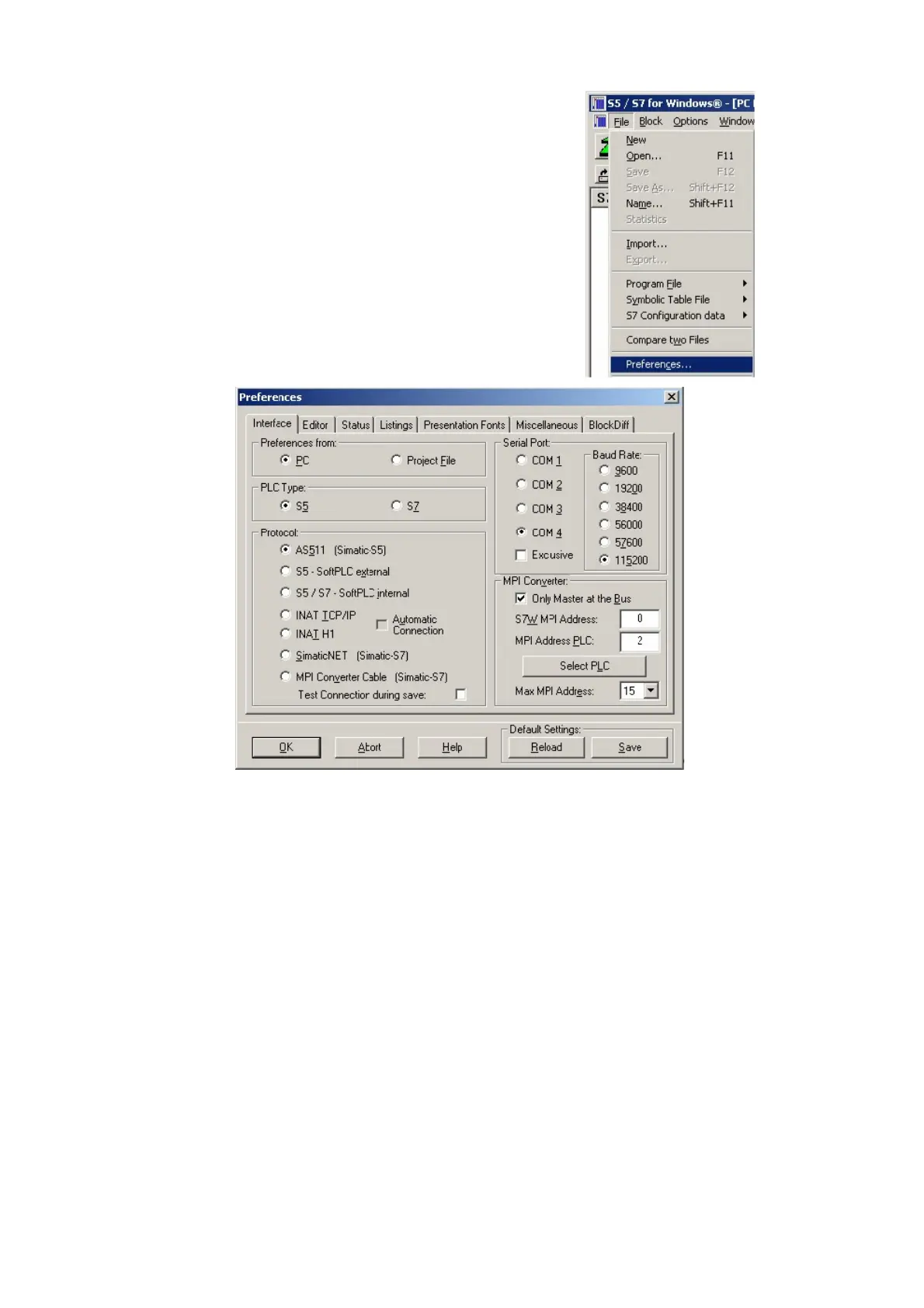
1. Start the “S5 for Windows” software by using the
link on your desktop or use the link in your start menu
(standard is “Programs\S5 for Windows\S5 for
Windows“)
2. Choose File - >Preferences... (top left in the menu
bar) to configure the communication configuration
between the computer and the PLC.
3. A new dialog appears which offers the possibility to
set up a lot of configuration data about the
communication with your PLC.
4. Choose the first registry card „Interface“ (standard) and set up the configuration data as
descriped below:
=> Interface Settings from : „PC“
=> PLC type: „S5“
=> Protocol: „AS511 (Simatic - S5“)
=> Serial Port: Select here the COM port for the AG-access
=> Baud Rate: Choose the speed you want to use at the bus
4. 5. After the software is configured , click “Select PLC” in the area “MPI Converter“. A new
dialog appears where you can select the desired PLC
Handbook PG-USB Page 16 of 21



 To Next Page