8
Customer support team: +44 (0) 333 220 6054
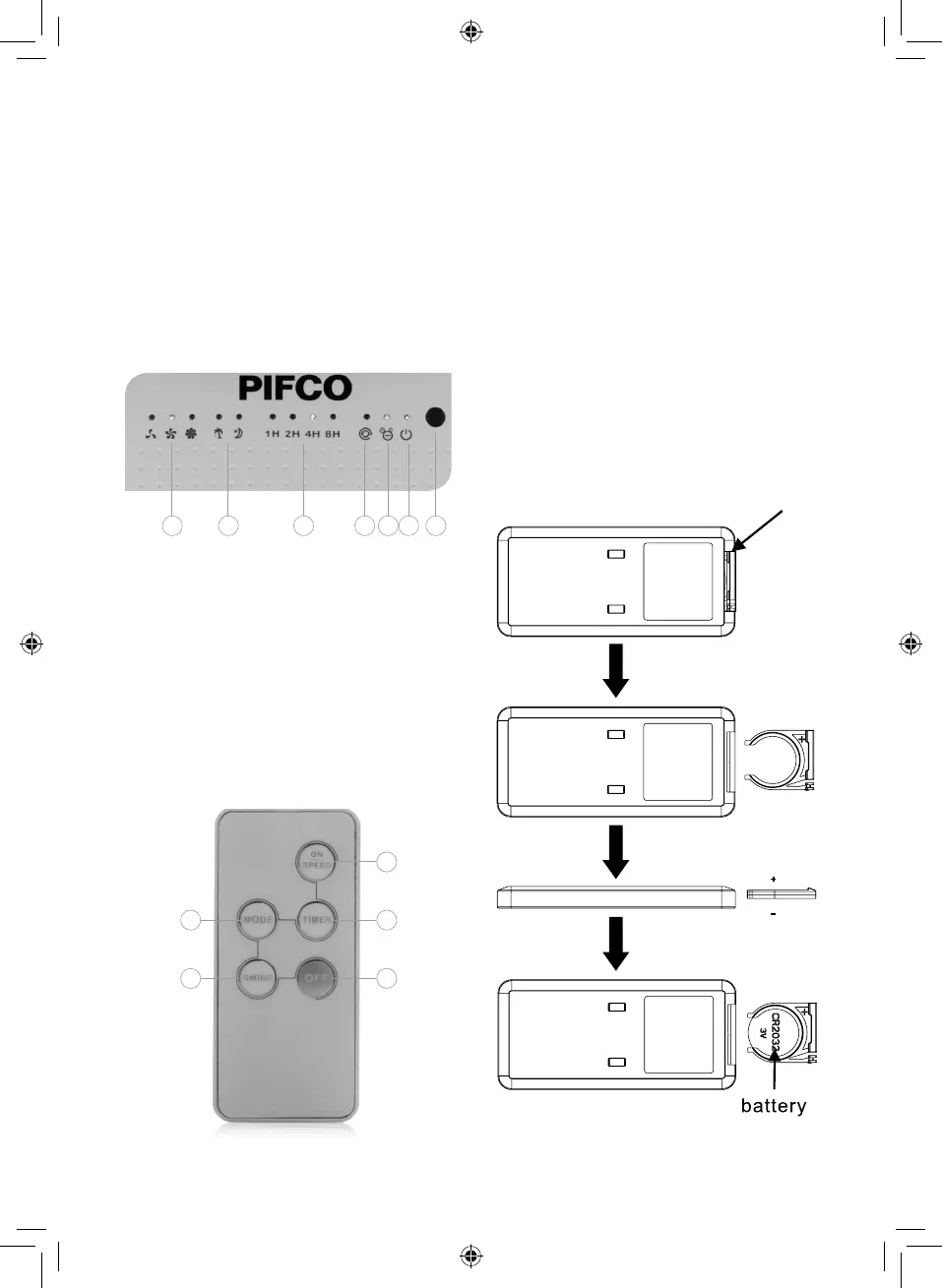
Control Panel Layout:
1. Speed indicator
2. Mode indicator
3. Timer indicator
4. Oscillation indicator
5. Ioniser indicator
6. Power indicator
7. Remote control sensor
Remote Control Layout:
1. On/Off/Speed button
2. Mode button
3. Timer button
4. Swing/Oscillation button
5. Swing/Oscillation Off button
Installing The Batteries:
To install the batteries, first detach the locking
latch from the remote. To do this, place your
finger on the recessed notch located beside
the latch and slide it to the right, while
simultaneously pulling the latch out from the
body of the remote.
When the latch has been separated from the
main body, remove the used battery from its
holder and replace it with a new one. When
installing the battery, take care to ensure the
positive polarity is facing upwards.
Once you have replaced the batteries, slide
the locking hatch back into the remote. It will
automatically lock into place and secure the
battery inside.
2
4
1
5
3
1 2 3 4 5 6 7


 To Next Page