11
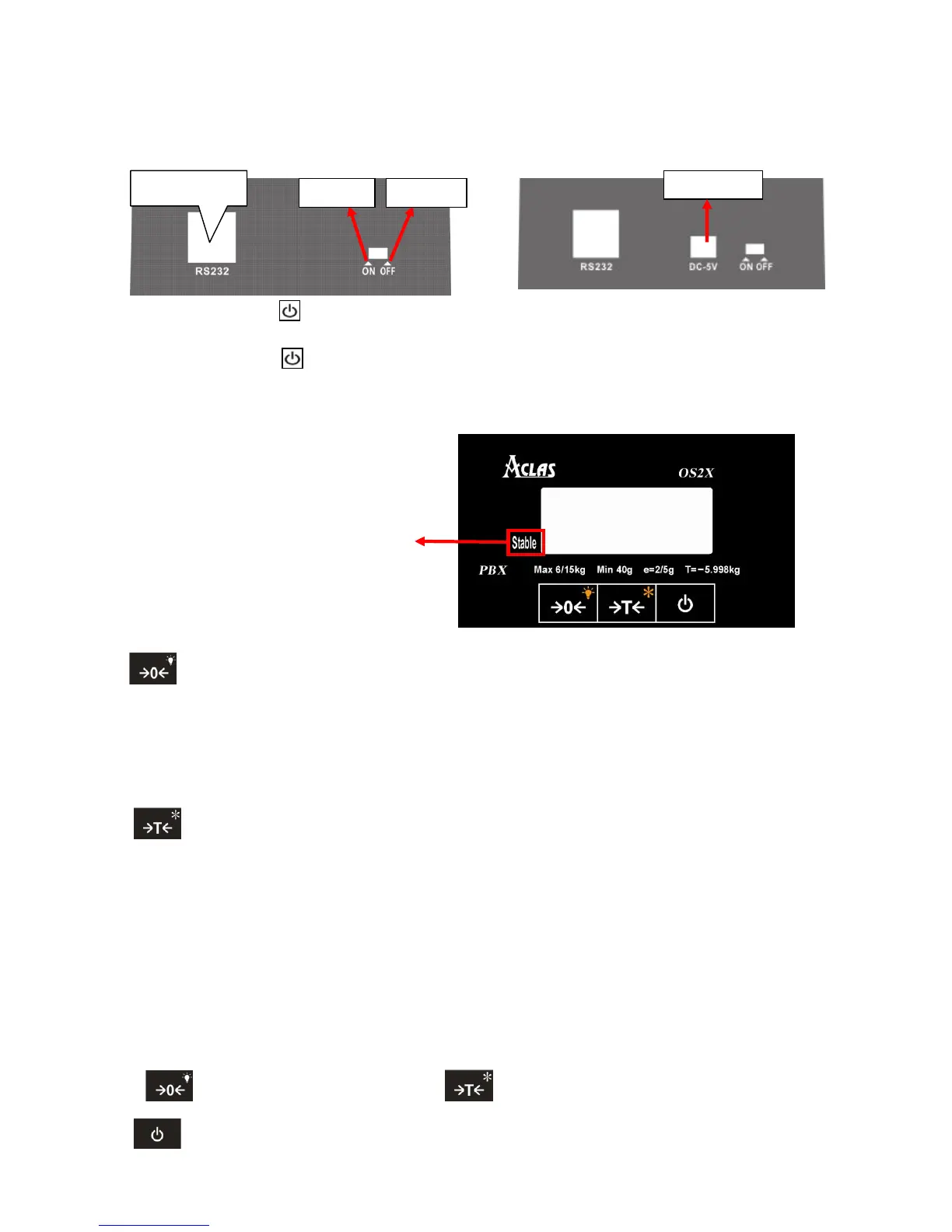
8. POWER ON/OFF
Power on: press the key to power on after soft turning off.
Power off: press the key to power off.
9. KEY EXPLANATION
: This key is to adjust the „WEIGHT‟ column to zero value.
Place the scale level steadily, if there are digits displayed on LCD when there is nothing on the
platter, you can press this key to adjust to zero.
Press this key and hold it for 1.5 seconds to turn on or turn off the backlight.
: This key is used to deduct the packing weight.
If you need to deduct the packing weight, put the container or wrapper on the scale first, and
then press this key to enter weight- deducting state. Then, take off the container and put the
commodity into the container and then place the packed goods on the pan again, now, the LCD will
display the net weight. Remove the merchandise and press this key, the scale will return to normal
weighting state.
Press this key and hold it for 1.5 seconds to enter into the unit switch function. Press the key
“ ”to shift the unit and press the key “ ” to confirm or exit the setting status.
: Press this key and hold it for 1.5 seconds to soft turn off the scale.
There is “stable” mark on the display
screen. When the weight is stable, the
triangle indicator will light which means it
is in the normal weighing status, at this
time you can put commodity on the platter
to sell.



 To Next Page